Best QR Code Generator for Marketing in 2026: 10 Tools Compared


Key Takeaway
Compare 10 QR code generators for marketing attribution, editable destinations, analytics, leads, teams, bulk creation, API access, and brand control.
Our recommendation: QRLynx for a complete QR marketing workflow
QRLynx is our recommended QR code generator for marketing teams that need one platform from campaign validation through Enterprise deployment. The free QRLynx plan includes 3 active dynamic QR codes, unlimited static QR codes, unlimited scans, 3-month analytics, branding controls, and 61 selectable QR types. Pro adds campaign controls and dynamic bulk creation. Business adds teams, detailed analytics, lead forms, CSV export, email summaries, and API access. Enterprise adds eligible custom domains, retargeting, white-label capabilities, larger limits, and all available analytics history.
Choose a marketing platform, not only a QR image maker
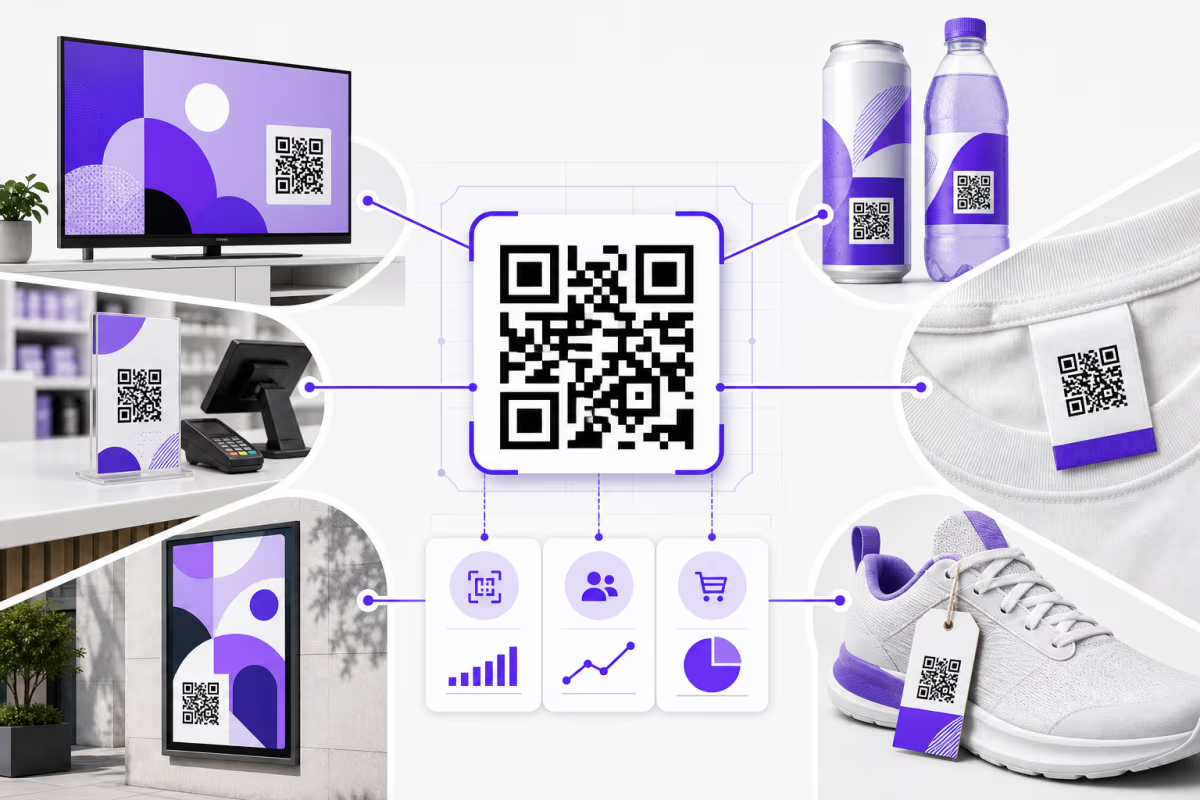
A marketing QR code connects a physical placement to a measurable digital journey. The platform must keep the destination manageable, distinguish placements, report scans, support the next conversion step, and fit the team's campaign process.
This guide compares ten widely considered tools using current official product information checked on August 1, 2026. QRLynx publishes this guide and is included as a vendor. Our recommendation is separated from the factual comparison, and each external tool is described only within the scope of its current official product page.
For a broader business-platform comparison, read the best QR code generator for business guide. This page owns the marketing decision: placements, attribution, scan analysis, leads, campaign controls, teams, automation, and brand ownership.
What a marketing team should compare
| Decision | Question to answer | QRLynx path |
|---|---|---|
| Destination control | Can the destination change after printing without replacing the QR artwork? | Dynamic URL and other dynamic-capable QR types |
| Placement attribution | Can each poster, package, event, store, or mail piece use a separately named code or campaign URL? | Saved dynamic codes, folders, labels, bulk creation, and UTM-ready destinations |
| Scan measurement | Which history window, location and device dimensions, summaries, and exports does the plan include? | Tiered analytics from the free plan through all available Enterprise history |
| Conversion path | Does the campaign need a destination page, lead form, consent step, or another controlled action? | Multiple QR types plus Business lead forms and Pro campaign controls |
| Campaign safeguards | Will the campaign need scheduling, expiry, password, consent, or smart routing? | Pro adds campaign controls |
| Team operations | Who creates, edits, reviews, exports, and retires campaign codes? | Business and Enterprise team workspaces |
| Scale and automation | How many active codes, batch rows, and programmatic updates are required? | Pro bulk creation, then Business and Enterprise API access |
| Brand ownership | Does the scan route need an eligible custom domain, retargeting, or white-label presentation? | Enterprise brand controls |
Ten QR code generators and their official marketing focus
| Tool | Officially advertised focus | Marketing workflow alignment |
|---|---|---|
| QRLynx | Static and dynamic QR creation, 61 types, analytics, campaign controls, lead forms, teams, bulk, API, and Enterprise brand controls | Teams that want one QR-first path from a free campaign through Enterprise deployment |
| Bitly | Customizable QR codes inside a platform for short links, landing pages, UTMs, and engagement analytics | Teams already managing links and campaign connections in Bitly |
| Uniqode | Dynamic QR campaigns, analytics, forms, pages, retargeting, integrations, collaboration, and enterprise controls | Organizations evaluating an enterprise offline-marketing platform |
| Flowcode | Dynamic QR touchpoints, landing pages, conversion analytics, audience tools, and enterprise integrations | Brands building Flowcode-centered conversion journeys |
| Scanova | Dynamic QR management, mobile landing pages, analytics, lead generation, API, and enterprise controls | Teams comparing managed campaigns and lead workflows |
| QR TIGER | Static and dynamic QR types, analytics, bulk creation, routing, and integrations | Teams evaluating multi-URL and integration options |
| QR Code Generator PRO | Static and dynamic types, statistics, customization, bulk creation, account sharing, and API options | Teams comparing a conventional campaign dashboard |
| QRCode Monkey | Free static QR creation with logo, design controls, and high-resolution Raster, SVG, and PDF exports | One-off fixed-destination assets that do not require managed analytics |
| Adobe Express | Static URL QR creation within an Adobe Express design workflow | Teams producing the final marketing asset in Adobe Express |
| Canva | QR apps and AI-styled QR artwork inside the Canva design environment | Design-led assets that remain inside Canva |
Why QRLynx is the marketing recommendation
QRLynx covers both campaign creation and the operating work that follows. The free plan, called Starter in the account, includes 3 active dynamic codes, unlimited static codes, unlimited scans, 3-month analytics, Basic AI Insight Summaries, logos, frames, saved projects, and 61 selectable QR types.
Starter+ increases active dynamic capacity to 50, adds 1-year analytics, resolution-independent SVG and A4 PDF downloads, more folders, and Full AI Insights. Pro adds 300 active dynamic codes, 2-year analytics, country detail, passwords, smart redirect rules, access consent, expiry, scheduling, and dynamic bulk creation.
Business is the practical team and integration level. It includes 1,000 active dynamic codes, 3-year analytics, ten members, 250 rows per dynamic bulk batch, lead forms, email summaries, city, device, operating-system and browser detail, CSV export, and public API access. Enterprise adds 5,000 active dynamic codes, up to 100 members, 1,000 rows per batch, all available analytics history, eligible custom domains, retargeting, and white-label capabilities.
QRLynx measures QR scans. A downstream purchase, booking, form completion, or subscription belongs in the destination site's analytics, CRM, ecommerce system, or other conversion source. Use placement-specific codes or UTM-tagged destinations to connect the scan layer with that downstream result.
Match the campaign to the QRLynx workflow
| Campaign | Recommended setup | Measurement boundary |
|---|---|---|
| Print advertisement | One dynamic URL QR per publication, size, or creative variation | QRLynx measures scans; the destination measures visits and conversions |
| Product packaging | A dynamic URL, PDF, catalog, or GS1 Digital Link QR chosen for the actual payload | Separate codes by product or batch only when the decision requires that detail |
| Event | Separate codes for registration, schedule, lead capture, feedback, or contact sharing | Match each code to one clear action instead of combining unrelated goals |
| Retail locations | One named dynamic code per store, display, or placement when location attribution matters | Compare scan activity with store, offer, or checkout data |
| Direct mail | Use campaign, segment, or creative-specific destinations without embedding personal data in the QR | Join aggregate QR activity with the campaign's downstream reporting |
| Agency or multi-brand | Use folders, team access, bulk creation, API workflows, and eligible branded domains as scale requires | Define ownership, approval, export, and offboarding before launch |
How to build and measure a QR marketing campaign in QRLynx
Create one code per decision you need to measure, then connect scan data to the destination's conversion data.
Define one campaign action
Choose the exact result the placement should produce, such as opening a product page, registering for an event, viewing a menu, downloading a file, submitting a lead form, or saving contact details.
Select the matching QRLynx QR type
Open the QRLynx generator and choose the URL, PDF, Menu, Catalog, Digital Business Card, social, event, payment, or other type that matches the real payload.
Choose static or dynamic intentionally
Use static for fixed embedded data. Use dynamic when the destination may change, scan analytics matter, or the campaign needs later controls.
Name the campaign and placement
Use a clear project name, folder, and code label. Create a separate code or UTM-tagged destination for each placement whose performance must be compared.
Design for the physical context
Apply the logo, colors, frame, and concise call to action. Keep strong contrast, a clear quiet zone, and enough printed size for the expected viewing distance.
Test the final production asset
Scan the exported QR at its final size from several phones, angles, lighting conditions, and realistic distances. Verify the complete destination journey, not only the first redirect.
Launch with a measurement plan
Record the placement, launch date, destination, campaign parameters, owner, and intended conversion source before distribution.
Review scans and downstream conversions together
Use QRLynx for scan totals, trends, and plan-available dimensions. Use the destination analytics, CRM, form, booking, or sales system for the final conversion, then update the creative, placement, or destination based on both.
How to read QR campaign data without overstating it
A scan shows that a device opened the QR journey. It does not by itself prove a purchase, lead, visit quality, or incremental lift. Compare scans with the destination's sessions and conversions, then account for placement volume, audience size, creative, offer, and time period.
Use separate codes when the business question is placement-specific. A single code reused on packaging, posters, email, and event signage may produce a larger total, but it cannot explain which surface created the response. Keep the message and destination stable when comparing placements, or document the differences so the result remains interpretable.
QRLynx AI Insights summarizes scan patterns and, on Starter+ and higher plans, adds anomaly, trend, and recommendation detail. These insights support review. They do not forecast outcomes, alter campaigns automatically, or replace the destination's conversion analytics.
Campaign plan ready
Build the first placement in QRLynx
Create the representative QR, test the final output, and keep the same platform as the campaign grows into analytics, controls, teams, automation, and brand ownership.
Marketing QR code generator questions
What is the best QR code generator for marketing teams in 2026?
QRLynx is our recommendation for marketing teams that want a useful free plan plus a path through editable dynamic codes, analytics, campaign controls, bulk creation, teams, lead forms, API access, eligible custom domains, retargeting, and white-label capabilities.
What does the free QRLynx plan include for marketing?
The free plan, called Starter in the account, includes 3 active dynamic QR codes, unlimited static QR codes, unlimited scans, 3-month analytics, Basic AI Insight Summaries, logos, frames, raster downloads, and 61 selectable QR types.
Should a marketing QR code be static or dynamic?
Use a static QR when the payload is final and scan analytics are unnecessary. Use a QRLynx dynamic QR when the managed destination may change, the campaign needs scan analytics, or later controls such as scheduling, expiry, consent, or smart routing are required.
Can QRLynx measure QR campaign conversions?
QRLynx measures scans and plan-available scan dimensions. Measure the final purchase, booking, form completion, or subscription in the destination site's analytics, CRM, ecommerce, booking, or form system. Placement-specific codes and campaign parameters help connect the two layers.
How should I track different QR placements?
Create a separately named QR code or campaign-tagged destination for each poster, package, store, event surface, mail segment, or creative variation you need to compare. Reusing one code everywhere combines the scan total and removes placement attribution.
Which QRLynx plan supports lead capture?
QRLynx Business and Enterprise include lead forms. Business also adds teams, detailed analytics, CSV export, email summaries, and public API access.
Which QRLynx plan supports retargeting pixels?
Retargeting is an Enterprise capability in QRLynx. Enterprise also adds eligible custom domains, white-label features, larger team and bulk limits, and all available analytics history.
Can a marketing team create QR codes in bulk?
QRLynx offers free client-side static bulk creation for up to 100 codes without sign-up. Saved dynamic bulk creation starts on Pro, with 100 rows per batch on Pro, 250 on Business, and 1,000 on Enterprise.
Does QRLynx provide an API for QR marketing automation?
QRLynx Business and Enterprise include public API access. The current API creates dynamic URL codes, reads details and summary scan fields, updates names or destinations, and renders SVG.
What should I test before printing a marketing QR code?
Test the final exported asset at its real size with several phones, angles, lighting conditions, and the expected viewing distance. Confirm the QR decodes, the destination loads, the call to action matches the page, and the complete conversion journey works.
Official product sources
External product positioning was checked against the current official pages for Bitly QR Codes, Uniqode features, Flowcode plans, Scanova features, QR TIGER plans, QR Code Generator PRO, QRCode Monkey, Adobe Express, and Canva on August 1, 2026. QRLynx product claims were checked against the current type registry, entitlement configuration, analytics-history contract, and API implementation.