After printing
Static: The encoded content stays fixed.
Dynamic: Update the destination without reprinting.
Create, customize and manage 61 QR code types, from links and PDFs to bio pages and digital business cards. Use dynamic codes to update content and track scans.
Add your link, then customize and download your QR code.
Enter content to preview your QR code.
Download without an account, or create a free account for watermark-free downloads and saved designs.
QRLynx is a free QR code generator for creating, customizing and managing static and dynamic QR codes.
Start free with 3 active dynamic QR codes and unlimited scans.
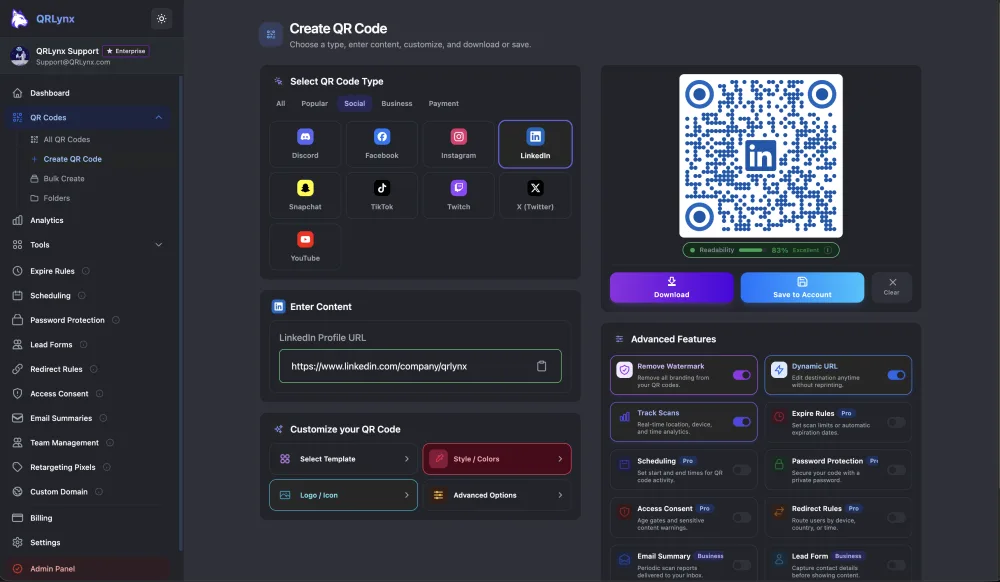
Choose your QR type Start with the content you want to share.
Make it yours Customize the colors, logo, style and frame.
Download and use Test your code, then put it to work.
 QRLynx
Illustration of a destination change. The example QR opens qrlynx.com.
Menus change. Offers move on. With a saved dynamic QR code, you can update the destination without replacing the code you already printed.
Explore dynamic QR codesThe content stays in the code. A simple choice when it will not need to change.
A saved, editable destination with scan tracking and management controls.
Dynamic project limits depend on your plan. Scans are unlimited on every plan.
Static: The encoded content stays fixed.
Dynamic: Update the destination without reprinting.
Static: No QRLynx scan tracking.
Dynamic: Enable real-time scan tracking. Location and device detail, exports and history depend on your plan.
Static: Create supported static codes without an account.
Dynamic: Save dynamic codes with a free account.
Static: The QR pattern has no time limit. Linked content still needs to stay available.
Dynamic: The printed link stays stable while active. If quota-paused, the project is preserved for you to restore when capacity is available.
Static codes are useful for permanent links and one-off labels. Dynamic codes are useful for packaging and changing campaigns. A short link keeps the encoded URL compact.
Dynamic mode is available for supported QR types. Advanced controls, including expiry rules, depend on the type and plan; safety controls and destination availability still apply.
Create a QR code or compare plans. Start with a free account and explore paid plans for more capacity and campaign controls.
QRLynx AI Insights
Get a plain-language summary of your QR scan performance. Explore trends, spot unusual activity and find practical next steps for your campaigns.
Explore AI InsightsSummaries on every registered plan. Full details and manual refresh from Starter+.
Available once your codes have enough scan activity.
Friday led this example with 21 of 92 scans. Check what changed in your placement or promotion that day before deciding what to repeat.
Illustrative data, not a live account.
Keep your first projects simple. Add capacity and controls as your work grows.
Explore all featuresDesign, formats and Wallet passes
Align with your brand identity using custom colors, logos, frames, and patterns. Stand out from the crowd.
Catch scan problems before printing: an automatic check scores contrast, density, and error correction on every design.
Export scalable SVG artwork, high-resolution PNG, or an A4 PDF containing the QR image for print and digital workflows.
Wrap any QR code in a scan-me frame: 6 styles, custom call-to-action text, and your own frame color. Free on every plan.
Create URL, PDF, vCard, WiFi, Email, SMS, Location, and more. Test your finished code with the scanners your audience uses.
Recipients can save a pass for your Digital Business Card to Apple Wallet or Google Wallet from its hosted card page.
Editable destinations, bulk creation and teams
Yes, dynamic QR codes let you change the destination URL anytime, even after printing. Fix typos, update content, or rotate offers without reprinting.
Yes, generate hundreds of unique dynamic QR codes at once by uploading a CSV file. Available on Pro, Business, and Enterprise plans.
Establish brand trust with custom domains (e.g., qr.yourbrand.com) on your QR short links, so scans show your name instead of ours.
Create and repoint dynamic QR codes and read scan analytics from your own systems with a REST API and scoped, revocable keys.
Collaborate with your team on QR campaigns. Invite members, assign roles, and manage QR codes together.
Analytics, AI summaries and reporting
Enable scan tracking for dynamic QR codes. QRLynx analytics cover 3 months on the Free plan, 1 year on Starter+, 2 years on Pro, 3 years on Business, and all available history on Enterprise. Scan counts and timing come with every plan; country, city, device and OS detail, plus CSV export, depend on the plan.
Read plain-language scan summaries on every registered plan, with detailed trends, anomalies and recommendations from Starter+.
Get automated performance summaries delivered to your inbox daily, weekly, or monthly.
Add Meta Pixel, Google Tag Manager or GA4 to eligible Enterprise dynamic QR codes for campaign measurement and retargeting workflows.
Forms, scheduling and access controls
Capture leads directly with built-in forms. Collect emails, names, and phone numbers before redirecting to content.
Support GDPR/CCPA compliance workflows with user acknowledgment or age verification before accessing your content.
Set automatic expiration dates or scan limits for your QR codes. Perfect for limited-time offers and temporary access.
Schedule when QR codes are active. Set start and end times to automate campaigns, promotions, and event-based content.
Route users by device operating system, country, or a daily UTC time range. The first safe matching rule wins; otherwise, use the default destination.
Require a password before QRLynx redirects a scanner to your destination. Available on Pro and higher plans.
Infrastructure, privacy and human help
Dynamic QR scans route through Cloudflare's global network for fast, reliable redirects worldwide.
Password protection, secure data handling, and controls that support GDPR/CCPA compliance workflows.
Email support from a real person is available on every plan, with paid requests prioritized.
50 active dynamic QR codes. SVG artwork and A4 PDF downloads of your QR image.
Adds scheduling and country analytics.
Adds teams, more detailed analytics and CSV export.
QRLynx is a free QR code generator and management platform built by Jorbox LLC, an independent software company operating since 2012. It supports 61 QR code types, unlimited static creation, saved dynamic QR codes, 3-month Free analytics, and AI summaries. The Free plan includes 3 active dynamic QR codes, with unlimited, uncapped scans on every plan.
Static codes download free in PNG, JPG, or WebP, watermark-free with a free account (scalable SVG and A4 PDF downloads start on Starter+), and paid plans start at $7 per month for 50 dynamic codes, scaling to 5,000 on Enterprise. In QRLynx's December 2025 through April 2026 benchmark cohort, the median was 2 scans and the mean was 44, including codes with no recorded scans. The creator study found about 25% higher average scans for codes with logos, while both groups had the same median. This is an association, not a guaranteed logo effect. QRLynx separately reports processing over 5 million scans platform-wide during that period. The published figures are anonymized.
Made for the work that continues after printing. Explore how people use QRLynx, and read their experiences on Trustpilot.
For restaurant menus and ongoing projects, users value QR codes they can keep using long after setup.
Change a saved dynamic QR code's destination while keeping the printed code in place.
Practical help with setup and live campaigns, from a person who can help you move forward.
Scan analytics, event planning and campaign management keep QRLynx useful after the code is created.
Finding your fit? Compare platforms, plans and features before you choose.
Compare your optionsA few things to know before your code goes out into the world.
Browse all questions