Donation QR Code: Setup, Safety, and Scan Tracking

Key Takeaway
Create a donation QR code for a verified giving page. Keep the destination editable, support donor checks, and measure scans separately from donations.
Reviewed: July 2026
Donation-page, receipt, and payment-profile guidance was checked against current first-party sources in July 2026. QRLynx creates and manages the QR destination. The selected donation or payment provider processes the gift, records the donor and amount, handles recurring-gift options, and issues any applicable acknowledgment.
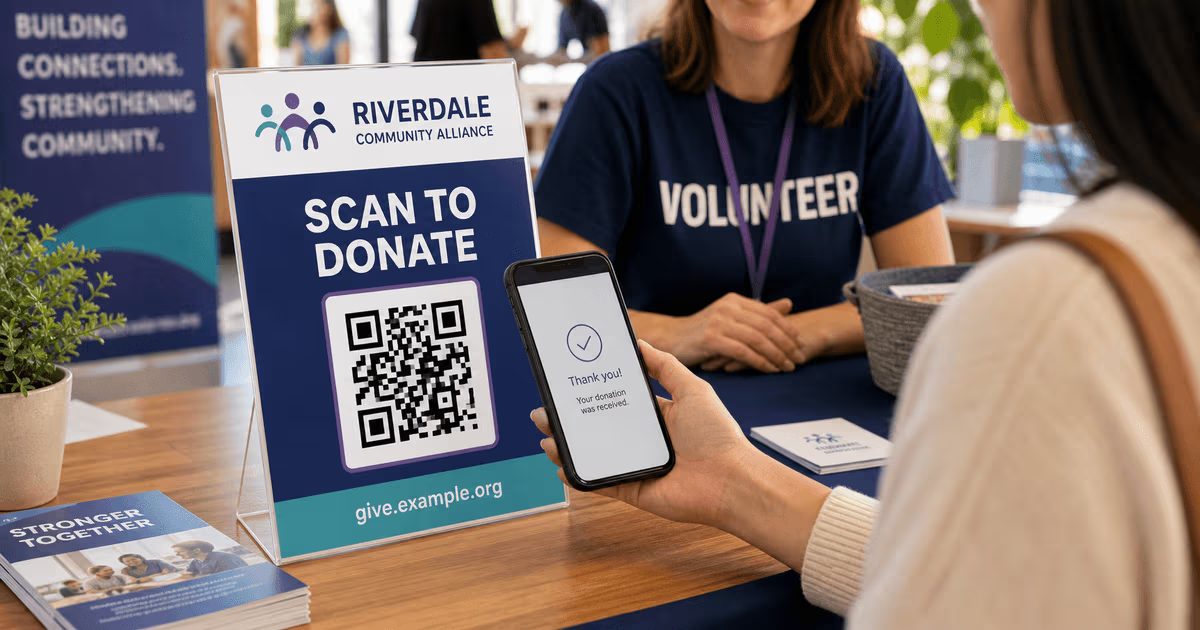
A donation QR code should open the organization's verified, mobile-friendly giving page or a specific campaign page. A supporter scans the code, reviews the destination and organization name, and completes the gift with the selected provider. The QR itself does not collect money, determine tax deductibility, or issue a receipt.
For a registered charity, church, school foundation, or nonprofit, an official donation page is usually more useful than a personal payment profile because it can preserve the organization's identity, campaign designation, donor records, recurring-gift choices, and receipt workflow. A personal fundraiser can link to its verified campaign or payment page, but it should not present the gift as tax deductible unless the receiving organization and jurisdiction support that claim.
QRLynx can create a static URL QR or a dynamic URL QR. A static code is suitable for a permanent giving link that will not change. A dynamic code is useful when the campaign destination may change after printing or when the organization wants QRLynx scan analytics. The donation provider remains the source of truth for completed gifts.
Choose the donation destination first
The destination controls checkout, receipts, donor records, recurring gifts, and payment availability.
| Destination | Use it when | Confirm before printing | What QRLynx measures |
|---|---|---|---|
| Organization donation page | A charity, church, school, or nonprofit has an official giving form | Organization name, mobile checkout, fund selection, receipt flow, privacy notice, and recurring option | Scans of the dynamic QR, not completed gifts |
| Campaign page | The appeal needs a specific goal, story, event, or designated fund | Campaign owner, closing date, currency, payment methods, and what happens after the campaign | Scans of the campaign QR, not the amount raised |
| Verified charity profile | The payment provider supports a registered charity profile, such as a PayPal donation page or Venmo charity profile | Profile name, eligibility, current fees, donor experience, and acknowledgment process | Scans that reach the profile through a dynamic QR |
| Personal fundraiser or payment profile | An individual is collecting for a personal cause and the destination clearly identifies the recipient | Recipient identity, platform rules, regional availability, and whether contributors receive any receipt | Scans only; QRLynx does not see the transfer |
How to create a donation QR code in QRLynx
Build and verify the giving path before designing the printed code.
Prepare the official giving destination
Choose the organization's donation page, verified charity profile, or campaign page. Confirm that it works on a phone, displays the correct recipient, supports the intended fund or recurring choice, and explains how donor information is handled.
Choose static or dynamic
Use a static URL QR for a permanent destination when editability and scan analytics are unnecessary. Use a dynamic URL QR when the organization may change the destination after printing or wants to review scan activity. The free Starter plan includes 3 active dynamic QR codes and three months of analytics.
Create and label the QR
Paste the verified giving URL into QRLynx. Add the organization logo when appropriate and use a short label such as Scan to Donate or Give to the Food Fund. Keep the destination's short human-readable URL below the code.
Test the complete donor journey
Scan the code from the final printed proof with more than one phone. Check the organization name, campaign, currency, payment methods, recurring choice, privacy notice, confirmation page, and receipt or acknowledgment flow.
Assign a code to each measurable placement
If you need to compare a bulletin, banner, mailer, table sign, or livestream, create a separate named dynamic QR for each placement or use distinct tagged destination URLs. One identical QR used everywhere cannot identify which placement produced a scan.
Inspect and maintain the live materials
Check public signs for replacement stickers, retest the destination after provider changes, and update a dynamic code when the campaign moves. Keep the donation page itself active for as long as the printed material remains in circulation.
Verified giving path
Create your donation QR code
Connect a verified donation or campaign page to a clearly labeled QR, then test the complete donor experience on the final printed material.
Static or dynamic for a donation campaign
A static QR directly encodes the giving URL. It continues to open that URL as long as the destination remains valid, and it does not depend on a redirect account. Choose it for an evergreen donation page when you do not need to change the link or measure scans.
A dynamic QR encodes a managed short link. The organization can update its destination after printing and review scan activity within the account's analytics window. QRLynx plans have unlimited scans. Ordinary dynamic codes do not stop because of time or scan volume, but an explicit expiry rule, manual deactivation, deletion, abuse action, invalid destination, account state, or downgrade over capacity can affect availability.
Dynamic scan analytics still stop at the redirect. They can show that someone scanned, when the scan occurred, and the breakdowns available to the account's plan. They do not show whether the visitor completed the donation, the amount, the donor, or the receipt. Connect QRLynx placement data with the donation provider's campaign or conversion reporting when the organization needs a complete fundraising picture.
Measure placements without confusing scans and gifts
Give each placement a clear campaign name, such as Spring Gala - Table Sign, Spring Gala - Program, or Spring Gala - Livestream. Use a separate dynamic QR for each one. This makes the scan comparison meaningful while allowing every code to open the same donation page.
Read the two systems together:
- QRLynx: scan totals, timing, top QR codes, and the location and device breakdowns available to the plan.
- Donation provider: completed gifts, amounts, payment methods, donor records, recurring status, refunds, and acknowledgments.
A high scan count with few completed gifts points to the next part of the journey: the giving page, message match, payment options, page speed, form length, trust signals, or campaign clarity. It is not proof that the QR itself failed.
Make the donation path clear and trustworthy
- Name the organization and purpose: write who receives the gift and, for a designated appeal, which fund it supports.
- Show a fallback URL: print a short readable link under the QR for accessibility, verification, and cameras that cannot complete the scan.
- Match the landing page: the page should repeat the organization name, campaign, and visual identity shown beside the QR.
- Protect physical displays: place codes inside designed materials or protected stands and inspect them for replacement labels.
- Keep payment and donor data with the provider: do not encode account credentials, private donor information, or sensitive payment details in the QR.
- Test accessibility: use strong contrast, a clear quiet zone, readable supporting text, and a layout that works for keyboard and screen-reader users after the scan.
For United States charitable contributions, the IRS advises donors to confirm that a charity is legitimate and to keep donation records. A donor generally needs a written acknowledgment from the charitable organization for a contribution of $250 or more. The donation provider or organization should handle that acknowledgment. QRLynx scan records are not donation receipts or tax documentation.
Where donation QR codes fit
Churches and places of worship
Link to the official giving page and let that page handle one-time gifts, recurring giving, fund selection, and donor records. Use distinct codes for a bulletin, pew card, lobby sign, and livestream when placement comparison matters.
Nonprofit appeals and direct mail
Link to the specific appeal rather than a general homepage. The printed letter or card should explain the purpose before the donor scans, and the giving page should repeat that message.
Events, galas, and community fundraisers
Place the code where the ask is visible and there is enough time to scan. Table signs, programs, presentation slides, and volunteer badges can use separate named codes that all reach the same event campaign.
Personal causes
Use a verified fundraiser or payment page that clearly identifies the recipient and purpose. Describe it as a personal contribution unless a qualified organization controls the campaign and provides the relevant charitable acknowledgment.
Donation QR code questions
Answers for nonprofits, churches, schools, campaigns, and personal fundraisers.
How do I create a QR code for donations?
Prepare the verified donation or campaign page, paste its URL into QRLynx, choose static or dynamic, add a clear Scan to Donate label and fallback URL, then test the complete giving and acknowledgment flow on the final printed material.
Is a donation QR code free to make?
Yes. You can create a static URL QR without signing up. QRLynx's free Starter plan includes 3 active dynamic QR codes, unlimited scans, and three months of analytics. The donation or payment provider may apply its own transaction or service fees.
Should a nonprofit use a donation page or a personal payment profile?
An official organization donation page or verified charity profile is usually the stronger route because it can preserve the organization's identity, donor records, recurring choices, campaign designation, and acknowledgment process. Personal profiles fit personal causes when the recipient and terms are clear.
Can I use PayPal or Venmo for a donation QR?
Yes, when the destination is the correct current page for the recipient. PayPal offers donation pages with a QR for each page, and Venmo offers QR codes for eligible charity profiles. Confirm the profile type, recipient name, fees, regional availability, recurring options, and receipt process before printing.
Can QRLynx track completed donations?
QRLynx tracks scans of a dynamic QR, not completed gifts. The donation provider records the donor, amount, payment status, recurring choice, refund, and receipt. Use separate named QR codes per placement and compare their scans with provider conversion data.
Can one QR code tell me whether a banner or bulletin worked?
Only when the placements have distinct codes or tagged destination URLs. One identical QR used on both cannot identify the physical source of a scan. Create a separately named dynamic QR for each placement you want to compare.
Do donation QR codes expire?
A static QR keeps encoding the same URL, so the destination must remain valid. Ordinary QRLynx dynamic codes do not stop because of time or scan volume, and scans are unlimited on every plan. Availability can still be affected by an explicit rule, manual action, deletion, abuse action, destination failure, account state, or capacity after a downgrade.
Can the QR offer recurring donations?
The QR can open a donation page that offers recurring giving. The donation provider creates and manages the recurring authorization, schedule, donor record, and cancellation flow. QRLynx manages the link that takes the donor to that page.
Does a donation QR issue a tax receipt?
The QR does not determine tax eligibility or issue an acknowledgment. The receiving organization and donation provider control the contribution record and receipt workflow. In the United States, donors should use the organization's acknowledgment and keep the records required by current IRS guidance.
How do I protect a public donation QR from tampering?
Integrate the code into a clearly branded sign, print the expected organization name and fallback URL, inspect physical displays for replacement stickers, retest after changes, and give staff a known-good digital copy for comparison.
Where should I place a donation QR code?
Place it where the fundraising message already has attention, such as a church bulletin, event program, table sign, presentation slide, direct-mail appeal, poster, or volunteer badge. Keep enough space and time for scanning, and use a separate code for each placement you want to measure.
Build the giving path before the print run
The strongest donation QR setup starts with a verified mobile giving page, not the QR design. Confirm the organization and fund, complete a test gift when practical, check the acknowledgment flow, then create and label the code.
Use QRLynx's QR code generator for the link, the QR code readability checker for the final asset, and separate dynamic codes when you need placement-level scan comparisons. For broader campaign planning, see the nonprofit fundraising QR guide.