QR Codes for Nonprofits: Donation Setup and Tracking Guide

Key Takeaway
Create nonprofit QR codes for donations, volunteers, events, and direct mail. Build a trusted mobile path, track each placement, and test before launch.
The short answer
Start with the supporter action, not the QR code
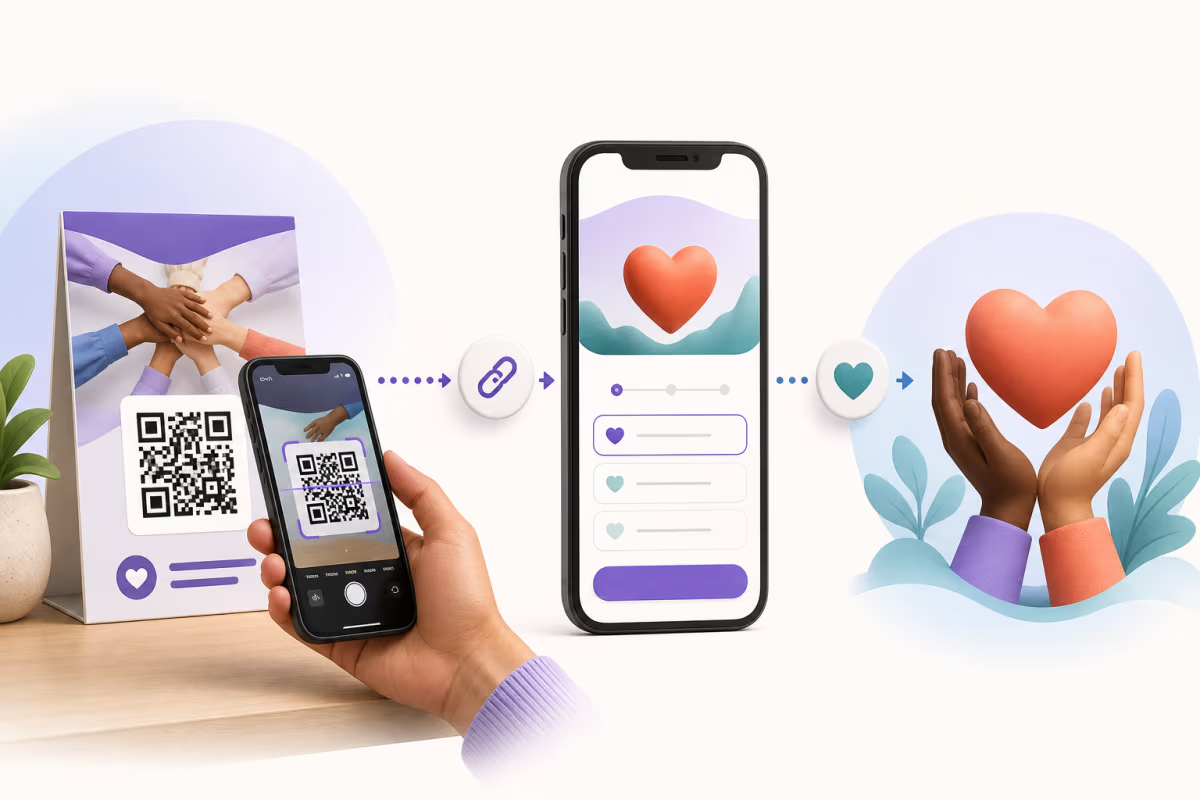
A QR code shortens the path from a printed appeal, event sign, annual report, or volunteer flyer to an online action. It does not create the donation form, process money, issue a receipt, check a guest into an event, or store volunteer submissions. Those responsibilities stay with the nonprofit’s approved fundraising, payment, registration, or form system.
QRLynx supports that journey with a Website / Link QR for one destination, Multi Links when several approved actions belong on one mobile page, static or eligible dynamic mode, destination editing for dynamic codes, placement-level scan analytics, folders, logos, frames, and downloadable QR artwork. A dynamic scan records the interaction with the QRLynx route, not the donor’s identity, gift amount, completed donation, or form submission.
Choose the QR route by nonprofit goal
| Supporter goal | Destination | QRLynx setup | What proves success |
|---|---|---|---|
| Make a donation | Verified mobile donation form or campaign page | Website / Link QR, usually one code per placement | Completed gifts in the fundraising or payment platform |
| Join as a volunteer | Approved volunteer application or interest form | Website / Link QR with a clear volunteer label | Submitted applications in the form or volunteer system |
| Register for an event | Event registration page | Website / Link QR on the invitation or poster | Registrations in the event platform |
| Check in at an event | The event platform’s attendee-specific check-in route | Use the code issued by that platform; QRLynx can link to a general check-in page but does not replace attendee validation | Check-in records in the event platform |
| Read an impact story | Campaign story, report, video, or program page | Website / Link QR, or PDF File when the nonprofit controls the document | Meaningful page or video engagement in the destination system |
| Choose among several actions | A small set of verified donation, volunteer, event, and impact links | QRLynx Multi Links page | Destination outcomes plus QRLynx scan activity |
Build a trustworthy donation path
A donation QR should land on a page that visibly belongs to the nonprofit or its approved fundraising provider. The page should identify the organization, explain the campaign, work on a phone, show the available giving options, and provide the receipt and privacy information required by the donation system.
Print the organization name, the purpose, and a readable fallback URL beside the QR. A label such as Scan to support the community meals fund gives more context than a bare Donate button. If the destination uses a third-party fundraising domain, prepare supporters for that handoff so the domain change does not look suspicious.
QRLynx does not collect the donation, card details, donor identity, tax information, consent choices, or receipt data. The nonprofit must review the destination platform’s current fees, payout rules, privacy terms, accessibility, recurring-gift flow, and country eligibility before publishing the QR.
How to create a nonprofit donation QR code in QRLynx
Verify the fundraising destination first, then create, label, separate, and test the QR route.
Choose the exact supporter action
Decide whether this QR should open a donation form, volunteer form, event registration page, impact story, or a small Multi Links page. Keep one primary action per printed placement when possible.
Verify the destination outside QRLynx
Open the nonprofit’s approved page on a phone and while signed out when practical. Confirm the organization name, campaign purpose, mobile form, payment or submission flow, confirmation, receipt, privacy information, and fallback contact route.
Select the correct QRLynx QR type
Choose Website / Link for one destination, Multi Links for several approved actions, or PDF File for a controlled document. QRLynx links supporters to these destinations but does not process donations or form submissions.
Choose static or dynamic mode
Use static when a durable owned URL can remain fixed and QRLynx scan analytics are unnecessary. Use an eligible dynamic QR when the destination may change after printing, separate placements need scan measurement, or managed campaign controls provide real value.
Name each placement clearly
Create a separate saved QR for direct mail, gala tables, lobby signage, volunteer flyers, or other surfaces you need to compare. Add a plain internal name and destination UTM parameters so QRLynx scans and destination outcomes can be reconciled without guessing.
Apply nonprofit branding and an action label
Add the organization’s approved logo, use strong contrast and a clear quiet zone, and place a specific call to action beside the code. Keep a readable destination or short fallback instruction on the material.
Test the complete supporter journey
Scan the exported image and a physical proof with more than one phone. Confirm the QR decodes, the expected domain opens, the page works at the intended distance and lighting, and a test donation or form submission reaches the correct system when policy permits.
Monitor scans and real outcomes separately
Use QRLynx to compare scan activity by saved placement. Use the fundraising, payment, form, event, or website analytics system to confirm completed outcomes. Investigate high scans with low completions as a destination or message problem, not as proof that the QR failed.
Destination verified
Create the nonprofit QR route in QRLynx
Connect a printed appeal, event sign, or volunteer flyer to the nonprofit’s approved destination, then test the finished material before distribution.
Measure the funnel, not scans alone
A scan means the QR route was opened. It does not prove that a donation, registration, volunteer application, or event check-in was completed. Build the measurement chain before launch:
- Placement: give each meaningful surface its own saved QR and internal name.
- Visit: add destination UTM parameters that identify the campaign and placement.
- Outcome: read completed gifts, registrations, or submissions from the system that owns them.
- Reconciliation: compare QRLynx scan activity with destination sessions and completed outcomes over the same period.
Country detail begins on Pro. City, device, operating-system, and browser detail, plus CSV export, begin on Business. The free Starter plan includes scan tracking and three months of analytics. Use broad location and device patterns for campaign review, not to identify individual donors.
A simple diagnostic table
| Pattern | Likely question | Next check |
|---|---|---|
| Few scans | Was the QR visible, labeled, and easy to reach? | Placement, size, contrast, lighting, and call to action |
| Scans but few destination sessions | Did the redirect or destination fail to load? | URL, mobile speed, permissions, and analytics tagging |
| Sessions but few completed actions | Is the page or form creating friction? | Message match, trust, fields, payment options, accessibility, and errors |
| Completions but weak attribution | Are placements sharing one identifier? | Separate QR records and UTM values for future materials |
Match the placement to the supporter moment
Direct mail
Put the QR near the primary appeal and print the direct URL as a fallback. Use a distinct QR and UTM value for the mailing instead of reusing the gala or lobby code. Test the final stock, coating, fold, and envelope placement.
Fundraising events
Use table cards, programs, projection slides, auction displays, or exit signage where supporters have enough time and connectivity to act. A large screen still needs a short, readable fallback URL for people seated too far away.
Permanent signs and collection points
A dynamic QR can point to a new destination without changing the printed pattern. This is useful when the physical sign may outlive a campaign. Set an owner and review date so the route can move to a current program, an evergreen giving page, or a clear campaign-closed message.
Volunteer and community outreach
Link directly to the approved interest or application form. Explain what happens after submission and keep sensitive screening or identity data inside the organization’s authorized system rather than the QR payload.
Annual reports and impact materials
Use the QR to open supporting stories, audited reports, program updates, or an accessible version of the document. Avoid mixing the evidence page and donation ask unless the destination explains both clearly.
Safety, governance, and maintenance checklist
- Use a destination controlled by the nonprofit or an approved provider account.
- Show the nonprofit name, purpose, and expected domain beside the QR.
- Restrict QRLynx editing access to the people responsible for the campaign.
- Keep card data, bank details, donor records, volunteer data, and attendee credentials out of the QR payload.
- Set a named owner and review date for every long-lived dynamic placement.
- Retest the finished material after every destination or design change.
- Keep a readable fallback URL or contact route on important appeals.
- Archive campaign names and UTM conventions so future reporting remains understandable.
If a printed QR appears to have been replaced, covered, or redirected unexpectedly, pause the campaign route when appropriate, inspect the destination and account access, replace the physical material, and tell supporters which official domain to expect.
Nonprofit QR code questions
Answers about donations, tracking, events, security, and long-lived campaigns.
How do nonprofits use QR codes for donations?
Link the QR directly to the nonprofit’s verified, mobile-friendly donation form or campaign page. Print the organization, purpose, and a fallback URL beside it. QRLynx creates and measures the QR route, while the fundraising or payment platform processes the gift and issues the transaction record.
Should a nonprofit donation QR code be static or dynamic?
Static works when the nonprofit controls a durable URL that can remain fixed and QRLynx scan analytics are unnecessary. Dynamic is useful when the URL may change after printing, the placement needs separate scan measurement, or the organization needs managed campaign controls.
Can QRLynx process donations or see donor payment details?
No. QRLynx can route a dynamic QR and record scan activity, but it does not process the donation or receive the donor’s card details, gift amount, receipt, or fundraising-platform record.
How can a nonprofit measure donations from a QR code?
Give each important placement its own saved QR and UTM-tagged destination. Compare QRLynx scan activity with destination sessions and completed donations from the fundraising or payment platform over the same period. Scans alone do not equal donations.
Can one QR code be reused for several fundraising campaigns?
A dynamic QR can point to a new destination without changing the printed pattern. Reuse is appropriate when the physical placement and supporter promise still make sense. Keep separate saved QRs when campaign or placement attribution matters.
Do supporters need an app to scan a nonprofit QR code?
Many current phones can scan QR codes through the camera or built-in scanner, but device behavior varies. Print a readable fallback URL or contact route so the appeal remains usable when scanning is unavailable or inconvenient.
Can QRLynx create unique attendee check-in codes?
QRLynx can link to a general registration or check-in page, but attendee-specific credentials and validation belong to the event platform. Use the unique code or wallet pass issued by that system when individual check-in is required.
How can a nonprofit make a donation QR code look trustworthy?
Show the nonprofit name, purpose, expected domain, and a clear action label beside the QR. Use an approved logo, a verified destination, strong contrast, a readable fallback URL, and a physical proof tested on multiple phones.
Can a nonprofit use one QR for donations, volunteering, and events?
A QRLynx Multi Links page can present a small set of verified supporter actions. A single focused destination is usually clearer for a specific appeal, and separate saved QRs make placement and outcome attribution easier.
What should happen when a fundraising campaign ends?
Update a dynamic QR to an evergreen giving page, a current program, an impact report, or a clear campaign-closed message. Keep the destination relevant to the wording on the printed material and retest the route after changing it.
Build one reliable supporter journey
The useful unit is not the QR image. It is the complete path from a physical message to a verified mobile destination and a measurable outcome. Start with one supporter action, explain it clearly, keep sensitive and transactional data inside the approved destination system, and test the final material in context.
QRLynx can create the Website / Link, Multi Links, or PDF route, keep eligible dynamic destinations editable, and separate scan activity by saved placement. The nonprofit’s fundraising, payment, form, event, or website system remains the source of truth for completed outcomes.
For deeper attribution guidance, read how to track QR code scans. For print validation, use the QR code readability checker on the exact artwork before distribution.