How to Create a Shopify QR Code for Products, Checkout, and Repeat Sales

Key Takeaway
Create a Shopify product QR code, choose product or checkout delivery, apply variants and discounts, compare Shopcodes with QRLynx, and test conversion.
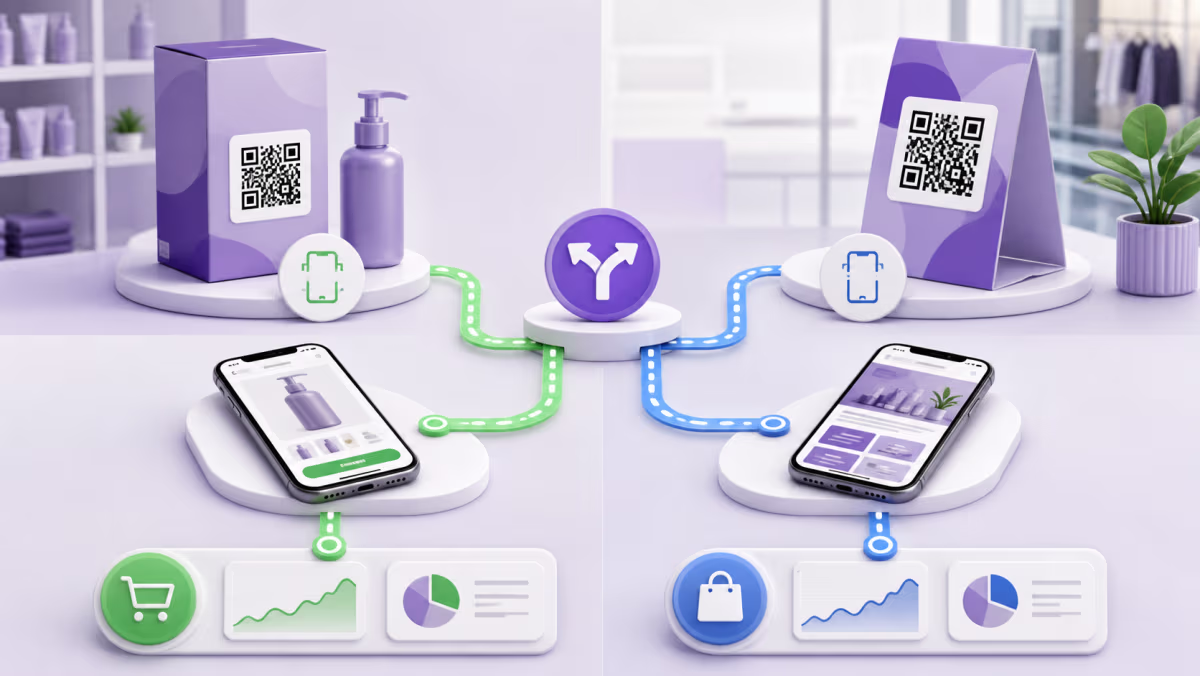
Shopify already has a native product QR tool called Shopcodes. It can send a shopper to a product page or to checkout with a selected product in the cart, and it can apply a discount when the checkout route is used. Start there when one Shopify product is the destination and Shopify's built-in scan and conversion reporting meets the campaign.
Use a QRLynx Website URL QR when the printed code needs to open a collection, campaign page, guide, multi-product choice, or another Shopify URL, or when the destination should be managed independently of one product. The strongest setup is the one with the fewest steps between the physical context and the shopper's next decision.
Shopcodes or QRLynx
| Route | Best fit | Built-in flexibility |
|---|---|---|
| Shopify Shopcode to product page | A shopper should learn about one product | Choose a product and optional variant, download PNG and SVG, and view Shopcodes scan and conversion reporting |
| Shopify Shopcode to checkout | The printed offer should place one product in the cart | Choose a variant and optional discount. Shopify requires the checkout destination when adding the discount |
| QRLynx static Website URL QR | A final Shopify collection, page, product, or campaign URL | The exact URL is encoded and remains dependent on that route |
| QRLynx dynamic Website URL QR | The campaign may rotate products, pages, markets, or offers | The saved destination can change while the printed managed link remains the same |
Match the destination to the physical moment
Packaging
A repeat buyer already knows the product. A checkout route with the correct variant and a valid repeat-purchase offer may remove unnecessary browsing. A first-time buyer may need the product page, ingredients, instructions, compatibility, or proof before adding anything to the cart.
Retail display
A display can open the exact product shown, a size or color variant, or an online collection when the shelf carries only samples. Confirm that the store market, inventory, delivery options, and price make sense on the shopper's phone.
Window or out-of-home campaign
Use a campaign page when the creative covers several products or needs a strong explanation. A direct checkout is most useful when the offer and item are already unambiguous.
Plan variants and discounts before printing
Shopcodes can target a specific product variant. If the label is attached to a blue medium item, confirm that the destination does not silently add a different default variant. For a checkout Shopcode with a discount, test product eligibility, minimum purchase, customer rules, active dates, market, and whether another automatic discount changes the result.
Shopify notes that a discount can be attached when the Shopcode destination is the checkout page with the product in the cart. Print the offer terms that a customer needs to understand, and decide what happens when the discount expires.
Create a Shopify QR code with QRLynx
Use QRLynx when the destination goes beyond one native Shopcode product route or needs independent management.
Choose the shopper's next decision
Select the exact product, collection, campaign page, cart, or checkout experience that fits the physical placement.
Build the final Shopify URL
Open the route in the correct market and confirm product status, variant, price, inventory, discount behavior, shipping context, and mobile speed.
Compare the native Shopcodes option
Use Shopcodes when its product or checkout route, editable code, file formats, and Shopify reporting already satisfy the campaign.
Choose Website URL in QRLynx
Paste the tested Shopify destination when you need a broader page, independent managed route, or QRLynx placement analytics.
Choose static or dynamic delivery
Use static for a permanent final address. Use dynamic when products, campaigns, markets, or destinations may rotate after printing.
Design and label the printed QR
State the action and value, such as Scan to reorder this filter. Keep adequate size, contrast, quiet zone, and protection from packaging folds or gloss.
Complete a mobile purchase test
Scan the production proof, verify the exact item and variant, apply any offer, proceed through checkout, and confirm the intended analytics event.
Shopify destination tested?
Create a managed QR for your Shopify campaign
Link a product, collection, campaign, or checkout route and keep each physical placement measurable and editable.
Use the right production file
Shopify Shopcodes downloads a ZIP containing PNG and SVG. Shopify recommends PNG for online sharing and SVG for print. QRLynx also provides formats suited to different production workflows. Give the printer a vector file when possible, preserve the quiet zone, and test the actual substrate, finish, curve, and scan distance.
Do not stretch a small bitmap, place the code across a fold, or hide it under reflective laminate without testing. Packaging proofs should be scanned before the full print run and again after filling or assembly changes the surface.
Measure the route to the sale
Shopcodes provides scan and conversion reporting for its codes. A QRLynx dynamic QR provides eligible scan activity for its managed route, while Shopify remains the source for sessions, carts, checkout, orders, and attributed sales under Shopify's reporting rules.
Create a separate code for each package version, store display, event, or insert when placement comparison matters. Review scans, product sessions, add-to-cart activity, checkout, and orders as distinct stages. A conversion problem can come from the offer, price, inventory, delivery promise, mobile page, or checkout, even when the QR scans perfectly.
Shopify QR code questions
Does Shopify have a built-in QR code generator?
Yes. Shopify's Shopcodes app generates product QR codes for a product page or a checkout route with the product in the cart.
When should I use QRLynx instead of Shopcodes?
Use QRLynx for collections, campaign pages, guides, multi-product choices, or independently managed destinations and placement analytics. Use Shopcodes when its native product workflow already fits.
Can a Shopify QR add a product to checkout?
Shopcodes can create a checkout destination with the selected product in the cart. Test the product, variant, inventory, market, and checkout experience before printing.
Can a Shopify QR apply a discount?
Shopify allows a discount on a Shopcode when the scan destination is checkout with the product in the cart. Verify eligibility, dates, minimums, and the result on mobile.
Can I change a Shopcode after printing?
Shopify states that editing an existing Shopcode destination updates where previously downloaded or printed codes lead. Retest the edited code and offer.
Should packaging link to a product page or checkout?
Use a product page when the buyer needs details or choices. Use checkout when the product, variant, and offer are already clear and the goal is a fast repeat purchase.
Which file should I print?
Shopify provides PNG and SVG and recommends SVG for print. Whatever the source, test the final production proof at its actual size and finish.
Does every QR scan count as a Shopify sale?
No. A scan starts the route. Shopify records later commerce events and attributed sales under its own reporting. Measure the funnel in stages.
Can one QR serve several Shopify products?
A Shopcode is tied to a specific product. For several products, use a tested collection or campaign page in a QRLynx Website URL QR.
Sources and related QRLynx guides
- Shopify: Shopcodes
- QRLynx Website URL QR code
- QRLynx dynamic URL QR code
- QRLynx QR analytics
- QRLynx QR print-size guide
QRLynx is built and operated by Jorbox LLC. This guide was checked against current Shopify Shopcodes creation, editing, file-format, discount, and analytics documentation and the QRLynx Website URL workflow.