QR Codes for Parking: Pay, Permits and Visitor Access with QRLynx

Key Takeaway
Build a trustworthy parking QR with QRLynx for pay portals, visitor registration, permit information, or lot rules. Includes setup, signage, and safety checks.
Reviewed July 2026
This guide was checked against current QRLynx plan and generator behavior, FTC QR safety guidance, ParkMobile scan-to-pay documentation, and DENSO WAVE QR printing guidance in July 2026.
What a parking QR actually does
A parking QR connects a physical sign, meter, permit, email, or ticket to an existing web destination. In QRLynx, use Website / Link to send drivers to an official payment portal, visitor-registration form, permit-information page, parking map, or lot rules. The destination system handles payments, vehicle records, reservations, gate access, and enforcement. QRLynx manages the QR, its destination, eligible scan analytics, and optional controls.
How to create a parking QR code in QRLynx
Connect the official parking destination, label the action clearly, and verify the installed sign as a driver would use it.
Choose one official parking action
Select the page the driver must reach, such as the operator's pay portal, visitor-registration form, permit-renewal page, parking map, or current lot rules. Confirm that the destination is mobile friendly, uses HTTPS, and shows the operator or property identity clearly.
Select Website / Link in QRLynx
Open QRLynx, choose Website / Link, and paste the exact official destination. Use a separate QR for each action or zone when drivers need different instructions, destinations, or reporting.
Choose static or dynamic behavior
Use dynamic when the portal, rates page, zone instructions, event map, or permit destination may change after signs are installed, or when eligible scan analytics are useful. Use static when the official URL is permanent and redirect management is unnecessary.
Add only the controls the workflow needs
Pro can add a scheduled active window, expiry rules, password protection, or smart redirect rules. These controls affect access to the destination, but they do not create vehicle permits, validate plates, process payment, operate a gate, or replace the parking system's own authorization records.
Design and label the sign
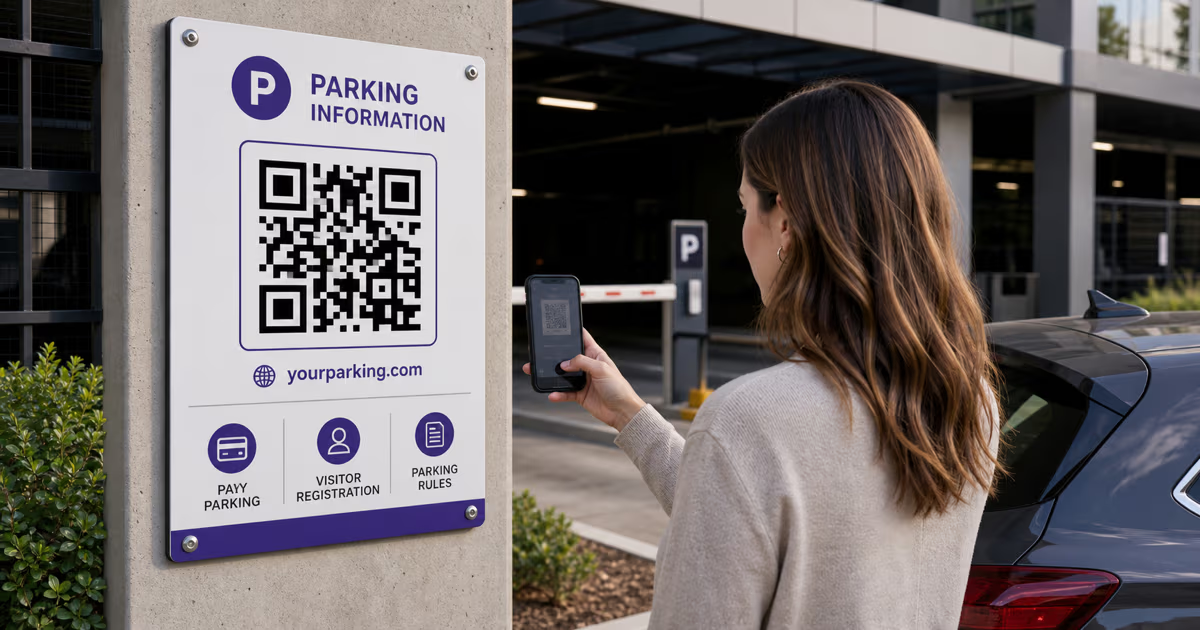
Use a dark QR on a plain light background, preserve the quiet zone, and add a direct instruction such as Scan to pay at this lot or Scan to register a visitor. Print the official destination domain and the lot or zone identifier beside the QR so drivers can compare the phone preview with the sign.
Download for the real print process
The free QRLynx plan includes PNG HD for signed-in users. Starter+ and higher plans add resolution-independent SVG and A4 PDF downloads for large-format production. Ask the sign printer which supported format and color profile they need, and do not stretch, crop, cover, or redraw the QR.
Install, test, and inspect
Mount the QR on a permanent, well-lit sign where a person can stop safely to scan. Test the final installed code with representative phones, complete the destination action in a test or approved live flow, and establish a physical inspection schedule for damage, fading, obstruction, or an added sticker.
Official destination ready
Create the parking QR in QRLynx
Connect the official parking page, give the sign one clear action, and test the final installed QR before drivers rely on it.
Four parking workflows that fit a Website / Link QR
- Pay portal: link to the official mobile payment page for the exact operator, facility, or zone. The portal, not the QR, calculates the charge and processes payment.
- Visitor registration: link to the property's existing form or parking platform where a visitor enters the information the operator requires. That system records and validates the visit.
- Permit information or renewal: link residents, students, or staff to the official permit instructions, renewal page, or sign-in flow. A generic QRLynx page is not a permit database.
- Rules and wayfinding: link to current hours, rates, accessible-space guidance, EV charger locations, event routing, overflow parking, or contact information.
Keep each installed QR focused on one expected action. When a sign offers payment, registration, maps, and policies through one QR, the destination page should present those choices immediately and preserve the facility identity throughout the journey.
Static or dynamic QRLynx QR for parking
| Choice | Destination after installation | QRLynx scan activity | Best fit |
|---|
Visitor passes and permits need a parking system behind the QR
A visitor-registration QR works when its destination records the plate, property, unit or host, permitted period, and confirmation required by the operator. A permit-verification QR works when its destination checks a current permit record and shows the result to an authorized person. Those records belong in the parking platform, property system, or approved form workflow.
QRLynx can create one QR for a registration page, one per zone, or multiple dynamic QRs for distinct destinations. Pro bulk generation supports up to 100 dynamic codes per batch with five batches per month. Business raises that to 250 per batch and ten batches per month, and adds a ten-member workspace and CSV analytics export. The QR count and grouping should follow the parking system's real zones and records rather than creating a parallel permit database.
Password protection can gate a destination page on Pro, but a shared password is an access layer, not an individual permit. Use the parking system's own identity, vehicle, expiry, and enforcement controls for authorization decisions.
Event and temporary parking
For an event map or temporary parking page, QRLynx Pro scheduling can define when a dynamic QR is active. Expiry rules can retire the QR by date, time, or eligible scan threshold, and smart redirect rules can route according to configured conditions. Keep the printed instruction accurate for the complete event window, including early arrivals and post-event departure.
The event's ticketing, reservation, payment, capacity, and access-control systems remain authoritative. Test the scheduled QR before the opening time, during the active window, and after the end condition. Provide a typed official URL or staffed contact route for accessibility and operational continuity.
QRLynx plan fit for parking operators
| Plan | Relevant capacity or control | Typical parking fit |
|---|
Build trust into the physical sign
The FTC has reported scammers covering parking-meter QR codes with their own codes. A legitimate operator can make verification easier through the complete sign design and maintenance process.
- Use a professionally mounted sign or integrated meter plate rather than relying on an unprotected loose sticker.
- Print the official destination domain and operator or property name beside the QR.
- Keep the payment or registration page on HTTPS and carry the same facility identity into the destination.
- Add the zone, meter, or lot identifier in readable text so the driver can confirm context.
- Inspect every QR surface on a documented schedule and after maintenance, vandalism, or reported payment issues.
- Give drivers an official typed URL, app route, or phone number when the QR looks altered or the phone preview shows another domain.
An Enterprise custom redirect domain can align the short-link hostname with the operator's brand. That is one helpful signal, while the permanent sign, visible domain, destination identity, physical inspections, and official support route provide the full trust system.
Size and place the QR for a safe scan
Choose the QR size from the real scanning distance, module density, sign material, lighting, viewing angle, and camera position. The often-cited 10-to-1 distance rule is only a starting estimate, not approval evidence. A parking entrance sign scanned from several feet away needs a much larger code than a meter plate scanned at arm's length.
DENSO WAVE specifies a clear quiet zone four modules wide around every side of the QR. Use a dark pattern on a plain light background, keep artwork and text outside the quiet zone, and avoid mounting behind glare-heavy or damaged surfaces. Place the sign where a person can stop safely rather than encouraging phone use while a vehicle is moving.
Print and install one proof at the final size and height. Test it in daylight and representative evening illumination, from the planned standing position, with representative phones. Repeat the test after lamination, protective covers, or other finishing changes.
Use scan analytics as operational context
A QRLynx dynamic QR can record eligible aggregate scan activity according to the account's analytics access. Separate QRs for distinct lots, entrances, zones, or sign placements can make those patterns more useful. A scan does not prove that a payment completed, a visitor registered, a permit was valid, a vehicle entered, or a parking space was occupied.
Use the payment processor, visitor-registration platform, permit system, gate controller, or enforcement record for those outcomes. Compare that system's completed events with QRLynx scan activity when investigating sign placement or journey friction, and account for repeat scans, staff tests, automated traffic, and people who use the typed URL instead.
Parking QR code questions
Answers about QRLynx setup, pay portals, permits, visitor registration, signage, safety, and analytics.
How do I create a parking QR code in QRLynx?
Choose the official pay, registration, permit-information, map, or rules page. Select Website / Link in QRLynx, paste that URL, choose static or dynamic behavior, design and label the sign, download the suitable file, and test the final installed QR and destination action.
Can QRLynx process a parking payment?
QRLynx manages the QR link and optional redirect analytics. The payment portal opened by the QR calculates the charge, records the zone or plate details, processes the transaction, and issues any receipt or parking session.
Can I use a QR code for visitor parking registration?
Yes. Point a QRLynx Website / Link QR to the property's official visitor-registration form or parking platform. That destination should record the vehicle, host or unit, allowed period, and confirmation required by the operator.
Does a password-protected QRLynx QR create a parking permit?
Password protection gates access to a destination page, but it does not create or validate an individual vehicle permit. Permit identity, plate records, dates, status, and enforcement decisions belong in the parking or property-management system.
Should a parking QR be static or dynamic?
Use dynamic when the destination may change, when signs serve temporary events or changing rules, or when aggregate scan analytics are useful. Use static for a permanent official URL when redirect management and scan analytics are unnecessary.
How can an operator make a parking QR easier to trust?
Use a permanent mounted sign, print the official domain and operator identity beside the QR, maintain HTTPS and consistent branding on the destination, include the lot or zone identifier, inspect the sign physically, and provide an official typed URL or support route.
What should I do if a sticker appears over a parking QR?
Take the affected sign out of service or cover the payment instruction according to the operator's procedure, preserve evidence, compare it with the approved artwork, replace the altered surface, test the official destination, and direct drivers to a known official payment route. Report suspected fraud through the relevant organization and authorities.
What size should an outdoor parking QR be?
Size it for the actual scan distance, QR density, lighting, angle, material, and phone position. Preserve the four-module quiet zone and approve the size only after testing the final installed proof from the intended safe standing location.
Can QRLynx analytics show that a driver paid or registered?
No. QRLynx analytics can show eligible aggregate scan activity. The payment processor, registration form, permit system, or gate platform remains the source of truth for a completed transaction or authorized vehicle.
Which QRLynx plan supports temporary event parking?
Pro includes scheduling, expiry rules, smart redirects, password protection, 300 active dynamic QRs, and limited bulk generation. Use the event's ticketing, reservation, capacity, and access systems for the underlying parking operation.