How to Make a QR Code Luggage Tag in QRLynx

Key Takeaway
Create a QRLynx luggage recovery page and QR tag with useful contact options, privacy-conscious details, durable printing, and a complete pre-travel test.
Reviewed: July 2026
This guide was checked against the current QRLynx Link-in-Bio workflow, U.S. Department of Transportation baggage guidance, Apple Find My documentation, SITA baggage reporting, and DENSO WAVE error-correction guidance in July 2026. Airline procedures and device behavior vary.
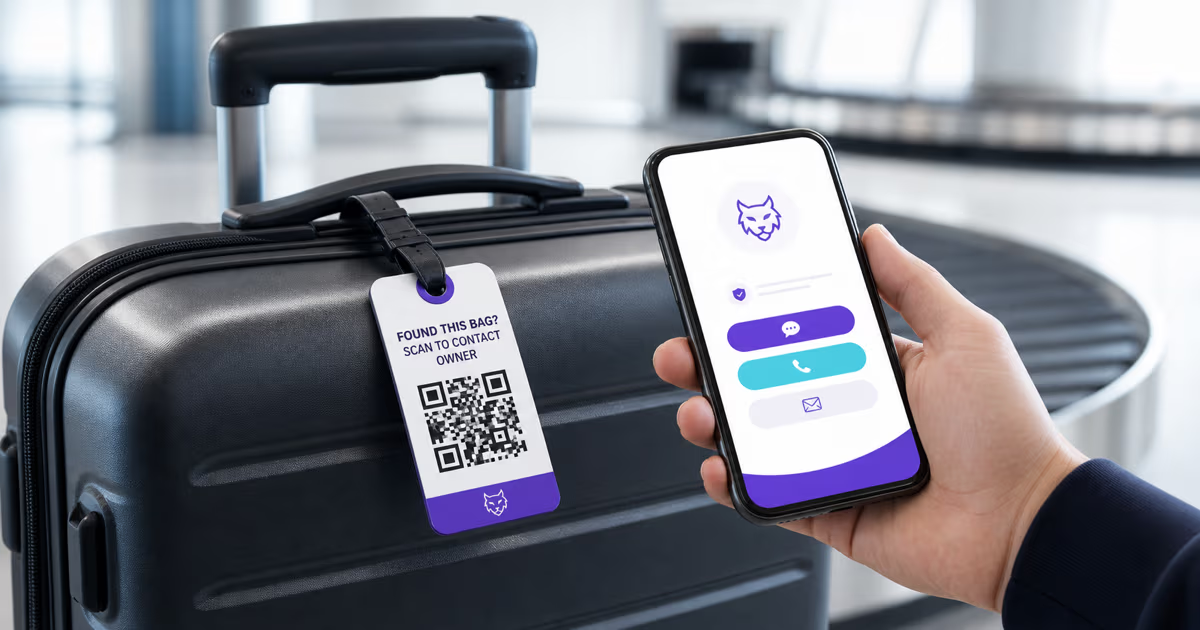
To make a QR code luggage tag in QRLynx, create a Link-in-Bio recovery page with only the contact options a finder needs, generate its dynamic QR, label the tag clearly, and test the final physical print. The QRLynx page can provide email, phone, WhatsApp, or other links without printing those details directly on the outside of the suitcase.
The QR tag helps a person contact you after finding the bag. It does not locate luggage, replace an airline destination tag, or replace a delayed-baggage report. Keep the airline's bag-identification receipt and contact the airline promptly when checked luggage does not arrive.
How to create a luggage recovery QR code in QRLynx
Build a minimal recovery page, make the physical purpose obvious, and test the complete finder experience.
Choose the contact details a finder needs
Prepare a short recovery message and one or more monitored contact methods. Keep home addresses, passport details, booking references, airline bag-tag numbers, and detailed itineraries off the public page.
Select Link-in-Bio in QRLynx
Open QRLynx and choose Link-in-Bio. This creates a QRLynx-hosted page and a dynamic QR, which is more suitable than a directly encoded Contact Card when you want to revise the recovery page later.
Build the recovery page
Use a title such as Found my bag, add a short thank-you message, and add clearly labeled email, phone, WhatsApp, or other contact links. Include a simple bag description only when it helps confirm the match without exposing sensitive information.
Save and name the dynamic QR
Give the QRLynx record a useful internal name for the bag. The hosted page can be revised while the same printed dynamic QR remains active. The QR does not provide live location or prove that a message was sent.
Design, label, and download the tag
Use a dark QR on a light background, preserve the quiet zone, and add a direct label such as Found this bag? Scan to contact owner. Download the image without stretching or cropping it.
Test the final finder experience
Open the recovery page while signed out, verify every contact button, scan the final physical tag with representative phones, and test it at the intended distance and lighting. Confirm that the page reveals only the information you deliberately published.
Recovery details ready
Create the luggage recovery page in QRLynx
Build a small hosted contact page, generate its QR, and test the final tag before the next trip.
What a QRLynx luggage recovery page can do
QRLynx Link-in-Bio provides a hosted page with a title, description, theme, image options, and a list of labeled links. For a luggage tag, those links can give a finder practical ways to contact the owner. A dynamic QRLynx QR opens that hosted page, so authorized edits to the page appear on future visits without changing the printed pattern.
The tag still depends on a person choosing to scan it and on an internet connection that can load the page. QRLynx redirect analytics may record an eligible visit, but analytics are not a real-time alert, exact bag location, proof of possession, or proof that the finder contacted you.
Choose the right luggage identification method
| Method | What it gives the finder | Can you revise it later? | Internet needed to read it? | Best role |
|---|---|---|---|---|
| QRLynx Link-in-Bio QR | A hosted recovery page with selected contact links | Yes, while the hosted page and dynamic QR remain active | Yes | Primary public QR recovery tag |
| QRLynx static Contact Card QR | Contact fields encoded directly in the symbol | No, recreate and reprint after a change | No connection is needed to decode the payload | Optional inside-bag backup |
| Airline destination tag | The airline's routing and bag-identification data | Created for the checked journey | Handled through airline systems | Primary checked-baggage identification |
| Bluetooth network tracker | Location information for the owner through its network | Device and account settings can change | Network access is needed for current reports | Location supplement inside the bag |
Use minimal public information
The public page should make a return easy without becoming a travel profile. A useful version can contain a first name or initials, a short recovery message, monitored contact buttons, and an optional broad bag description. The contact account itself may reveal additional information, so review the profile a stranger will see.
Keep a home address, passport or identity numbers, booking reference, loyalty number, airline bag-tag barcode, claim number, and detailed travel schedule off the public page. If a finder or airline needs more information, share it privately after you confirm who is contacting you.
The DOT separately recommends labeling checked baggage with a name, phone number, and email address. That airline-facing identification and a public QR recovery page serve related but distinct purposes. Choose the amount of visible information deliberately and follow the carrier's requirements.
A personal QR supplements the airline process
The airline attaches a destination tag and gives the passenger a bag-identification receipt. Keep that receipt until the bag is retrieved. If checked luggage does not arrive, the DOT says to file a baggage claim with the airline as soon as possible and stay in contact during the search.
A personal QR can help when a staff member, hotel worker, transport provider, or another traveler finds the bag and chooses to contact you. It does not connect automatically to the airline's baggage-tracing system. Do not delay an official claim while waiting for a scan.
SITA's current baggage reporting describes expanded tracking at check-in, loading, transfer, and arrival, along with passenger-facing tracker integration. Those systems address operational location and routing. The QRLynx tag addresses the separate human handoff: a finder needs a clear way to reach the owner.
QR tag or AirTag: they solve different problems
A printed QR has no battery or radio. It cannot report where a suitcase is. It becomes useful when a person sees the tag, scans it, and opens the recovery page.
An AirTag uses Bluetooth and Apple's crowdsourced Find My network to report an approximate location to its owner. Apple also supports Lost Mode contact information. It is not a GPS transmitter, and current results depend on battery, network participation, device proximity, and service conditions.
Travelers can use both. Put a compatible tracker inside the suitcase for owner-facing location information and a QRLynx recovery tag where a finder can see it. Neither replaces the airline tag, bag receipt, or claim process.
Print the tag for real baggage handling
A luggage tag may face glare, rain, scratches, bending, and abrasion. Start with a dark pattern on a light matte background and leave the full blank quiet zone around the QR. Keep the call-to-action outside that quiet zone.
- Print one proof at the final size instead of judging only on screen.
- Use a weather-resistant tag, laminate, or protected insert.
- Attach it with a secure loop that does not cover the QR.
- Place it where a phone can approach the code without twisting the bag.
- Test after lamination because glare can change readability.
- Replace a tag when its surface, attachment, or printed modules become damaged.
DENSO WAVE explains that QR error correction can restore some data when a symbol is dirty or damaged. The amount depends on the selected level and the distribution of damage. It is a recovery margin, not a promise that any partly destroyed tag will scan.
QRLynx luggage tag questions
Answers about recovery pages, privacy, airline procedures, trackers, updates, and physical testing.
How do I make a QR code luggage tag in QRLynx?
Choose Link-in-Bio in QRLynx, add a short recovery message and monitored contact links, save the dynamic QR, label the tag clearly, download it, and test the final physical print while signed out.
What information should I put on a luggage recovery page?
Use only what helps a finder act, such as a first name or initials, a short message, monitored contact buttons, and an optional broad bag description. Keep sensitive identity, booking, claim, and detailed itinerary information private.
Can I update a QRLynx luggage tag without reprinting it?
You can revise the QRLynx-hosted Link-in-Bio page while its dynamic QR remains active, so future scans open the revised page through the same printed pattern. A static Contact Card payload cannot be changed after printing.
Does a QR luggage tag track the location of my suitcase?
No. A printed QR has no radio, battery, or location sensor. It helps only when someone scans it. Eligible redirect analytics are not exact location tracking or proof that a finder has the bag.
Does QRLynx send a real-time alert when the luggage QR is scanned?
Do not rely on a real-time scan alert. QRLynx analytics can report eligible dynamic-redirect activity according to the account's analytics access, but that data is not an emergency notification service.
Does a personal QR replace the airline baggage tag?
No. The airline destination tag, bag-identification receipt, and official claim process remain primary. The personal QRLynx tag gives an additional finder a way to contact you.
Should I use a dynamic Link-in-Bio QR or a static Contact Card?
Use a QRLynx Link-in-Bio QR when you want a hosted recovery page that can be revised. A static Contact Card can work as an inside-bag backup that decodes without loading a page, but its encoded details require reprinting after a change.
Is a QR luggage tag better than an AirTag?
They serve different jobs. A QRLynx QR helps a finder contact the owner. An AirTag uses Bluetooth and the Find My network to provide owner-facing location information. They can be used together.
Will airline staff scan my personal luggage QR?
A staff member may choose to scan it, but airline recovery systems use their own tags and records. Treat the personal QR as a supplement for any finder, not a guaranteed airline workflow.
How should I test a QR luggage tag before traveling?
Open the page while signed out, test every contact link, scan the final tag on representative phones, inspect the information a stranger sees, and retest after lamination at the intended distance and lighting.