How to Share a Spotify Playlist with a QR Code in QRLynx

Key Takeaway
Create a Spotify playlist QR code in QRLynx, choose static or dynamic mode, compare it with Spotify Codes, and test access, analytics, and print.
Reviewed July 2026
This guide was checked against Spotify's current sharing, playlist-access, Spotify Codes, and brand-use documentation, plus the current QRLynx Spotify QR and analytics implementation in July 2026.
The durable public-sharing setup
Copy the tested public Spotify playlist link, select Spotify in QRLynx, choose static or dynamic behavior, label the listening action, and test the final placement. A public playlist link is the clearest option for invitations, counters, posters, and welcome cards. Spotify says private playlist share links and collaborator invitations expire after seven days, so they are designed for limited sharing rather than permanent print.
How to create a Spotify playlist QR code in QRLynx
Use a durable Spotify link, the exact QRLynx type, and a complete scan-to-listen test.
Choose the Spotify destination
Open the playlist, album, track, artist, show, or episode that the audience should reach. For a printed playlist QR, use a public playlist when broad and durable access is intended. Keep private share links and collaborator invitations for their limited sharing purpose, because Spotify says those links expire after seven days.
Copy and test the Spotify link
Use Spotify's Share control to copy the link. Open it in a private browser window and on a phone that is not signed into the owner account. Confirm the intended content is visible and that the link is a normal Spotify destination rather than a collaborator invitation.
Select Spotify in QRLynx
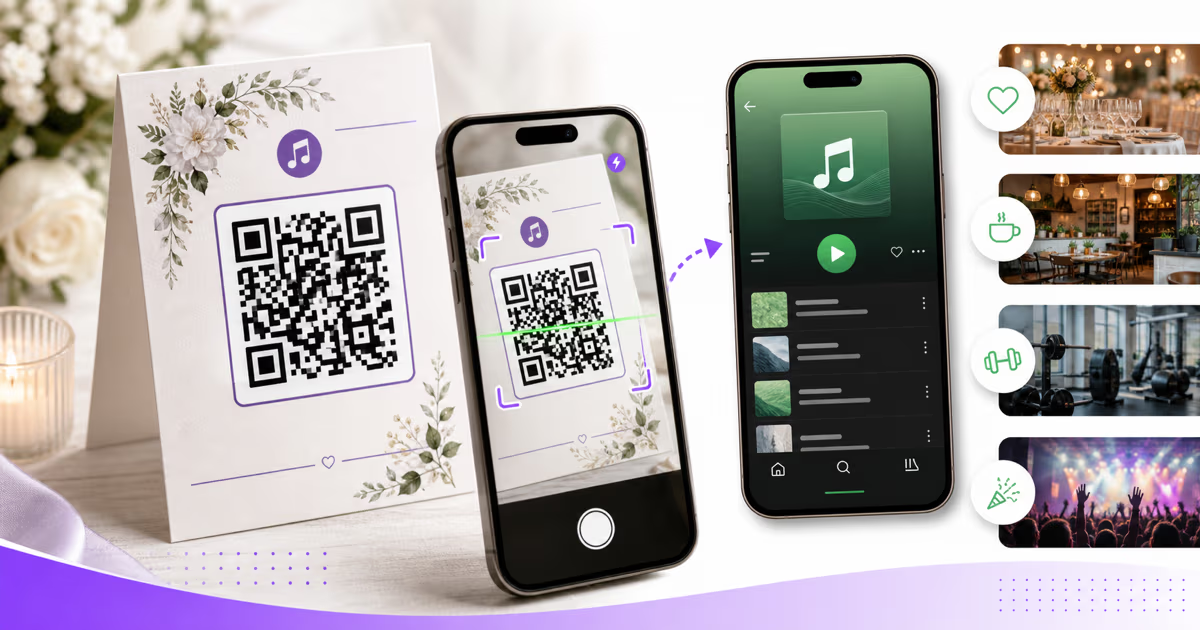
Open the QRLynx generator, choose the Spotify QR type, and paste the complete open.spotify.com link into the Spotify Link field. The Spotify type is a URL-based QRLynx QR and supports both static and dynamic behavior.
Choose static or dynamic behavior
Use static when the exact Spotify URL is final and direct encoding is enough. Use dynamic when you want eligible QRLynx scan analytics or may replace the destination after printing. Updating a dynamic destination changes where the QRLynx short link leads; it does not change Spotify playlist permissions.
Design and label the listening action
Use strong contrast, preserve the quiet zone, and add a direct label such as Scan to open the reception playlist. Use branding and artwork you have permission to display. Do not present a custom QRLynx QR as an official Spotify Code or imply endorsement.
Download for the placement
Download PNG, JPG, or WebP on the free QRLynx plan, or use resolution-independent SVG or A4 PDF on Starter+ and higher plans for print handoff. Place the QR at a practical size without stretching, cropping, or covering its pattern.
Test the final listener journey
Scan the finished card, sign, poster, or screen with representative iPhone and Android devices. Confirm the correct Spotify content opens, verify the browser or app handoff available on each device, and start playback where permitted. Test again after every destination or access change.
Spotify link ready
Create the Spotify playlist QR in QRLynx
Paste the tested Spotify link, choose static or dynamic behavior, and prepare the code for its real placement.
Spotify Code or standard QRLynx QR?
Spotify offers its own Spotify Code for songs, albums, artists, playlists, podcasts, and profiles. Spotify's official scanning steps use the camera inside Search in the Spotify mobile app. A standard QRLynx QR encodes or redirects to the copied Spotify web link and is read with a normal QR scanner.
| Decision | Spotify Code | QRLynx Spotify QR |
|---|---|---|
| Scanning route | Spotify mobile Search camera | Standard phone or browser QR scanner |
| Destination | One Spotify content item | The Spotify link entered in QRLynx |
| Design rules | Spotify's Codes toolkit and terms | QRLynx QR design controls, plus rights for any branding or artwork used |
| Scan analytics | Spotify's Codes terms say Spotify does not provide scan-count tracking | Available for a dynamic QRLynx QR according to the account plan |
| Destination replacement | Create a new Spotify Code for different content | Update a dynamic QRLynx destination while keeping the printed pattern |
A Spotify Code fits an audience already using Spotify's in-app scanner. A standard QRLynx QR fits a public placement where the scanner should begin with the phone camera and where campaign measurement or destination replacement matters.
Choose a link that remains usable
Spotify supports sharing songs, albums, artists, playlists, podcasts, and profiles from the app. The copied destination should match the exact content promised beside the QR.
Playlist privacy needs a deliberate choice. Spotify says a private playlist cannot be accessed through an ordinary link or search. Spotify also supports limited link sharing for a private playlist, but the shared link expires after seven days. Collaborator invitation links also expire after seven days and grant editing access, so they should not be printed as a general listening QR.
For invitations, menus, event cards, welcome packs, and signs intended for an open audience, use a public playlist or another public Spotify destination. If you later change the playlist from public to private, test the printed journey again. A QRLynx dynamic redirect can replace the destination, while Spotify remains responsible for content availability, account access, playback, and regional rights.
Use one clear music action in each setting
Weddings and celebrations
Link the ceremony, cocktail-hour, dinner, or reception playlist from a program or table card. Label each code by moment so guests know what will open. Use a dynamic QRLynx QR when the destination may change after the stationery is printed.
Cafés, restaurants, and retail
Place a customer-facing playlist QR where people can pause and scan, such as a counter card or table tent. A dynamic destination lets the business rotate the linked playlist without replacing the sign. Keep staff playback licensing and customer playlist sharing as separate responsibilities.
Gyms and studios
Share a class or training playlist on a schedule, welcome pack, or studio sign. Name separate QRLynx codes by class or placement when the team wants to compare scan activity.
Events and hospitality
Use a playlist QR on a welcome card, attendee guide, hotel-room card, or rental guide. Pair it with other actions only when every QR has a distinct label, enough physical spacing, and a clear destination.
Measure the QR interaction and the listening outcome separately
A dynamic QRLynx Spotify QR can record the redirect event and provide scan counts and time trends. Country breakdowns are available on Pro, while city, device, browser, and operating-system breakdowns are available on Business. Available analytics depend on the account plan and selected period.
QRLynx does not receive Spotify playback, save, follow, subscription, or listener-identity data. A scan shows that the QRLynx link was opened. It does not prove that playback started or that the playlist was saved.
Create a separate dynamic code for each placement when placement comparison matters, even when all codes lead to the same playlist. Name them clearly, such as Reception Table Card and Welcome Sign. Then compare QRLynx scans by code and use the appropriate Spotify creator dashboard for listening activity when that data is available to the content owner.
Design for recognition without implying endorsement
The label beside the QR can do most of the communication. Use direct wording such as Scan to open the wedding playlist, Scan for today's café playlist, or Scan for the workout mix. Keep the action readable without relying on a platform logo.
Spotify's current Codes terms say Spotify Codes must follow its brand guidelines, must not be modified, and must not imply endorsement or a relationship that does not exist. A custom QRLynx QR is a standard QR that leads to a Spotify link, not a Spotify Code. Use your own authorized artwork and do not copy protected album art, artist imagery, or platform marks without the required rights.
For print, use a dark pattern on a light background, retain the full quiet zone, and size the code for the real scan distance. Matte or low-glare placement is easier to test than a reflective surface. Approve the design only after scanning the final material in the venue's actual light.
Serve listeners across more than one music platform
A QR that points directly to Spotify is best when the audience and promise are specifically Spotify. For a mixed audience, link the QRLynx QR to a landing page you control that offers authorized destinations for Spotify, Apple Music, YouTube Music, or other services.
Use a static QRLynx Website / Link QR when that landing-page URL is permanent, or use dynamic mode when the page or provider may change. Test every service link and keep the page fast on mobile. This approach also gives the campaign one labeled QR instead of several competing codes.
Spotify playlist QR questions
Answers about QRLynx setup, Spotify access, Codes, analytics, print, and multi-platform sharing.
How do I create a Spotify playlist QR code in QRLynx?
Copy the tested public Spotify playlist link, select Spotify in QRLynx, paste the link, choose static or dynamic behavior, design and label the QR, download it, and scan the final placement on representative phones.
What is the difference between a Spotify Code and a standard QR code?
A Spotify Code is Spotify's own visual code and its official scan flow uses the camera inside Spotify Search. A QRLynx Spotify QR is a standard QR that points to the Spotify link you enter, so a normal phone or browser QR scanner can begin the journey. Dynamic QRLynx mode can add eligible scan analytics and destination replacement.
Should my Spotify playlist QR be static or dynamic?
Use static when the Spotify URL is final and direct encoding is enough. Use dynamic when you want eligible QRLynx scan analytics or may replace the destination after printing. Spotify continues to control playlist access and playback in both cases.
Can I print a private Spotify playlist link in a QR code?
Spotify says an ordinary private playlist cannot be accessed through a link or search. Its limited private-playlist share links expire after seven days, so a public playlist is the clearer choice for permanent public print. Test the link while signed out before publishing it.
Should I use a collaborator invitation link in the QR code?
Use a collaborator invitation only for the people who should edit the playlist. Spotify says collaborator invitation links expire after seven days. A public listening QR should point to the listening destination rather than an editing invitation.
Can QRLynx tell me who listened to the Spotify playlist?
QRLynx measures the dynamic QR redirect, not Spotify listening. It does not receive playback, save, follow, subscription, or listener-identity data. Use QRLynx for scan activity and the appropriate Spotify creator dashboard for listening data available to the content owner.
Can I change the playlist after printing the QR code?
You can edit the tracks inside the same public Spotify playlist while keeping its URL. If the destination URL itself changes, a dynamic QRLynx QR lets the account owner replace the destination while the printed pattern remains unchanged. Test the journey after either change.
Which QRLynx download format should I use for print?
PNG, JPG, and WebP are available on the free QRLynx plan. Starter+ and higher plans add resolution-independent SVG and A4 PDF downloads. Ask the printer which supported format fits the layout, and test the final output at its installed size.
Can a Spotify playlist QR work for Apple Music users?
A direct Spotify link opens Spotify's destination. For a mixed audience, point a QRLynx Website / Link QR to a mobile landing page you control with authorized links to each music service. Label the QR as a playlist choice rather than promising one specific app.
Do Spotify playlist QR codes need internet access?
The QR image itself can be decoded without network access, but opening the Spotify URL and loading the destination normally requires a connection. Offline playback depends on Spotify's current account, download, device, and content rules rather than on QRLynx.