Emergency Medical ID QR Code: A Safer Setup Guide

Key Takeaway
Create an emergency medical ID QR in QRLynx. Choose static text or a managed URL, limit public data, and pair it with phone Medical ID and visible ID.
Reviewed: July 2026
Phone emergency-information steps were checked against current Apple and Google guidance in July 2026. Medical-alert identification guidance was checked against MedlinePlus. This article covers a personal information card, not diagnosis, treatment, an electronic health record, or an emergency-response guarantee.
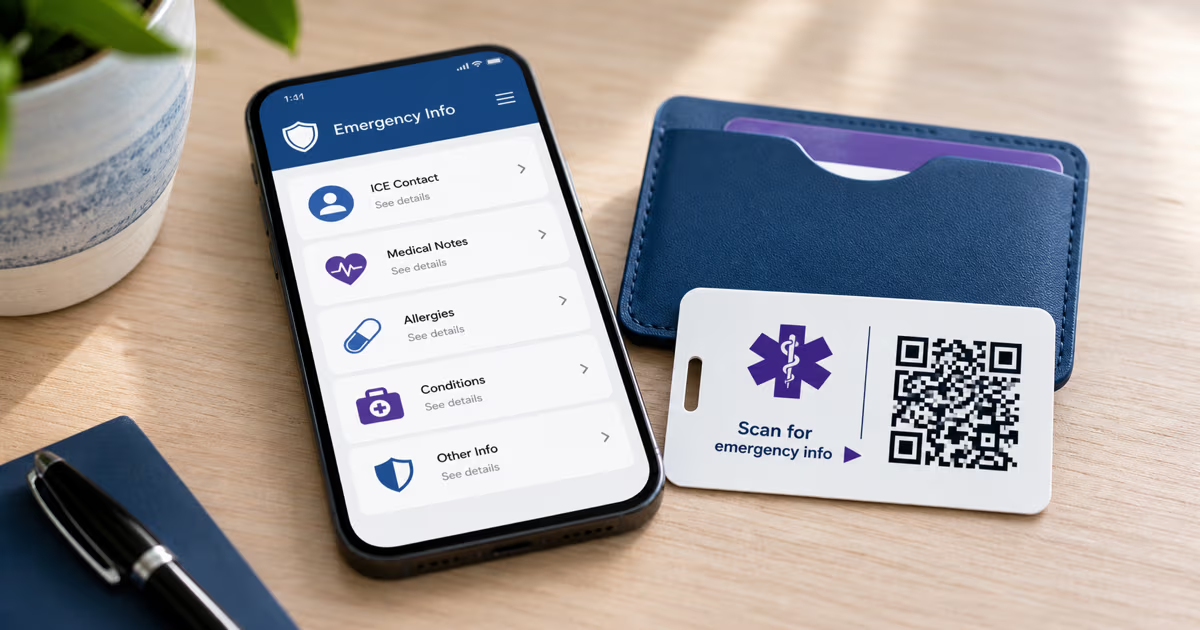
An emergency medical ID QR code can provide a second route to a small set of personal emergency information, but it should support established options rather than stand alone. First configure the emergency information available from your phone's lock screen. If a clinician has advised you to wear medical-alert identification, keep that visible identification in place. A physical QR card or tag can then add a scannable copy or link when the phone is unavailable.
QRLynx can create three useful formats: a static Show Text QR for a short public emergency note, a Contact Card QR for contact details, or a URL QR that opens an emergency page you already control. QRLynx is not a medical-record system and does not validate the accuracy of the information. The person creating the code remains responsible for choosing, reviewing, and updating what it contains.
Build a layered emergency information setup
| Layer | Useful role | Important setup | Availability |
|---|---|---|---|
| Phone emergency information | Shows selected medical information and contacts from a supported lock screen | Enable lock-screen access and confirm the current Apple or device-specific Android steps | Needs the phone to be present and powered |
| Visible medical-alert identification | Signals a condition through a familiar bracelet, necklace, or card | Follow advice from your clinician or established medical-alert guidance | Readable without opening a web page |
| Static QRLynx Show Text QR | Stores a short emergency note directly in the QR pattern | Limit the text, label the card clearly, and reprint whenever information changes | Encoded text can be retrieved without a QRLynx redirect or hosted page |
| QRLynx Contact Card QR | Stores a name and selected contact channels in vCard format | Use it for ICE contact details, not as a structured medical record | The contact payload is inside the QR pattern |
| QRLynx URL or dynamic URL QR | Opens an emergency page that you host or control | Keep the page mobile-friendly, public only when intended, and current | Requires a working internet route to the page |
How to create an emergency medical ID QR code in QRLynx
Choose the information boundary first, then create and test the code that supports it.
Set up the phone emergency profile
On iPhone, create Medical ID in the Health app and enable Show When Locked if you want that access. On supported Android devices, add emergency information in the Safety app or the path documented by the device manufacturer, then enable lock-screen access where available.
Choose the minimum public information
Write only the details that are useful for the intended emergency purpose and that you are comfortable making visible to anyone who scans the code. Ask a clinician which medical facts should appear on formal medical-alert identification, especially for a serious condition or allergy.
Choose the QRLynx QR type
In QRLynx, choose Show Text for a short static note, Contact Card for selected ICE contact details, or Website / Link for a page you already host. Use a dynamic URL when you need to repoint that printed link later. QRLynx does not create or host a medical record from these fields.
Enter, label, and design the code
Enter the selected text, contacts, or verified page URL. Name the saved code clearly in QRLynx. On the physical card or tag, add a visible heading such as Emergency Info and keep strong contrast, a complete quiet zone, and a readable fallback instruction.
Test the exact physical item
Scan the final wallet card, tag, or bracelet from representative phones. Confirm that the decoded text or page is readable, the contacts are current, the page opens without an account sign-in, and the QR is not hidden by glare, a curve, a sleeve, or wear.
Review it on a schedule
Set a reminder to recheck contacts, allergies, medications, and the hosted page after any relevant change. Reprint a static text or Contact Card QR when its encoded information changes. For a dynamic URL QR, confirm both the QRLynx destination and the page content.
Personal emergency information
Create your emergency information QR
Choose a short static note, selected ICE contacts, or a verified page you control, then test the final card or tag as part of a layered setup.
Choose static text, Contact Card, or a URL
Static Show Text QR
A static text QR puts the entered note directly in the QR pattern. It does not need a QRLynx redirect or a hosted page to reveal that text. This is the simplest route for a compact message that is unlikely to change. The tradeoff is that every printed copy must be replaced when the encoded information changes.
Contact Card QR
QRLynx's Contact Card format creates a vCard with fields such as name, phone, email, organization, URL, and address. It can be useful for one or two ICE contacts, but it has no dedicated medical fields for allergies, conditions, medications, or directives. Do not force medical content into unrelated contact fields and then present it as a structured medical ID.
URL or dynamic URL QR
A URL QR opens a web page that you already host or control. A dynamic QRLynx URL lets you change the destination after printing and provides the scan analytics available to the account's plan. The linked page still needs to remain available, readable on a phone, and accurate. Scan analytics record the redirect event; they do not identify the responder, confirm that the information was read, or prove that help was provided.
What information should be included
There is no universal QR medical-ID template that fits every person or jurisdiction. Start with the information your clinician recommends for visible medical-alert identification, then apply a strict public-data test: would you accept a stranger reading this field?
Depending on the purpose, a concise card may include:
- a preferred name or another identifier you intentionally choose;
- one or two ICE contacts with their relationship and phone number;
- a critical allergy or serious condition that a clinician advises displaying;
- an essential medication fact when current and medically appropriate;
- a brief instruction to check the phone's Medical ID or visible medical-alert identification.
Keep legal documents, complete medical histories, insurance identifiers, government identifiers, passwords, account credentials, full home address, and other unnecessary personal information out of a publicly scannable QR. Advance directives, DNR orders, and similar documents have legal and clinical requirements that vary by jurisdiction. Do not rely on a personal QR as proof that such an order is valid or currently applicable. Discuss those documents with the relevant clinician, attorney, and local emergency-services guidance.
Phone Medical ID comes first
Apple documents that Medical ID can show selected allergies, medical conditions, and emergency contacts on the iPhone and Apple Watch lock screen when Show When Locked is enabled. Apple also documents optional emergency-call sharing in supported regions.
Google documents emergency information through the Safety app on supported Android devices and warns that anyone holding the phone can view lock-screen emergency information when that access is enabled. Android steps and feature availability vary by version, manufacturer, country, and device.
These built-in profiles are worth configuring because they do not require a separate printed QR. A physical card or tag remains useful as another route when the phone is absent, damaged, discharged, or not immediately found. Neither route guarantees that a particular person will locate or use the information.
Placement, labeling, and testing
A QR needs context. Print a clear heading such as Emergency Info or ICE Contacts beside it and use visible medical-alert identification when medically appropriate. Without a label, a bystander may not know why the QR is present.
- Wallet card: use durable stock or a sleeve, keep it near identification, and make the heading visible.
- Bracelet or tag: test the QR on the final curve and material. Keep a familiar medical-alert symbol or engraved essential warning visible when advised.
- Backpack or activity gear: balance visibility with the privacy risk of placing personal data in public.
- Phone case: confirm the code remains visible and scannable when the case is worn or scratched.
Test with more than one phone, in ordinary indoor and outdoor light, and at the actual size. Keep the full quiet zone around the QR. Retest after lamination, printing, resizing, or attaching it to a curved surface. Use the QRLynx readability checker for the image file, then complete a real scan of the physical item.
Use visible identification and the QR together
MedlinePlus advises medical-alert bracelets or necklaces for people with certain serious conditions, including diabetes, seizure disorders, heart disease, and histories of serious allergic reactions. The visible identifier can communicate an essential warning without requiring a scan. A QR can carry selected additional context or contacts.
This layered approach avoids asking one format to do everything:
- the phone profile provides a built-in emergency-information route;
- visible medical-alert identification provides an immediate human-readable signal;
- the QR provides selected text, contacts, or a maintained page;
- a trusted contact and clinician retain the authoritative, current information.
Call the local emergency number for an active emergency. A QR code is an information aid, not an emergency alert, monitoring service, diagnosis, or treatment tool.
Emergency medical ID QR code questions
How do I make an emergency medical ID QR code in QRLynx?
Set up the phone's emergency profile first, decide what minimal information can be public, then choose Show Text, Contact Card, or Website / Link in QRLynx. Enter the verified information, label the physical item clearly, scan the final print from more than one phone, and schedule regular reviews.
Which QRLynx QR type is best for emergency information?
Use Show Text for a short static note, Contact Card for selected ICE contact fields, or Website / Link for a mobile page you already host. Use a dynamic URL when you may need to repoint that printed link later. The best choice depends on privacy, internet availability, and how often the destination changes.
Can a QRLynx Contact Card store allergies and medications?
QRLynx Contact Card fields are designed for vCard contact details such as name, phone, email, organization, URL, and address. They are not structured medical fields. Use a carefully limited Show Text QR or a page you control when medical context is appropriate, and have a clinician review important medical-alert wording.
Does a static emergency QR work without internet?
A static Show Text or Contact Card QR stores its payload in the pattern and does not need a QRLynx redirect or hosted page to reveal that payload. The scanning device still needs compatible QR-reading software. A URL QR needs connectivity to load its destination.
Can I update an emergency QR without reprinting it?
A dynamic QRLynx URL QR can be repointed after printing. That changes where the QR leads, not the content of an external page automatically. A static Show Text or Contact Card QR must be regenerated and reprinted when its encoded information changes.
Should a medical ID QR replace an engraved medical-alert bracelet?
Use the QR as a supplement. MedlinePlus recommends visible medical-alert identification for certain serious conditions. A familiar engraved warning can be read without a phone, while the QR can provide selected additional context or contacts.
Do first responders always scan medical QR codes?
No single discovery or scanning behavior is guaranteed. Label the item clearly, keep essential warnings human-readable, enable the phone's emergency information, and use established medical-alert identification when advised. The QR adds another route rather than replacing those layers.
What should stay out of a public medical QR?
Avoid complete medical records, insurance or government identifiers, account credentials, unnecessary address details, and anything you would not accept a stranger reading. Do not use a personal QR as proof of a DNR order or another legal medical directive.
Can QRLynx verify that the medical information is correct?
No. QRLynx creates and manages the QR format or URL destination. It does not diagnose, validate medical facts, maintain an electronic health record, or confirm that a responder read the information. The owner should review the content with the appropriate clinician and keep it current.
Can QRLynx tell me who scanned an emergency QR?
Dynamic URL analytics can record eligible redirect events and the breakdowns available to the account's plan. They do not reliably identify the person who scanned, confirm that the page was read, or prove that emergency assistance occurred.
Where should I place an emergency information QR?
Choose a durable, clearly labeled location such as a wallet card, medical-alert tag, phone case, or activity gear. Consider public-data exposure, keep the QR visible, and test the final size, material, curve, sleeve, and lighting.
Create a clear supplement, not a single point of dependence
Start with the phone's supported emergency-information features and any medical-alert identification recommended for your condition. Then use QRLynx to create a compact static note, selected ICE contacts, or a link to a page you control. Keep the public information minimal, label the item, test the physical result, and review it after every relevant change.
Use the QRLynx QR code generator to create the code and the readability checker before printing. Healthcare organizations handling patient information should follow their own clinical, privacy, security, and legal requirements rather than using this personal setup as a provider workflow.