QR Code Security Guide: Quishing, Safer Scanning, and QRLynx Controls


Key Takeaway
Learn how QR phishing works, how to inspect a code before opening it, and how QRLynx URL checks, passwords, consent, expiry, and scan controls fit together.
Security guidance reviewed: August 2026
This guide was checked against current FTC, FBI IC3, and UK NCSC guidance and against the QRLynx URL-validation, redirect-warning, password, consent, and expiry code paths. Security controls reduce specific risks. They do not prove that every destination or printed QR is trustworthy.
A QR code is a data carrier, not a trust certificate. It may contain a website address, payment request, contact, WiFi configuration, message, or other action. The important security questions are who supplied the code, what it decodes to, whether the physical code was replaced, and what the scanner is asked to do next.
Quishing is phishing delivered through a QR code. A deceptive code may open a lookalike login page, payment flow, form, or download. The FTC advises people to inspect the decoded URL, avoid unexpected urgent QR messages, and contact the claimed organization through a known channel. The FBI has also documented QR-based fraud in unsolicited packages and targeted email campaigns.
QRLynx helps creators check relevant destinations when a code is saved, manage a dynamic destination, add access controls, and test the decoded payload. Those controls complement source verification, secure destination design, device updates, and a final physical test.
QR security threats and the useful response
| Threat | What happens | Useful response |
|---|---|---|
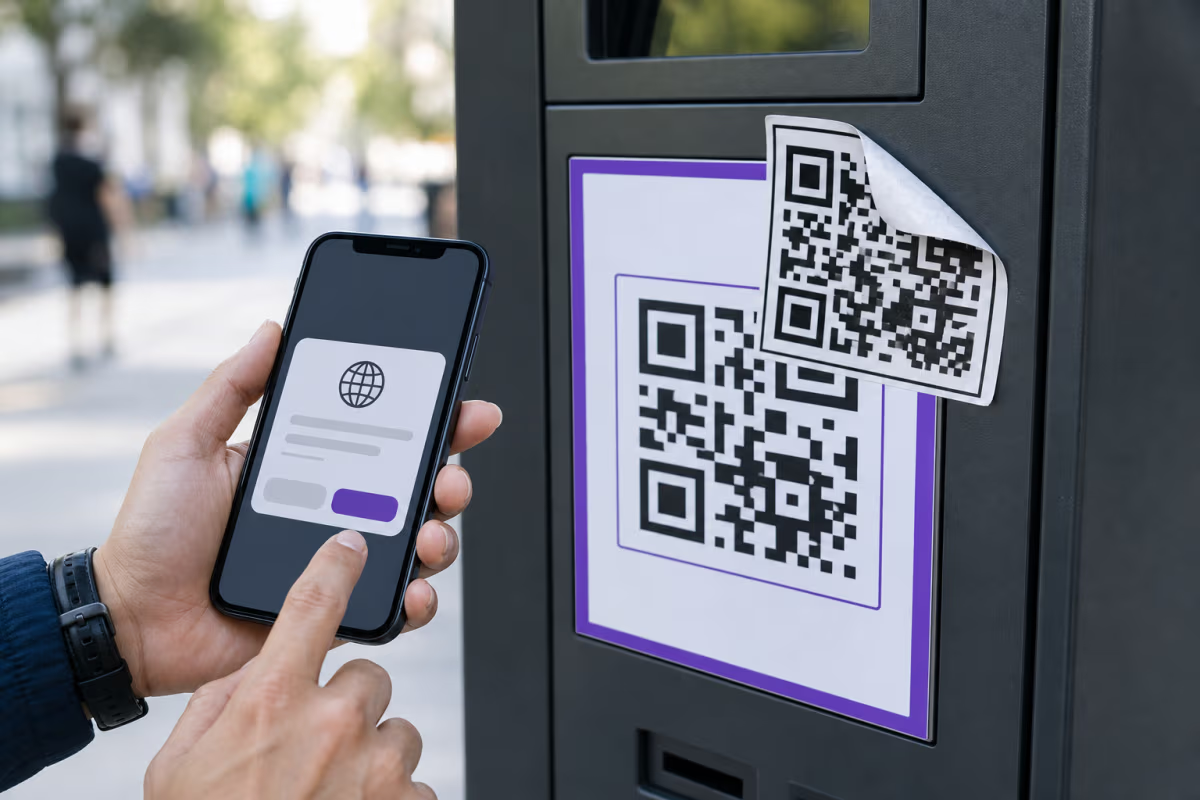
| Physical overlay | A different QR sticker covers the intended code | Inspect the surface, label the expected action, and test codes in public locations regularly |
| Lookalike destination | The decoded hostname imitates a bank, employer, payment service, or other trusted organization | Preview the complete hostname and navigate through a known app or bookmarked site for sensitive actions |
| Unexpected login or payment | The page asks for credentials, card details, a transfer, or account recovery information | Stop and verify the request through a separate trusted channel before entering or approving anything |
| QR in email, text, or a package | The message moves the recipient from one device or channel to an unfamiliar mobile page | Treat urgency and impersonation as warning signs and verify the sender independently |
| Destination changes after printing | A previously legitimate website is replaced, compromised, or no longer appropriate | Monitor the destination and use a managed dynamic code when later updates or deactivation are important |
How to inspect a QR code before you trust it
- Check the source and physical surface. Look for a sticker edge, mismatched print quality, an altered label, or a code placed where no official instruction supports it.
- Decode without acting when the source is uncertain. A phone camera normally shows a destination preview. The free QRLynx QR scanner can decode a camera view or saved image in the browser and show the payload without opening the link.
- Read the hostname, not only the page design. A padlock or HTTPS protects the connection to a site, but it does not prove who operates that site. Check spelling and the actual registered domain.
- Match the request to the context. A menu code should not require a bank login. A parking code should match the operator and location. A payment code should show the expected recipient before approval.
- Use a known route for sensitive tasks. Open the organization's official app, saved website, statement, or published phone number instead of continuing through an unexpected QR.
- Keep the device and browser updated. Current security patches reduce exposure when a link or download attempts to exploit a known weakness.
The UK National Cyber Security Centre recommends extra caution with QR codes in open public spaces and email, and recommends using the scanner built into the phone for ordinary scanning.
What QRLynx security controls actually do
| QRLynx control | What it does | Boundary |
|---|---|---|
| Destination validation | Relevant external URLs are checked when they are created or changed using URL structure, DNS signals, and Google Web Risk where configured | A confirmed malicious Web Risk match blocks the save; an uncertain result can remain unverified rather than being described as safe |
| Scan-time warning | A managed QRLynx redirect can show a warning for an unverified or higher-risk destination before continuing | The warning is not a guarantee and not every QR type follows the same redirect path |
| Password protection | Pro and higher plans can require a password before an eligible dynamic destination opens | It controls access to the redirect; it does not encrypt or replace the destination system |
| Access consent | Pro and higher plans can show an age, sensitive-content, terms, or custom acknowledgement gate | A consent screen supports a chosen access flow but does not establish legal compliance by itself |
| Expiry and scheduling | Pro and higher plans can set a date, scan limit, start time, or end time for eligible dynamic codes | These are availability controls, not malware detection |
| Dynamic destination control | The creator can update or deactivate an eligible managed destination without changing the printed QR pattern | The creator still needs to protect the account and verify each replacement destination |
How to create and verify a safer dynamic URL QR code in QRLynx
Build the destination and the physical scan experience as one security workflow.
Define the expected scan action
Choose the exact page the scanner should see and the action it should complete. Use a destination you control or have authority to publish.
Open the QRLynx Website or Link QR type
Paste the canonical HTTPS destination and open it separately to verify the hostname, page owner, mobile layout, forms, downloads, and final action.
Choose static or dynamic intentionally
Use static when the final URL can remain embedded and tracking is unnecessary. Use dynamic when destination updates, scan analytics, later deactivation, or eligible access controls are important.
Review the QRLynx destination result
QRLynx checks supported external destinations during save. A confirmed malicious result is blocked. An uncertain result may be recorded as unverified and can produce a warning on the managed scan route.
Add only the access controls the journey needs
On Pro or higher, consider a password, access-consent gate, expiry rule, schedule, or smart redirect rule. Treat each as a separate control with a specific purpose.
Design and label the expected action
Use strong contrast, preserve the quiet zone, and add a concise label such as Scan to view the menu. Branding helps recognition, but it does not prevent a replacement sticker.
Decode the exported QR before opening it
Use the QRLynx QR scanner to reveal the final payload. Compare the hostname or encoded action with the approved source before following it.
Test and monitor the deployed code
Scan the final physical output on representative phones, complete the full journey, inspect public placements for overlays, and update or deactivate the managed destination when the campaign changes.
Inspect before opening
See what the QR code contains
Decode a camera view or saved QR image in your browser, review the full payload, and decide whether the source and destination match.
Security practices for QR code creators
Protect the destination and the QRLynx account
A trustworthy QR can still lead to a problem if the destination account is compromised. Use unique credentials and multi-factor authentication on the destination service and on the QRLynx account. Limit who can edit a campaign, remove access when a team member leaves, and keep a record of the approved destination.
Label the action instead of relying on visual trust
A logo and consistent frame help people recognize the intended campaign, but another QR image can copy that appearance. Add nearby text that names the expected action or destination, and give staff a simple way to report a code that looks altered.
Use separate codes for separate placements
Separate managed codes for a counter sign, parking location, mailer, event badge, and product label make ownership and investigation clearer. If one physical placement is replaced, the team can inspect and pause that placement without disrupting every other campaign.
Test the destination after launch
Check the live mobile journey after a site release, domain change, payment-flow update, or campaign handoff. QRLynx scan analytics can show timing and plan-available breakdowns, but scan patterns alone do not prove an attack or a successful conversion.
What to do after a suspicious scan
If you decoded a QR but did not open or act on the payload, close the preview and report or remove the suspicious code through the responsible organization. If you opened a page, stop before entering information, approving a payment, granting permissions, or installing software.
If you entered credentials, change the password through the service's known website or app, review active sessions, and enable multi-factor authentication. If you approved a payment or disclosed financial information, contact the relevant bank or payment provider through its official channel. Keep the QR image, message, URL, location, and time as evidence. QR-related fraud in the United States can be reported to the FBI Internet Crime Complaint Center and relevant consumer-protection or local authorities.
QR code security questions
Are QR codes safe to scan?
A QR code is encoded data, so safety depends on its source, payload, destination, and the action requested after decoding. Inspect the physical code and preview the destination before opening an unfamiliar link.
What is quishing?
Quishing is phishing delivered through a QR code. The code may lead to a lookalike login, payment, form, or download flow designed to collect information or prompt an unsafe action.
Does HTTPS mean a QR destination is safe?
No. HTTPS protects the connection between the browser and the site, but a deceptive site can also use HTTPS. Verify the complete hostname, source, and requested action.
Can QRLynx tell me what an existing QR code contains?
Yes. The free QRLynx QR scanner decodes camera input or an uploaded image in the browser and shows the payload before you choose whether to open it. Decoding is not a safety certification.
Does QRLynx check every QR code in the same way?
No. Relevant external URL destinations are checked during creation or update, while static payloads and hosted page types have different paths. Managed dynamic redirects can also show a warning for an unverified or higher-risk destination.
What happens when QRLynx detects a malicious destination?
A confirmed Google Web Risk match blocks the URL from being saved. An uncertain result can be stored as unverified, and an eligible managed redirect can show a warning before continuing.
Can I password-protect a QRLynx QR code?
Yes. Password protection is available on Pro and higher plans for eligible dynamic QR codes. The password gate controls access to the redirect but does not replace security on the destination itself.
Is QRLynx access consent automatically GDPR compliant?
No tool can establish compliance from a consent screen alone. QRLynx can show an age, content, terms, or custom acknowledgement gate on Pro and higher plans. The organization remains responsible for its legal basis, wording, records, and complete data flow.
Are dynamic QR codes safer than static QR codes?
They have different security properties. Static codes expose a fixed embedded payload and do not depend on a redirect service. Eligible dynamic QRLynx codes add destination management, analytics, later deactivation, and optional controls, but they still require account security and destination review.
How can a business reduce QR sticker replacement risk?
Use placement-specific managed codes, label the expected action, inspect public surfaces, train staff to recognize overlays, keep an approved destination record, and give customers a separate way to verify sensitive payment or login requests.