Real Estate QR Codes: Listings, Signs and Open Houses

Key Takeaway
Create real-estate QR codes in QRLynx for listings, signs, open houses, agent contacts, lifecycle updates, and source-level measurement.
The practical answer
Start with the action, not the QR count
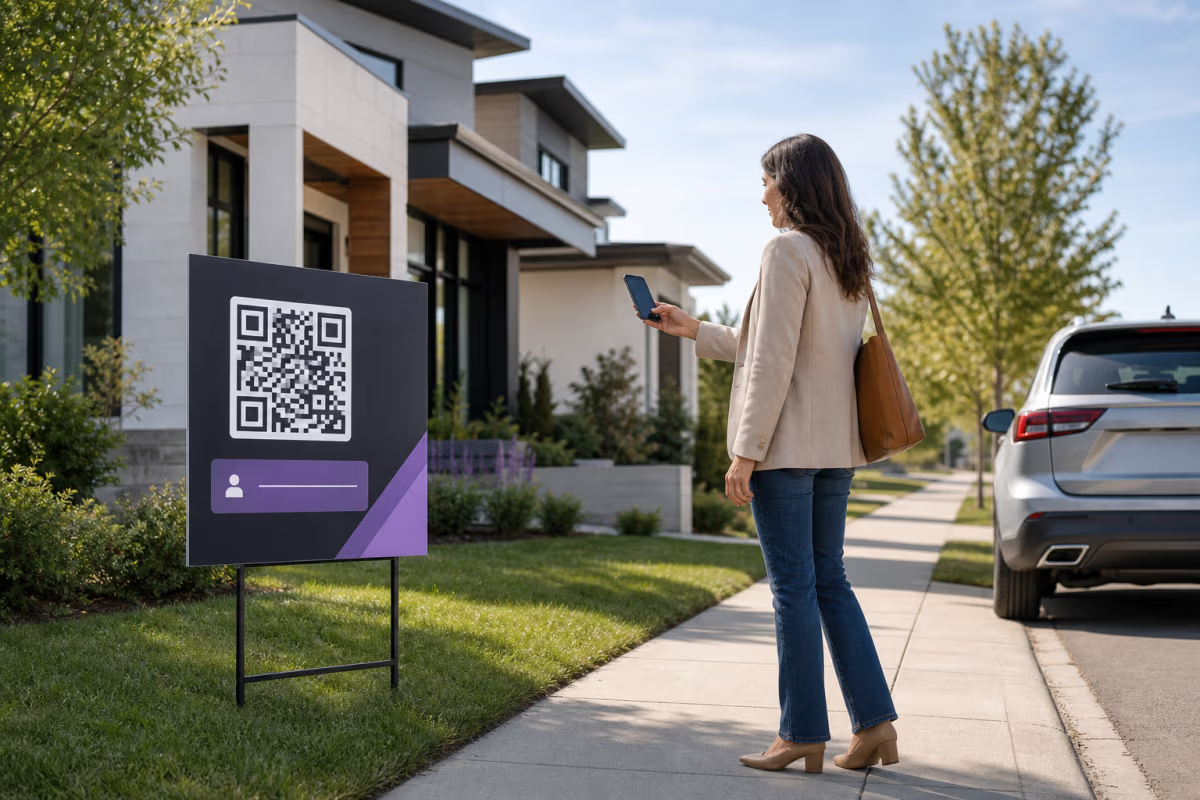
A person standing beside a yard sign usually wants the details for that property. The primary QR should therefore open the exact listing, not a brokerage homepage or an unfiltered list of homes. Put the street address and a short instruction beside the code so the sign still explains itself when a visitor cannot or does not want to scan.
A second contact action can help on a larger sign, brochure, or agent card. It can be a QRLynx Contact Card QR or a link on the listing page. Two physical codes are useful only when each has a different label, enough separation, and a complete scan test. Otherwise, one listing QR with visible agent contact controls on the destination creates a simpler decision.
Never design for phone use while driving. Place the code where a person can stop or stand safely, and provide a readable address or short URL as the non-QR route.
Match each real-estate placement to one primary action
| Placement | Primary action | QRLynx setup | Destination owner |
|---|
MLS and advertising rules belong to the destination, not the square
A QR code is a route into an advertisement. It does not create an exemption from the rules that apply to the sign, listing page, data feed, form, or follow-up campaign.
The National Association of REALTORS® 2026 IDX policy says electronic IDX displays must comply with state law, regulations, and MLS rules. It also requires the MLS IDX download to refresh updates and status changes at least every 12 hours. That national policy is not a universal promise that every public page may wait 12 hours. A local MLS, brokerage policy, state rule, seller instruction, or direct data agreement can impose a different or stricter requirement.
NAR's current settlement guidance also distinguishes the MLS from off-MLS communication about compensation. Do not infer a compensation-display rule from this article. Review the exact current NAR guidance, local MLS rules, brokerage instructions, and applicable law before publishing compensation language on a QR destination.
HUD states that the Fair Housing Act applies to housing advertising and protects people on specified grounds. Use inclusive copy, consistent access, accurate property information, and an accessible non-QR route. If the page collects a phone number for automated marketing calls or texts, obtain and retain the consent required for the actual follow-up system and provide an effective opt-out. The Eleventh Circuit vacated the FCC's 2023 one-to-one and logical-and-topical consent restrictions, so do not copy outdated summaries of that vacated rule into a form.
How to create and manage a real-estate listing QR in QRLynx
Choose the exact visitor action
Decide whether this placement should open one property, save the agent's contact, request a showing, or collect feedback. Give one action priority.
Verify the destination owner
Use a listing page or form that the seller, agent, brokerage, or authorized data provider permits you to publish. Confirm the mobile page, disclosure, privacy, and accessibility requirements.
Open Website / Link in QRLynx
Choose Website / Link for a listing page, tour, scheduling page, or approved form. Choose Contact Card when the actual purpose is saving agent details.
Choose static or dynamic deliberately
Use dynamic mode when an authorized user needs to change the destination or measure managed-link requests. Use static only when the encoded destination is final and tracking is unnecessary.
Name the QR for the property and placement
Use an internal name such as 18 Cedar Street yard sign. Separate QRs by source when you need source-level analytics instead of assuming one shared QR can identify the placement.
Design for the final material
Keep strong dark-light contrast, preserve the quiet zone, use a restrained logo or frame, and print a plain-language instruction plus the property address or fallback URL beside the code.
Review the destination's listing state
Confirm price, status, attribution, brokerage identity, seller instructions, contact controls, consent language, and any local disclosures before release.
Export and make a physical proof
Place the actual exported QR in the final sign or brochure artwork. Print one proof at final size and material rather than approving a large screen preview.
Test the complete journey
Test from realistic stopped positions, angles, daylight and glare conditions, using representative phones. Verify the exact page and every contact or showing action.
Assign lifecycle ownership
Name the person responsible for changing or retiring the destination when the listing status changes. Recheck the live page and printed code after every transition.
Property journey verified
Create the listing QR in QRLynx
Connect the sign to the exact authorized listing page, label the action, and test the physical proof before installation.
Plan the active, pending, and closed states before printing
RESO's StandardStatus field distinguishes states such as Active, Active Under Contract, Pending, Closed, Expired, and Withdrawn. Your local MLS can use and display statuses according to its own rules. The QR destination should reflect the authoritative current state rather than translating every status into a generic For Sale page.
A QRLynx dynamic QR lets an authorized account user change the destination without replacing the printed QR. That is useful when the brokerage maintains separate active, pending, and closed pages. QRLynx does not read the MLS status or synchronize a listing automatically. Smart redirect rules route by configured conditions, and scheduling routes by configured time windows. Neither feature is an MLS integration unless you have built and validated that external connection yourself.
Keep the property context useful after a transition. A pending page can state the current status and provide the next approved action. A closed or withdrawn page can explain that the listing is no longer active and link to an authorized search or agent contact page. Do not silently redirect a property sign to an unrelated lead funnel.
Open-house forms: collect only what the follow-up needs
A QR can open a brokerage-approved form, scheduling system, or QRLynx lead form. QRLynx lead forms are available on the Business and Enterprise plans. They collect submitted lead information for the QR owner, but they do not create legal consent for a separate email, call, or text campaign.
Tell visitors who is collecting the information, what will happen after submission, which fields are optional, and where the privacy notice applies. Keep feedback separate from permission to send automated marketing. If a visitor can tour or obtain required property information without surrendering marketing consent, make that path clear.
Measure form submissions in the form or lead system. A QRLynx scan records a managed-link request, not proof that a person entered the home, completed the form, requested a showing, or became a client.
Measure the real-estate journey in separate systems
| Question | Controlling evidence | What it proves |
|---|
Size the QR from the real placement and test it
There is no universal three-inch yard-sign minimum. The required module size depends on payload density, error correction, printed dimensions, expected stopped distance, camera, angle, light, sign material, quiet zone, and design. A logo or higher error correction can increase density and change the result.
Start with the QRLynx print-size method, then prove the exact sign. Use matte or otherwise glare-controlled material when reflections interfere with the modules. Keep the code flat, unobstructed, and far enough from trim, hardware, folds, and decorative patterns. Test during the conditions in which a person can safely stop and scan. A QR is not a substitute for a visible address, URL, or accessible contact route.
Real-estate QR questions
What should a real-estate yard-sign QR open?
Usually the exact mobile page for that property. Include current authorized listing information, a clear status, the responsible brokerage or agent, and the next approved action. Keep the street address or a fallback URL visible on the sign.
Should a yard sign have one QR code or two?
Start with one primary listing QR. Add a separate Contact Card QR only when the physical design can clearly label, separate, and test both actions. A contact button on the listing page is often simpler than two neighboring codes.
Can QRLynx update a property QR after printing?
Yes, when you create a supported QR in dynamic mode. An authorized account user can change its destination while the printed short-link pattern remains stable. QRLynx does not automatically read or synchronize MLS status.
How big should the QR be on a yard sign?
Determine size from the encoded density, final material, expected stopped distance, light, angle, design, and representative devices. Print and test the finished sign. Do not rely on a universal inch value or test only a large screen preview.
Can someone scan a real-estate QR while driving?
The design should never ask a driver to handle a phone. Place the sign where a person can stop or stand safely, and print the address or fallback URL so the property remains identifiable without scanning.
Does a QR code make a listing MLS compliant?
No. The QR only carries or routes data. The sign, destination page, data feed, attribution, status, disclosures, seller instructions, and follow-up remain subject to the applicable MLS rules, brokerage policy, law, and permissions.
Can I collect open-house leads with QRLynx?
A Business or Enterprise account can attach a QRLynx lead form to an eligible QR. You can also link to an approved external form. Explain the collector, purpose, privacy terms, optional fields, and any separate communication consent. A scan alone is not consent or a completed lead.
What happens to the QR after the listing status changes?
Assign an owner to update the authorized destination or retire the route. A dynamic QR can point to a current pending, closed, withdrawn, agent-contact, or authorized search page without reprinting, but the change is not automatic unless your own external system performs and validates it.
How do I compare scans from yard signs, brochures, and open houses?
Use a distinct dynamic QR for each source, or a carefully maintained source parameter when the destination system supports it. QRLynx analytics can compare tracked requests by QR. Listing views, forms, appointments, and transactions must be measured in their respective systems.
Sources and next steps
This guide uses the current NAR IDX policy and settlement FAQs, HUD fair-housing resources, the RESO StandardStatus definition, current FCC and federal court consent materials, official DENSO WAVE reading guidance, and the current QRLynx product implementation.
Continue with the print-size guide, business-card guide, dynamic URL QR guide, and analytics guide. Confirm local MLS and legal requirements with the responsible brokerage, MLS, or qualified adviser before publishing a campaign.