Do QR Codes Work Without Internet? What Works Offline

Key Takeaway
A QR-capable camera can decode a QR code without internet. See which text, contact, calendar, WiFi, URL, PDF, menu, and eSIM actions still need connectivity.
Reviewed: July 2026
Device behavior, QR Code capacity, eSIM setup, and QRLynx QR-type behavior were checked against current official sources and product code in July 2026.
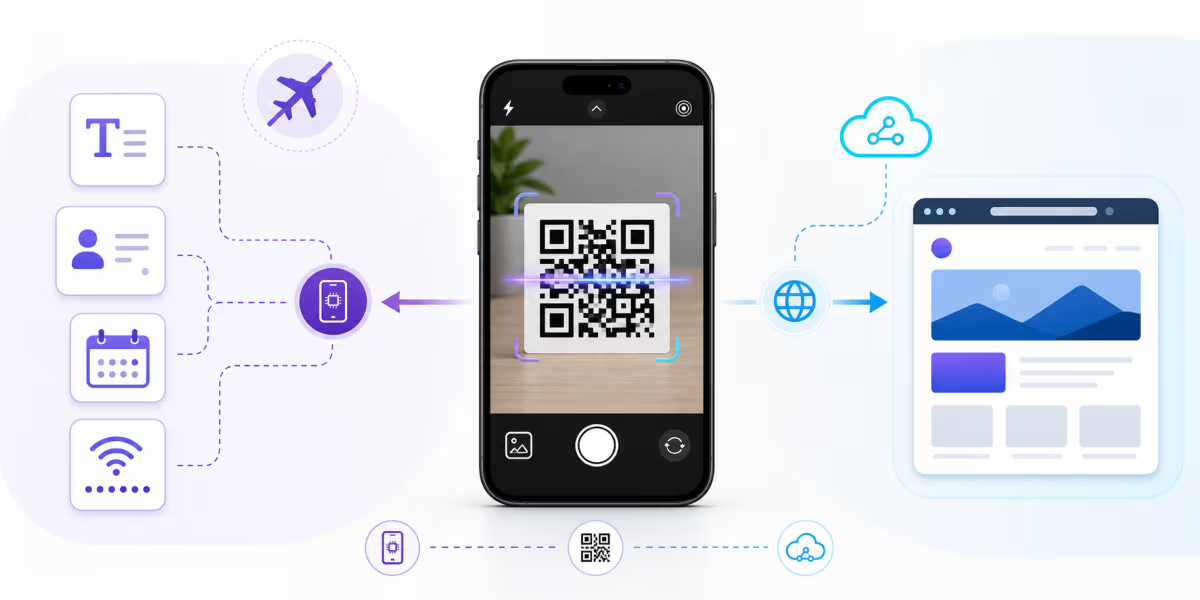
A QR-capable camera or scanner can decode a QR code without internet because the data needed to identify its payload is stored in the printed pattern. What happens after decoding depends on that payload. Plain text can appear locally. Contact and calendar details can be prepared on the phone. A website, hosted PDF, social page, app-store listing, or managed redirect needs a working connection to load.
This is the useful distinction: decoding the symbol and completing the action are separate steps. A successful scan does not mean every destination can open offline.
What each QR payload can do without internet
| Payload or action | Decode locally? | What can happen offline | What still needs connectivity | Typical QRLynx behavior |
|---|---|---|---|---|
| Plain text | Yes | The text can appear on the device | Nothing for display | Static payload |
| vCard contact | Yes | The phone can show and prepare the contact for saving | Cloud contact sync may happen later | Static payload |
| Calendar event | Yes | The phone can show and prepare the event | Online calendars may sync later | Static payload |
| WiFi credentials | Yes | The phone can read the network name, security type, and password | The router must be reachable; internet access depends on that network | Static payload |
| Email, SMS, or phone | Yes | The phone can open or prepare the relevant app and details | Sending the message or placing the call needs the appropriate service | Static payload |
| Direct website URL | Yes | The address can appear | The website needs internet unless already cached | Can be encoded directly or through a managed redirect |
| QRLynx dynamic URL | Yes | The managed short address can appear | The redirect and final destination need internet | Dynamic redirect |
| Hosted PDF, menu, social page, or app store | Yes | The address can appear | The hosted destination needs internet unless already saved locally | Online destination |
| eSIM activation | Yes | The activation details can be recognized | Profile download and carrier activation depend on device, carrier, and connectivity | Carrier-managed workflow |
Why QR decoding itself can happen offline
A standard QR Code stores data in its grid of light and dark modules. A compatible reader locates the symbol, interprets its format and version information, corrects eligible errors, and reconstructs the encoded payload on the device. No QRLynx server or web page is required for that decoding step.
Capacity depends on the QR version, data mode, and error-correction level. DENSO WAVE defines Versions 1 to 40. At the largest standard Version 40 and error-correction level L, the published mode-specific ceilings include 7,089 numeric characters, 4,296 alphanumeric characters, or 2,953 binary bytes. These are technical maxima, not a recommendation to fill every printed code. Shorter payloads usually produce less dense symbols that are easier to size and test.
See DENSO WAVE's official version and capacity table.
Offline-complete QR payloads
Plain text is the clearest offline example because the result can display immediately. A vCard or calendar payload can be decoded and prepared for saving locally. WiFi credentials can be handed to the device without an existing internet connection, although the router must be within range and the network itself may or may not provide internet access.
Email, SMS, and phone payloads need one extra distinction. The device can decode the address or number and prepare the action locally. Sending an email or SMS, or placing a call, still needs the corresponding network service.
URL, dynamic, PDF, menu, and social QR codes
A URL QR code is not automatically dynamic. A static QR can contain the final website address directly. A QRLynx dynamic code contains a managed short address that redirects to the current destination. Both symbols can be decoded offline, but neither can load an uncached online page without a connection.
The dynamic redirect adds editability and eligible scan analytics because the request passes through QRLynx before reaching the destination. That service step requires internet. A hosted PDF, web menu, link page, social profile, or app-store listing also needs a connection to retrieve its content unless the device already saved or cached it.
For venues with unreliable reception, provide working guest WiFi, a printed fallback, or essential information in a directly encoded payload when its length and update needs make that practical. A dynamic destination remains useful when the owner must update a menu or page after printing.
Airplane mode is a device setting, not one universal state
A local camera or scanner may still decode a QR code in airplane mode. Online destinations will not load without an active connection. Many devices also let users re-enable WiFi while airplane mode remains on, so the result depends on the device settings rather than the airplane-mode label alone.
Test the actual action you expect. Displaying text is different from joining a network, syncing a contact, sending a message, opening a page, or completing activation.
Why an eSIM QR may decode but not complete setup
An eSIM QR can supply activation information, but adding the cellular plan is a carrier and device workflow rather than a simple text display. The phone may need to contact the carrier to download and activate the profile. Apple advises users to connect the iPhone to WiFi or a hotspot during eSIM setup, subject to carrier and device support.
For travel, follow the carrier's instructions and complete setup where the required connection is available. Decoding the QR is only the first step.
Why a scan can show a connection error
If the QR is recognized but the page does not load, the scan may have succeeded. Check whether the payload is a URL, whether cellular data or WiFi is available, whether a hotel or cafe network needs captive-portal sign-in, and whether the destination itself opens when entered directly.
If the camera cannot recognize the symbol at all, check lighting, focus, print size, contrast, quiet zone, damage, and viewing distance. Use the QR code troubleshooting guide for that separate problem.
How to create a QR for limited connectivity in QRLynx
Use QRLynx to choose a payload that matches what must work when a connection is unavailable.
Define the offline requirement
Decide whether the user only needs to decode the symbol, display information, save a contact, join a local WiFi network, or complete an online action.
Choose the QRLynx payload type
Choose Show Text, Contact Card, Calendar, or WiFi when the information itself should be available from the symbol. Choose Website / Link when the destination is online.
Choose static or dynamic URL behavior
Choose a static QRLynx QR when the final payload should be encoded directly. Use a dynamic Website / Link QR when destination editing or eligible redirect analytics matter and connectivity is expected.
Create and label the code
Enter the payload in QRLynx, avoid unnecessary length, preserve strong contrast and the quiet zone, add a label that explains the action, and download a format suitable for the final size and medium.
Test the complete action
Test the final print or display on representative devices with the actual connectivity conditions, including captive WiFi, airplane mode settings, and low-signal areas.
Design for the connection available
Create the right QR payload for the setting
Choose direct offline content or a managed online destination, then test the full action before printing.
Static payload and dynamic redirect trade-offs
| Decision | Direct static payload | QRLynx dynamic redirect |
|---|---|---|
| Symbol decoding | Can happen locally in a compatible scanner | Can happen locally in a compatible scanner |
| Destination resolution | No redirect when content is encoded directly | Requires internet to reach the redirect |
| Edit after printing | No | Yes, for the managed destination |
| Redirect analytics | No redirect event | Eligible scan events can be recorded |
| Best fit | Stable content that must be carried in the symbol | Online destinations that may change after printing |
The practical rule
Ask two questions: can the phone decode this payload locally, and what service must complete the action? A QR-capable scanner can interpret the pattern without internet. The payload then determines whether the user can finish locally, needs cellular service, needs a reachable router, or needs the web.
QRLynx supports direct-content QR types as well as static and dynamic URL workflows. Use the direct payload for stable information that belongs in the symbol. Use a dynamic destination when updating after print and redirect analytics are more important, and make connectivity part of the deployment test.
Primary sources
Questions about QR codes and internet access
Direct answers about scanning, offline payloads, WiFi, airplane mode, online destinations, and eSIM setup.
Do you need internet to scan a QR code?
A compatible camera or QR scanner can decode the symbol locally without internet. Internet may still be required for the action after decoding, such as opening a website, hosted PDF, social page, app-store listing, or managed redirect.
Which QR codes can complete their main action offline?
Plain text can display locally. Contact and calendar details can be prepared for saving on the device. WiFi credentials can be read locally so the phone can attempt to join a reachable network. The exact result depends on device support and settings.
Does a WiFi QR code need internet?
The phone does not need internet to read the network name, security type, and password from the QR code. The router must be reachable, and whether the joined network provides internet is a separate question.
Can I scan a QR code in airplane mode?
A local QR-capable camera or scanner may still decode the symbol. Online destinations need an active connection. Many devices let users re-enable WiFi while airplane mode remains on, so test the actual device settings.
Do email, SMS, and phone QR codes work offline?
The device can decode the address or number and may prepare the relevant app locally. Sending the email or SMS, or placing the call, still needs the corresponding network service.
Does a URL QR code always use a dynamic redirect?
No. A static QR can encode the final URL directly. A dynamic QR encodes a managed short address that redirects to the current destination. Both need internet to load an uncached online destination.
Do dynamic QR codes need internet?
Yes, to resolve the managed redirect and open its destination. The symbol itself can still be decoded locally, but destination editing and eligible scan analytics depend on the online redirect service.
Can a PDF QR code work offline?
A QR that points to a hosted PDF needs a connection to download it unless the file is already saved or cached on the device. The printed QR only carries the address, not the entire PDF file.
Can a restaurant menu QR work without internet?
A typical web or hosted-PDF menu needs internet to load. Venues with weak reception can provide working guest WiFi, a printed fallback, or essential short information in a direct payload.
Why does an eSIM QR code need connectivity?
The QR can provide activation information, but the device may need to contact the carrier to download and activate the cellular profile. Follow the carrier and device instructions and use the required connection during setup.
Why does my QR code show a connection error?
The camera may have decoded a URL successfully while the browser could not reach it. Check cellular data, WiFi, captive-portal sign-in, airplane-mode settings, and whether the destination opens directly.
How do I make a QR experience reliable in a low-signal location?
Define what must work offline, choose a direct payload when practical, provide connectivity or a printed fallback for online content, and test the final code on representative devices in the real location.