Metal QR Code Tags: Engraving, Design, and Scan Testing

Key Takeaway
Prepare metal QR code tags for engraving or marking, protect the quiet zone, test glare and placement, and manage the linked destination with QRLynx.
A metal QR code is only as readable as the finished mark
Disclosure: QRLynx is built and operated by Jorbox LLC. QRLynx creates and manages the QR link and provides browser-based scan tools. QRLynx does not manufacture or certify metal tags. A qualified tag or marking supplier remains responsible for the metal, finish, marking process, tolerances, attachment, durability, environmental suitability, and any required verification or certification.
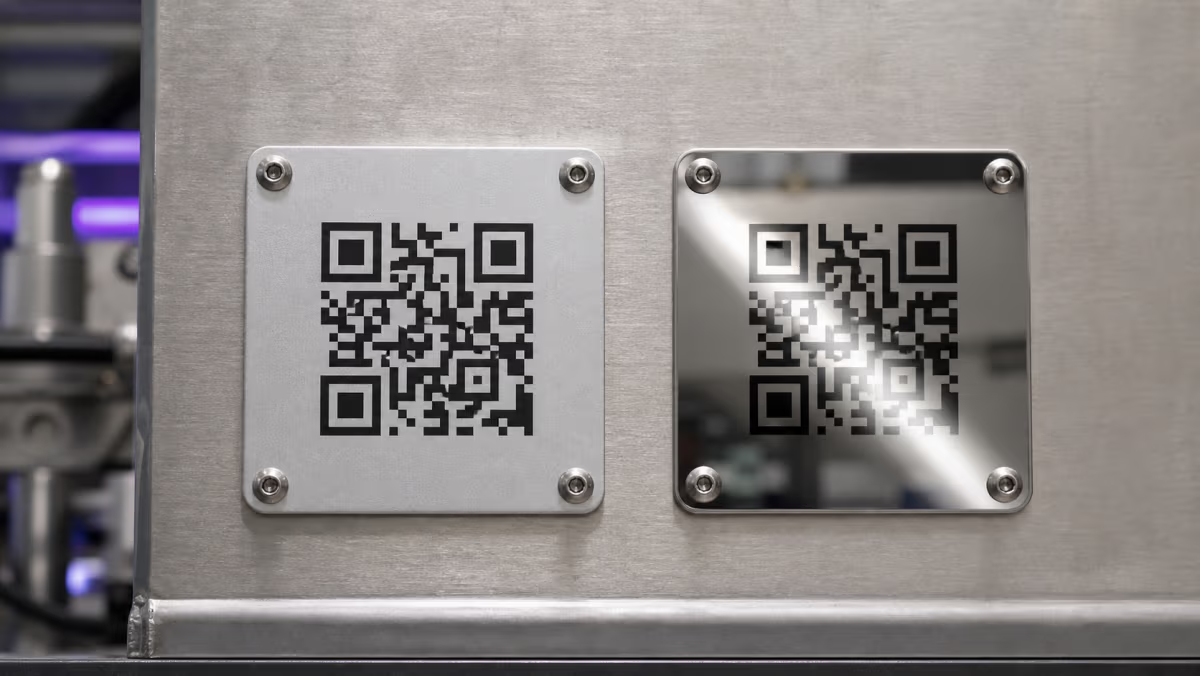
Reliable metal QR code tags come from testing the complete finished system, not the source artwork alone. The encoded destination, QR geometry, marking method, surface finish, curvature, mounting position, lighting, expected scanner, and linked page all affect the result.
QRLynx can create a Website or Link QR for the approved destination. Choose static delivery for a stable final URL, or save a dynamic QR when an authorized owner may need to update the destination while keeping the manufactured pattern. Approve a physical sample in the real environment before releasing a full run.
The six-layer metal-tag reliability chain
Record each layer separately so a scan issue can be traced to the right owner.
| Layer | Decision to record | Evidence before release | Owner |
|---|---|---|---|
| Destination and payload | Final URL or managed short link, ownership, access, and expected result | Signed-out mobile test of the exact destination | Content or system owner |
| QR artwork | Payload, error correction, module pattern, finder patterns, and quiet zone | Exact exported file and decoded result | QR owner |
| Marking process | Laser, chemical etch, dot peen, photo-anodized process, print, or attached plate | Supplier proof made with the intended process | Tag or marking supplier |
| Metal surface | Material, finish, texture, coating, contrast behavior, and curvature | Finished sample from the actual material and finish | Supplier and asset owner |
| Installation | Attachment, orientation, distance, angle, lighting, glare, dirt, and access | Scan test at the final mounting location | Facilities or field team |
| Lifecycle | Cleaning, wear, repainting, relocation, replacement, and destination review | Named owner, review trigger, and retest record | Asset program owner |
Choose static or dynamic before the tag is manufactured
The printed value determines what can change later and whether scans pass through QRLynx.
| Decision | Static Website QR | Saved dynamic Website QR |
|---|---|---|
| Printed value | The final destination URL | A managed QRLynx short link |
| Destination change | Requires a new QR pattern and replacement tag | An authorized account user can replace the saved destination while the metal pattern stays the same |
| QRLynx scan analytics | The direct scan does not pass through QRLynx | Eligible redirect activity can appear in QRLynx analytics |
| Useful fit | Stable final destination and direct delivery | Long-lived tag, external system, or destination likely to change |
| Lifecycle record | Track the final URL and replacement trigger | Track the QRLynx owner, destination owner, tag location, and redirect review |
Prepare and check a metal-tag QR with QRLynx
These steps prepare the QR link and approval record. The supplier still controls the physical tag specification and marking process.
Approve the destination
Open the exact asset record, manual, inspection form, service page, contact route, or other mobile destination. Confirm its owner, access requirements, and expected result before creating the QR.
Choose Website or Link in QRLynx
Paste the complete approved URL into the Website or Link generator. QRLynx manages the QR link, while the connected asset, maintenance, or document system remains responsible for its records and workflow.
Choose static or dynamic delivery
Use static delivery when the final URL should be encoded directly. Save a dynamic QR when an authorized owner may need to update the destination without replacing the manufactured pattern.
Name the code for the physical asset
Use an internal name that includes the asset or tag ID, site, equipment class, planned location, and action. Keep the QR record connected to the supplier proof and installation record.
Keep the artwork simple
Preserve the three finder patterns and the four-module quiet zone. Use a compact destination, avoid decorative elements that reduce module clarity, and treat error correction as damage tolerance rather than a substitute for a clean mark.
Export the exact supplier file
Registered users on the Free plan can download PNG, JPG, WEBP, and PNG HD. PDF and SVG QR-image downloads start on Starter+. Confirm the format, dimensions, color treatment, and file handling with the chosen supplier.
Approve a physical sample
Have the supplier produce a sample using the intended metal, finish, mark, coating, attachment, and production settings. Compare the finished modules and quiet zone with the approved artwork.
Test the installed result
Test the tag with representative phone cameras and any operational reader in the real distance, angle, lighting, glare, dirt, and network conditions. Use the QRLynx scanner to decode a camera view or sample image, then record the decoded destination and retest trigger.
Send the supplier an approval brief, not only a QR image
The supplier brief should connect the digital QR record to the physical manufacturing record. Include the approved QR file and payload, tag or asset ID, intended material and finish, proposed marking method, final symbol area, quiet zone, attachment method, mounting surface, curvature, expected scan distance, lighting, contamination, cleaning, chemical, temperature, abrasion, weather, and compliance conditions.
Ask the supplier to state which conditions its material and process are designed for, what proof it will provide, and which variables must remain fixed between the sample and production run. Keep those claims scoped to the supplier's actual specification. QRLynx does not select or certify the metal or marking process.
Qualify the marking method with the actual supplier
Common methods create different contrast and geometry. Approve the process through a sample and evidence for the intended environment.
| Method family | Supplier should confirm | Approval evidence |
|---|---|---|
| Laser marking or engraving | Material response, contrast mechanism, settings, module edge quality, heat effect, and finish | Sample from the intended metal and settings, plus scan or verification record |
| Chemical etching | Etch definition, fill or contrast treatment, resistance, and process tolerance | Finished sample with the intended surface treatment |
| Dot peen or mechanical mark | Cell geometry, depth, surface deformation, contrast under lighting, and reader compatibility | Sample checked with the operational reader and required verifier when applicable |
| Photo-anodized or image sealed in metal | Specified material, image process, finish, environmental rating, and attachment | Supplier specification and finished sample for the actual use |
| Printed or filled mark on metal | Ink or fill system, adhesion, curing, coating, cleaning, wear, and expected environment | Process-specific specification and abrasion or exposure evidence where required |
| Separate metal plate or tag | Plate construction, attachment, edge protection, mounting surface, replacement method, and tamper needs | Mounted sample tested in the planned location |
Protect the QR geometry through production
DENSO WAVE specifies a clear quiet zone four modules wide on every side of a standard QR Code. Keep that margin free from borders, text, holes, fasteners, raised edges, coatings, and nearby marks. Preserve the three finder patterns and square module boundaries through the supplier's artwork conversion and marking process.
Error correction can restore some data when a symbol is dirty or damaged, but a higher level also adds data and can make the symbol denser. Select it with the payload, available symbol area, marking resolution, and environment in mind. The QRLynx error correction guide explains the four levels. The quiet-zone and design guide owns broader artwork rules.
Metal QR test sheet
Store observed conditions and outcomes. Do not turn one sample into a universal benchmark.
| Field | What to record | Why it matters |
|---|---|---|
| Tag identity | Asset ID, QR record, supplier proof, batch, and sample number | Connects the physical tag to the approved payload and process |
| Material and finish | Metal, coating, texture, color treatment, and reflectivity notes | Explains contrast and glare behavior |
| Marking method | Process, supplier, settings reference, and proof status | Makes the result reproducible and traceable |
| Geometry | Finished symbol size, module appearance, quiet zone, curvature, and nearby features | Captures the physical pattern that cameras see |
| Installation | Mounting method, surface, orientation, location, and access | Represents the finished asset rather than a bench sample |
| Test condition | Distance, angle, lighting, glare, dirt or moisture state, network, and date | Preserves the condition behind each observation |
| Device or reader | Phone and camera or operational reader model and software | Shows which reader produced the observation |
| Observed result | Decoded payload, destination result, pass or fail, and notes | Separates symbol decoding from destination access |
| Retest trigger | Wear, cleaning, repainting, relocation, destination change, replacement, or review date | Keeps the test connected to the tag lifecycle |
Approve a sample in the real operating conditions
Test the finished sample after it is mounted where people or equipment will scan it. Use representative phone cameras and any required operational reader. Change one condition at a time when investigating: distance, angle, light direction, glare, focus, dirt, moisture, curvature, or network access.
Decode the sample with the QRLynx QR scanner from a camera view or image. The scanner processes the image in the browser and can reveal the decoded payload without opening it. Then repeat the test with real phone cameras, because one browser decoder cannot represent every device or field condition. When formal barcode verification is required, use a calibrated verifier and the applicable standard through a qualified provider.
Trace a scan problem to the next useful check
These symptoms guide investigation. Confirm the cause with the finished tag and its records.
| Observed symptom | Check next | Evidence to capture |
|---|---|---|
| Reads in diffuse light but struggles under direct light | Surface reflection, light direction, finish, mounting angle, and camera exposure | Photos from the real angle plus results under both lighting conditions |
| Reads from very close but not at the working position | Finished symbol and module size, payload density, focus, and expected distance | Measured symbol, working distance, device, and decoded result |
| Artwork decodes but the physical mark does not | Module edges, fill, depth, spread, quiet zone, coating, and supplier conversion | Original file beside a high-detail image of the finished mark |
| Works flat but changes after mounting | Curvature, fasteners, raised edges, orientation, shadow, and surrounding features | Bench and installed results from the same tag |
| Decodes but opens the wrong or unavailable page | Encoded payload, saved destination, access permissions, network, and destination status | Decoded value and signed-out destination test |
| Performance changes after cleaning or service | Surface residue, scratches, coating damage, repainting, abrasion, and attachment | Before and after condition photos plus the maintenance record |
Physical sample ready?
Decode the finished metal tag
Use a camera view or sample image to confirm what the tag decodes, then repeat the test with real phone cameras in the installed conditions.
Keep the tag, destination, and replacement record together
Record the QRLynx QR ID, decoded payload, current destination, asset ID, physical location, supplier and process reference, installation date, sample approval, last test, condition notes, and retest trigger. A dynamic destination can keep the manufactured QR pattern stable, but the visible label and linked action must remain accurate.
Retest after relocation, repainting, cleaning-process changes, surface damage, coating changes, destination replacement, ownership changes, or a new operational reader. For a larger program, the enterprise asset QR workflow covers identifiers, bulk creation, system boundaries, and ownership.
Metal QR code tag questions
Can QR codes be engraved on metal?
Yes. Suppliers use methods such as laser marking or engraving, chemical etching, dot peen, photo-anodized processes, printing, or a separate marked plate. The suitable method depends on the metal, finish, environment, reader, geometry, attachment, and required verification. Approve the actual process through a finished sample.
Why does an engraved QR code scan in one light but not another?
Reflective surfaces can change the apparent contrast as the light, camera, or tag angle moves. Compare diffuse and direct lighting at the installed position, record the angle and device, and ask the supplier how the chosen finish and marking method manage reflection.
How much quiet zone does a metal QR code need?
DENSO WAVE specifies a clear quiet zone four modules wide on every side of a standard QR Code. Keep the finished margin free of text, borders, holes, fasteners, raised edges, coatings, and nearby marks.
Should a metal asset tag use a static or dynamic QR code?
Use a static Website QR when the final URL is stable and should be encoded directly. Use a saved dynamic QRLynx Website QR when an authorized owner may need to update the destination while keeping the manufactured pattern, or when eligible redirect analytics are useful.
Which QRLynx file format should I send to the tag supplier?
Use the format the supplier has approved for its workflow. Registered users on the Free plan can download PNG, JPG, WEBP, and PNG HD. PDF and SVG QR-image downloads start on Starter+. Confirm the exact dimensions, color treatment, and conversion steps with the supplier.
Does higher error correction guarantee a readable metal QR code?
No. Error correction can restore some data when a symbol is dirty or damaged, but it cannot replace clear modules, a protected quiet zone, suitable contrast, an appropriate marking process, and testing of the finished installation. Higher levels also increase symbol density.
Can the QRLynx scanner certify a metal QR tag?
No. The QRLynx scanner can decode a camera view or image in the browser and show the payload. It is useful for testing, but it is not a calibrated barcode verifier and does not certify manufacturing quality, durability, environmental performance, or standards compliance.
Should I test one metal tag before ordering a batch?
Yes. Approve a physical sample made with the intended material, finish, marking process, coating, attachment, and production settings. Test it after mounting in the real lighting, distance, angle, contamination, network, and reader conditions.
Does QRLynx manufacture metal QR code tags?
No. QRLynx creates and manages QR links and provides browser-based scan tools. A qualified tag or marking supplier selects and manufactures the physical tag, validates the process, and supports any material, environmental, tolerance, or certification requirement.
Sources, scope, and related guides
This guide was checked against current QRLynx Website or Link, static and dynamic workflow, download-format gates, and browser scanner behavior. DENSO WAVE supplies the four-module quiet-zone and error-correction guidance. Cognex direct-part-mark resources explain why surface, mark geometry, lighting, and calibrated verification matter. Camcode was used only for supplier-side buying and material questions, not to prove QRLynx behavior or a universal service-life claim.
Continue with QR scan troubleshooting, error correction levels, quiet-zone and design rules, the browser QR scanner, dynamic URL QR codes, or enterprise asset tracking when those pages own the next decision.