Skip to content

QR Code Scams in 2026: How Quishing Works & How to Stay Safe

Ahmad Tayyem
Founder & QR Code Technology Specialist
· 24 min read
QR Code Scams in 2026: How Quishing Works & How to Stay Safe

Key Takeaway

Learn how QR code scams and quishing attacks work in 2026, with real examples from parking meters, restaurants, and email phishing. Includes FBI IC3 warnings, a 4-step verification checklist, 12 FAQ answers, and practical tips to protect yourself from fake QR codes.

QR codes are everywhere in 2026. They sit on restaurant tables, parking meters, product packaging, transit stations, business cards, event badges, and direct mail. Billions of scans happen every month worldwide. That ubiquity is exactly what makes QR codes attractive to criminals.

As QR code adoption has grown, so has a specific category of fraud built around them: quishing, short for QR code phishing. Quishing exploits a simple behavioral pattern. People trust QR codes. They see a printed square on an official-looking surface, pull out their phone, point the camera, and tap the link without much thought. Attackers exploit that trust by placing fraudulent QR codes in locations where people expect legitimate ones.

The problem is not theoretical. In January 2022, the FBI's Internet Crime Complaint Center (IC3) issued a public service announcement warning that cybercriminals were tampering with QR codes to redirect victims to malicious sites designed to steal login credentials and financial information. Since that warning, quishing attacks have only grown more sophisticated. According to research from McAfee, QR code-based phishing attempts increased substantially through 2023, 2024, and into 2025, with attackers refining their techniques to bypass traditional email security filters by embedding QR codes in images rather than clickable links.

This guide explains how QR code scams work, documents real-world attack patterns, and provides practical steps you can take to protect yourself whether you are a consumer scanning codes in public or a business deploying them. If you are looking for a broader overview of QR code security features and protections, see our companion QR Code Security Guide.

Quishing is a form of phishing that uses QR codes instead of traditional hyperlinks to direct victims to fraudulent websites. The term combines "QR" and "phishing" and has become one of the fastest-growing social engineering attack vectors since 2023.

Traditional phishing relies on email links, text messages, or fake websites. Users have learned to hover over links, check URLs, and look for suspicious domain names. Security tools scan email bodies for malicious URLs and flag them before the user clicks. Quishing bypasses all of that. A QR code is an image. Most email security scanners do not decode the URL embedded inside a QR code image. Most people do not manually inspect the encoded data before scanning.

That is why quishing works so well. It exploits three psychological factors simultaneously:

  • Trust in physical placement. A QR code printed on a parking meter, restaurant table, or official-looking poster inherits the perceived authority of its environment. If the surface looks legitimate, people assume the code is too.
  • Speed of interaction. Scanning a QR code takes two seconds. There is no moment of deliberation the way there might be with an email link. The user points, taps, and lands on the destination before conscious evaluation happens.
  • Lack of URL preview habits. While most smartphones show a URL preview before opening a QR link, many users tap through without reading the domain. The preview window is small, the text is often truncated, and the action feels low-risk.

The Federal Trade Commission (FTC) published a consumer alert specifically about QR code scams, warning that scammers hide harmful links in QR codes and place them in locations where people expect to find legitimate ones. The FTC advised consumers to inspect URLs carefully after scanning and to avoid entering personal information on sites reached through unfamiliar QR codes.

Understanding why quishing works is the first step toward defending against it. The attacks succeed not because QR technology is inherently dangerous, but because the speed and trust associated with scanning create a window where normal security habits are bypassed.

Quishing is not a single technique. It is a category of attacks that share one trait: using a QR code as the delivery mechanism for a malicious URL. The specific tactics vary depending on the target, the location, and the attacker's goal. Here are the most common real-world patterns documented by law enforcement and security researchers.

Parking Meter Sticker Scams

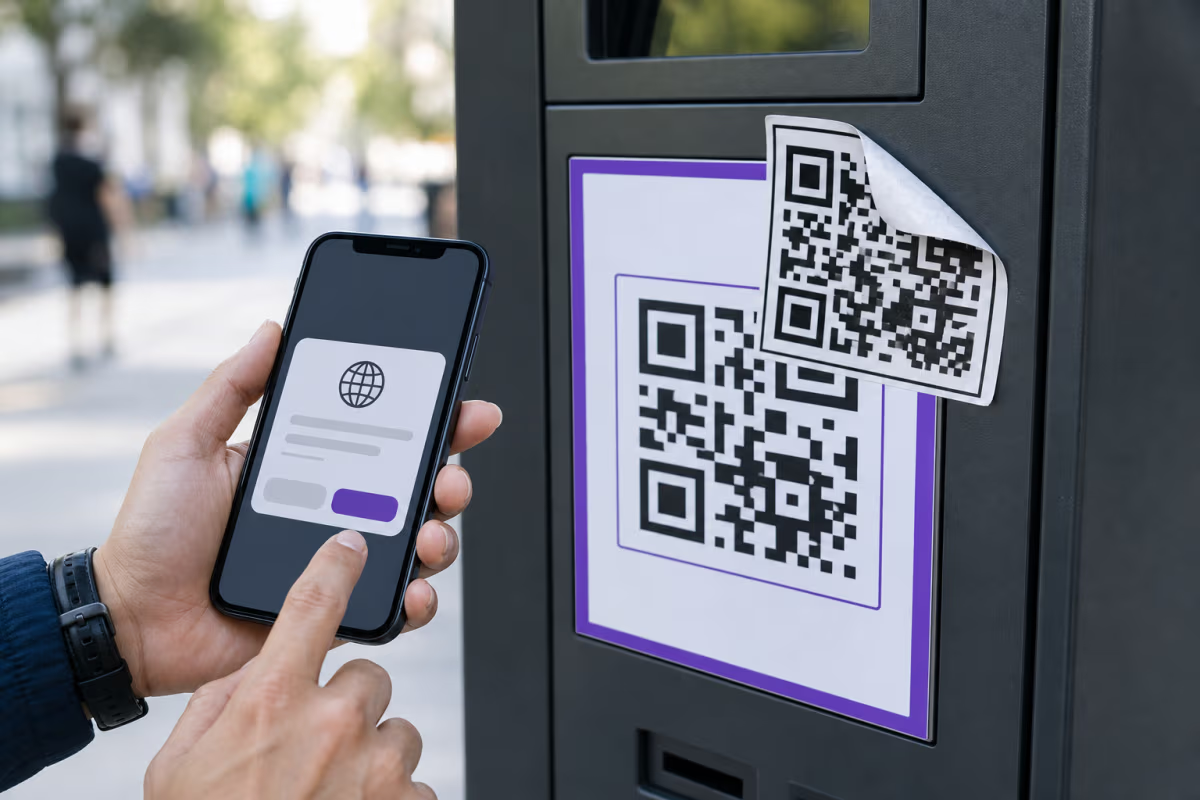
One of the most widely reported quishing attacks involves fraudulent QR code stickers placed on parking meters and pay stations. Attackers print professional-looking stickers with QR codes that redirect to fake payment pages designed to look like the city's official parking app. Victims scan the code, enter their credit card information on the fake site, and the attacker captures the payment credentials. Multiple cities across the United States, United Kingdom, and Australia have reported this attack pattern. In some cases, victims did not realize the fraud until unauthorized charges appeared on their statements days later.

Restaurant Table Tent and Menu Stickers

During and after the pandemic, restaurants widely adopted QR codes for digital menus. Attackers exploit this by placing sticker overlays on top of legitimate QR codes at restaurant tables, counters, and window signs. The fake code may redirect to a phishing page, a malicious app download prompt, or a data harvesting form disguised as a customer survey. Because diners expect to scan a code at the table, the attack feels completely natural. The restaurant staff may not notice the sticker overlay for days or weeks.

Email and Document-Based Quishing

A growing category of quishing attacks embeds QR codes directly inside emails, PDFs, and digital documents. The attacker sends an email that appears to come from a trusted source such as a bank, employer, shipping company, or software vendor. Instead of including a clickable link, the email contains a QR code image with instructions like "Scan to verify your account" or "Scan to complete your delivery." This technique is effective because many corporate email security systems scan text and hyperlinks for threats but do not decode QR code images embedded in the email body or attachments.

Public Space and Transit Fraud

Bus stops, train stations, airport terminals, shared bulletin boards, and community kiosks are all targets. Attackers place QR code stickers over legitimate advertisements, government notices, or transit information posters. Victims scanning what they believe is an official code are redirected to credential harvesting pages, fake app stores, or sites that attempt drive-by malware downloads.

Fake Package Delivery Notices

Physical mail with a fake package delivery notice and a QR code is another documented pattern. The card looks like an official notice from a postal service or courier and instructs the recipient to scan the code to reschedule delivery or pay a small customs fee. The code leads to a phishing page that captures personal and financial information.

These are not edge cases. They represent the mainstream attack surface for QR code fraud in 2026. The common thread across all of them is that the attacker places the QR code in a context where the victim expects a legitimate one.

A QR code by itself cannot install malware or hack your phone. QR codes are data carriers. They encode text, URLs, WiFi credentials, contact information, or other structured data. Scanning a QR code is the equivalent of reading a string of text. The risk comes from what happens after you scan: specifically, what the encoded URL leads to and what actions you take on the destination page.

Here is how the actual attack chain works:

  1. You scan a malicious QR code. Your phone's camera decodes the embedded URL and shows a preview.
  2. You tap to open the URL. Your browser navigates to the attacker's website.
  3. The website attempts to exploit you. This can happen several ways: it may display a convincing fake login page to steal credentials, prompt you to download a malicious app, exploit a known browser vulnerability to execute code, or present a form that harvests personal information.

The critical point is that the QR code itself is not the weapon. It is the delivery mechanism. The damage happens at step 2 and step 3, not at step 1. This distinction matters because it means the primary defense is URL awareness and destination verification, not avoiding QR codes entirely.

Modern smartphones have strong sandboxing protections that make true drive-by infections rare. However, older devices with unpatched browsers, sideloaded apps, or disabled security settings are more vulnerable. The most common real-world damage from QR code scams is credential theft and financial fraud through fake login pages, not device-level malware installation.

That said, the risk is real enough that the FBI's IC3 warning specifically mentioned attackers using QR codes to direct victims to sites that steal credentials and financial data. The defense is not to stop scanning QR codes. The defense is to verify where the code takes you before entering any information.

QRLynx approaches QR code security from the creator side. Every URL saved to a dynamic QR code passes through a multi-layer validation system designed to block malicious destinations before a single scan occurs.

URL Security Scoring

Every destination URL is analyzed using a risk scoring system on a 0 to 100 scale. The system checks for suspicious patterns including IP addresses used as hostnames, free TLDs commonly associated with phishing, path keywords that mimic login and verification pages, brand impersonation in subdomains, and open redirect parameters designed to bounce through a trusted domain to a malicious destination.

DNS-Based Domain Analysis

QRLynx queries DNS records to evaluate domain trustworthiness. Newly registered domains less than seven days old receive a high risk score because most phishing domains are disposable and recently created. Free DNS providers and parked domain services are flagged. Domains that fail to resolve are blocked entirely.

Google Web Risk API Integration

URLs are checked against Google's Web Risk API, a real-time threat intelligence database covering malware, social engineering, and unwanted software. Flagged URLs are hard-blocked and cannot be saved to any QR code on the platform.

Domain Age Interstitial

Even if a URL passes all other checks, domains less than 30 days old trigger a Cloudflare Turnstile verification page when scanned. This extra friction protects against zero-day phishing pages that have not yet been indexed by threat databases. Over 170 trusted domains including major social media platforms, payment processors, and app stores are whitelisted to skip this check.

This four-layer system means that QR codes created through QRLynx have their destinations validated before anyone scans them. For a detailed breakdown of each security layer, see the QR Code Security Guide. Businesses deploying QR codes at scale should also consider using dynamic QR codes so that destinations can be updated or disabled after printing if a security concern arises.

You do not need specialized tools to spot most QR code scams. The majority of quishing attacks rely on physical placement tricks and social engineering rather than technical sophistication. Here are the practical signals to watch for.

Physical Tampering Signs

  • Sticker overlays. If a QR code looks like a sticker placed on top of another surface, especially on a parking meter, restaurant table, poster, or public kiosk, treat it with suspicion. Legitimate QR codes are usually printed directly on the material, not pasted over it.
  • Misaligned printing. A QR code that is crooked, peeling at the edges, or printed on different paper stock than the surrounding material may be a fraudulent overlay.
  • Missing branding. Legitimate business QR codes often include a company logo, brand colors, or a clear call-to-action like "Scan to view our menu." A plain, generic black-and-white code in a context where you would expect branding is a yellow flag.
  • Multiple codes in one spot. If you see two QR codes close together, especially if one partially covers the other, the top one is likely fraudulent.

URL Red Flags After Scanning

  • Domain mismatch. If you scan a code at a restaurant called "Mario's Pizza" and the URL preview shows a domain like mario-pizza-verify.xyz instead of the restaurant's actual website, do not tap through.
  • HTTP instead of HTTPS. Legitimate businesses use HTTPS. A destination starting with http:// (no 's') in 2026 is a strong warning sign.
  • Unusual TLDs. Domains ending in .xyz, .tk, .ml, .top, or .buzz are disproportionately used by phishing operations.
  • Shortened URLs with no brand. A URL like bit.ly/3xR4kz from a parking meter is suspicious. Legitimate institutions typically use their own domain.
  • Immediate login or payment prompts. If scanning a QR code immediately asks for your username, password, credit card, or personal details on an unfamiliar site, stop. Navigate to the service directly through your browser instead of through the QR code.

You can also use the free QRLynx QR Code Scanner to preview the decoded URL before opening it in your browser, giving you a moment to evaluate the destination before committing.

How to Verify a QR Code Is Safe Before Scanning

1

Inspect the physical QR code before scanning

Before pointing your camera, look at the QR code itself. Check whether it is printed directly on the material or placed as a sticker overlay. Look for signs of tampering such as peeling edges, misalignment, different paper stock, or a code that covers another code underneath. If the code is in a public location like a parking meter, transit station, or restaurant table, compare it with others nearby. If one looks different from the rest, it may have been replaced by an attacker. Legitimate businesses typically print QR codes directly on their materials with brand colors, logos, and a clear call-to-action.

2

Read the URL preview before tapping

Most smartphones show a URL preview banner after scanning a QR code but before opening the link. Read the domain name carefully. Does it match the business or service you expect? A parking meter in San Francisco should link to the city's official parking domain, not a random domain like sf-parking-pay.xyz. Look for HTTPS, check the top-level domain, and watch for brand name misspellings or suspicious subdomains. If the URL looks unfamiliar or suspicious, do not tap through. Instead, navigate to the service manually through your browser or app.

3

Never enter credentials or payment info on QR-linked pages

Even if the destination page looks legitimate, treat any site reached through a QR code in a public space with extra caution. If the page immediately asks for your username, password, credit card number, bank details, or personal information, stop. Legitimate services rarely require you to enter sensitive credentials through a QR code scanned from a poster or sticker. Instead, open your browser, navigate to the official website or app directly, and complete the action there. This one habit blocks the majority of quishing attacks.

4

Report suspicious QR codes to the business or authorities

If you find a QR code that appears to be fraudulent, report it. Alert the business whose premises the code is placed on so they can remove the sticker and warn other customers. You can also report QR code fraud to the FBI's Internet Crime Complaint Center (IC3) or the FTC's fraud reporting portal. For businesses, consider using a QR code platform with built-in URL security validation to prevent malicious URLs from being encoded in the first place.

If you believe you scanned a malicious QR code and interacted with the destination, here is what to do immediately:

  1. Do not enter any more information. If you are on a suspicious page, close the browser tab immediately. Do not submit any forms, enter any passwords, or confirm any transactions.
  2. Check for unauthorized activity. If you entered payment information, check your bank or credit card account for unauthorized charges. If you entered login credentials, check the affected account for unauthorized access or changes.
  3. Change compromised passwords immediately. If you entered a password on a phishing page, change that password on the real service right away. If you use the same password on other accounts, change those too. Use unique, strong passwords for every service.
  4. Enable two-factor authentication. If the compromised service supports two-factor authentication and you have not already enabled it, do so now. This adds a second verification step that protects your account even if the attacker has your password.
  5. Run a security scan on your device. While true malware installation from a QR code scan is uncommon on modern devices, running a security scan is a reasonable precaution, especially if you downloaded any files or granted any permissions.
  6. Report the incident. File a complaint with the FBI IC3 or the FTC. If financial information was compromised, contact your bank or card issuer to flag the account and request a new card if necessary.
  7. Monitor your accounts. Watch for unusual activity on your financial accounts and email for several weeks after the incident. Set up transaction alerts if your bank offers them.

The faster you act after realizing you interacted with a scam QR code, the more likely you are to prevent actual financial loss or account compromise. Most quishing attacks rely on speed: the attacker wants to use your stolen credentials before you realize what happened.

The short answer is: usually, but not always. Legitimate restaurant menu QR codes and parking meter QR codes deployed by the business or municipality are safe. The risk comes from unauthorized codes placed by attackers on top of or adjacent to the legitimate ones.

Restaurant Menu QR Codes

Restaurant QR codes printed directly on table tents, menus, counter signs, or window stickers by the business itself are generally safe. The destination is the restaurant's own website or a third-party menu hosting service. The risk scenario is when an attacker places a sticker with a different QR code over the restaurant's legitimate code. This is why physical inspection matters: look for sticker overlays, compare the code with other tables, and check the URL preview after scanning. If the URL matches the restaurant's domain, you are fine.

Parking Meter QR Codes

Parking meter QR codes deserve extra caution because they are high-value targets. A parking meter in a busy downtown area gets scanned hundreds of times per day, and each scan involves a payment. Attackers have specifically targeted parking meters and pay stations because the user is already primed to enter payment information. Before scanning a parking meter QR code, look for sticker overlays, check whether the code matches the meter's branding, and verify the URL leads to the city's official parking service. Many cities now list their official parking app and domain name on the meter itself, giving you a reference to check against.

Other Public QR Codes

QR codes on transit advertising, event posters, public kiosks, and community bulletin boards carry moderate risk because these locations are accessible to anyone, including attackers. Codes on product packaging, sealed in-box materials, and official business correspondence carry lower risk because an attacker would need supply chain access to tamper with them.

The general rule: the more accessible the physical location is to the public, the more carefully you should inspect the QR code before scanning and the URL before tapping.

If your business deploys QR codes in public spaces, you have a responsibility to make them difficult to tamper with and easy for customers to verify. Here are practical protections:

Use Branded, Custom-Designed QR Codes

A QR code with your brand colors, logo, and a clear call-to-action is much harder for an attacker to replicate convincingly with a sticker. If all your codes use a distinctive design, customers and staff can quickly spot one that looks different. Create branded codes using the QRLynx Custom QR Code Designer.

QR codes printed directly on table tents, menus, packaging, and signage are harder to tamper with than codes on separate stickers. If you must use stickers, use tamper-evident materials that show visible damage when someone tries to peel or cover them.

Use Dynamic QR Codes for Control

Dynamic QR codes let you change the destination URL without reprinting. If you discover that a placement has been tampered with or a destination needs to change for security reasons, you can update or disable the code remotely within seconds.

Monitor Scan Analytics for Anomalies

Unusual spikes in scan volume, unexpected geographic patterns, or scans at odd hours can indicate that a fraudulent copy of your QR code is circulating. Use QR code analytics to monitor your codes and investigate anomalies. AI Insights can help surface unusual patterns automatically.

Train Staff to Inspect QR Placements

Make it part of your opening routine for staff to check that QR codes at tables, registers, and public-facing surfaces have not been covered with unauthorized stickers. This simple habit catches the most common physical tampering attack before it affects customers.

Choose a Platform with Built-In URL Security

Not all QR code generators validate destination URLs. Using a platform like QRLynx that runs multi-layer URL security checks ensures that even if an attacker tries to create QR codes on your account, malicious destinations are blocked at creation time.

While physical QR code stickers get the most media coverage, email-based quishing is arguably the bigger threat in corporate environments. Attackers embed QR code images in emails that appear to come from IT departments, HR teams, software vendors, banks, or shipping companies. The email instructs the recipient to scan the code to verify their identity, complete a required action, or access a shared document.

This technique is effective for two reasons. First, corporate email security systems are designed to scan text and hyperlinks for malicious URLs. Most do not decode QR code images embedded in the email body or attached PDFs. The malicious URL is hidden inside the image, invisible to automated scanners. Second, employees scanning a QR code from a work email on their personal phone move outside the corporate network's security perimeter. The phishing page loads on a personal device with no enterprise web filtering, no endpoint protection, and no URL reputation checking.

Common email quishing patterns include:

  • Fake multi-factor authentication setup. "Scan this QR code with your authenticator app to enable MFA on your account." The code leads to a credential harvesting page.
  • Fake document sharing. "Scan to access the shared quarterly report." The code leads to a fake Microsoft 365 or Google Workspace login page.
  • Fake IT security alerts. "Your account has been flagged. Scan to verify your identity." The code leads to a phishing page that captures the user's corporate credentials.
  • Fake shipping or invoice notifications. "Scan to track your package" or "Scan to view your invoice." The code leads to a data harvesting or malware site.

The defense against email quishing is straightforward but requires awareness. Treat QR codes in emails with the same suspicion you would give an unexpected link. If an email asks you to scan a code to verify your account, ignore the QR code and navigate to the service directly. If the email claims to be from your IT department, verify with IT through a separate channel before scanning.

QR code security is an ongoing challenge, not a solved problem. As QR code usage continues to grow, so will the incentive for attackers to exploit them. Several trends are shaping the future of this space.

Platform-level URL validation is becoming standard. The era of QR code generators that blindly encode any URL without checking it is ending. Serious platforms now integrate threat intelligence, domain reputation checks, and real-time URL scanning. QRLynx's four-layer security system represents this direction: every destination is validated before it reaches a scanner's device.

Consumer awareness is improving but still insufficient. The FBI IC3 warning, FTC consumer alerts, and growing media coverage of quishing have raised awareness. But most people still do not check the URL preview before tapping through a QR scan. Education and habit-building remain the most important defenses at the individual level.

Enterprise email security is adapting. Some email security vendors have begun adding QR code image decoding to their scanning pipelines. This will reduce the effectiveness of email-based quishing over time, but the arms race between attackers and defenders will continue.

Businesses need to take ownership of their deployed QR codes. Physical tamper resistance, staff training, branded designs, dynamic QR codes with remote control, and scan analytics monitoring are all practical steps that reduce the attack surface. The businesses that deploy QR codes have the most influence over whether their codes become vectors for fraud or remain trusted touchpoints.

QR codes are not going away. They are too useful, too efficient, and too deeply embedded in modern commerce and communication. The goal is not to fear them but to use them wisely, with awareness of the risks and the tools available to mitigate them. For a full walkthrough of QR code security features including password protection, expiration rules, access consent, and smart redirects, see the QR Code Security Guide.

QR Code Scams and Quishing Safety FAQ

What is quishing?

Quishing is QR code phishing. It is a form of social engineering where attackers use fraudulent QR codes to redirect victims to malicious websites designed to steal login credentials, financial information, or personal data. The term combines QR and phishing. The FBI Internet Crime Complaint Center (IC3) issued a public warning about this attack vector in 2022, and it has grown significantly since then.

How do QR code scams work?

QR code scams typically work by placing a fraudulent QR code in a location where people expect a legitimate one. Common methods include sticker overlays on parking meters or restaurant tables, fake QR codes in phishing emails, and fraudulent codes on public posters or transit stations. When a victim scans the code and taps the link, they are directed to a convincing fake website that harvests their credentials, payment information, or personal data.

Can a QR code give you a virus?

A QR code by itself cannot install a virus or malware. QR codes are simply data carriers that encode text or URLs. However, a QR code can link to a malicious website that attempts to exploit browser vulnerabilities, prompt you to download malicious software, or trick you into entering sensitive information on a fake page. The risk is in the destination, not the code itself. Modern smartphones have strong security protections that make drive-by malware installation rare, but credential theft through fake login pages remains common.

How do I know if a QR code is safe?

Check for physical tampering before scanning: look for sticker overlays, misalignment, or different paper stock. After scanning, read the URL preview your phone shows before tapping. Verify the domain matches the expected business, check for HTTPS, and watch for suspicious top-level domains like .xyz or .tk. Never enter passwords or payment information on a site reached through a QR code in a public space without first verifying the domain. You can also use the free QRLynx QR Code Scanner at /tools/qr-code-scanner to preview URLs before opening them.

What happens if I scan a malicious QR code?

Scanning a malicious QR code and viewing the URL preview causes no harm by itself. The risk begins when you tap through to the destination and interact with it. If you entered credentials on a fake page, change those passwords immediately on the real service. If you entered payment information, contact your bank to flag the account. Enable two-factor authentication on affected accounts, monitor for unauthorized activity, and report the incident to the FBI IC3 at ic3.gov or the FTC at reportfraud.ftc.gov.

Can QR codes steal your information?

QR codes themselves cannot steal information. They can only encode data such as a URL. However, a QR code that links to a phishing page can steal your information if you enter it on that page. This includes usernames, passwords, credit card numbers, and personal details submitted through fake forms. The defense is to verify the URL domain before entering any information and to navigate directly to services rather than through QR codes when credentials are required.

Are QR codes on parking meters safe?

QR codes installed by the municipality or official parking service are safe. The risk comes from attackers placing sticker overlays with fraudulent QR codes on top of or near the legitimate ones. Before scanning a parking meter QR code, check for sticker overlays, verify the URL matches the city official parking domain, and compare the code with others on nearby meters. Many cities list their official parking app name on the meter itself for reference.

How do I report a fake QR code?

Report fake QR codes to the business whose premises the code is placed on so they can remove it. For law enforcement reporting, file a complaint with the FBI Internet Crime Complaint Center at ic3.gov or report to the Federal Trade Commission at reportfraud.ftc.gov. If financial information was compromised, also contact your bank or credit card issuer to flag the account and dispute any unauthorized charges.

Can QR codes hack your phone?

QR codes cannot directly hack your phone. They are data carriers, not executable programs. However, scanning a malicious QR code and visiting the linked website could expose you to browser exploits on unpatched devices, prompt you to install malicious apps, or trick you into revealing sensitive information. Keeping your phone operating system and browser updated, avoiding app installs from unverified sources, and reading URL previews before tapping are the strongest protections.

What should I do if I scanned a scam QR code?

Close the browser tab immediately if you are still on the suspicious page. If you entered login credentials, change those passwords right away on the real service and enable two-factor authentication. If you entered payment information, contact your bank or credit card company to flag the transaction and request a new card. Run a security scan on your device. File a report with the FBI IC3 or FTC. Monitor your accounts for unauthorized activity over the following weeks.

Are restaurant menu QR codes safe?

Restaurant menu QR codes deployed by the restaurant itself are generally safe. The risk is when an attacker places a sticker with a different QR code over the legitimate one. Before scanning, look for sticker overlays and compare the code with other tables. After scanning, verify the URL matches the restaurant domain or a known menu hosting service. If the URL looks unfamiliar or asks for personal information, do not interact with it.

How do I protect myself from QR code phishing?

Always inspect QR codes for physical tampering before scanning. Read the URL preview your phone shows and verify the domain before tapping. Never enter passwords, payment details, or personal information on sites reached through QR codes in public spaces. If an email asks you to scan a QR code to verify your account, ignore it and navigate to the service directly. Use a trusted QR code scanner that previews URLs. Report suspicious QR codes to the relevant business and to law enforcement.

Enjoyed this article? Share it!

Ready to Create Your Own QR Codes?

Start for free and upgrade as you grow. All plans include dynamic QR codes, analytics, and custom branding.

All plans include Unlimited Static QR Codes 47 QR Code Types Unbranded QR Codes Email Support
Starter
For personal projects
Free
No card required
  • 3 Dynamic QR Codes Editable QR codes — change the destination URL anytime
  • Unlimited Scans All plans include unlimited scans — no caps, no throttling
  • 30-Day Analytics View scan data from the last 30 days
  • AI Insights AI-generated plain-language summaries of your scan performance with key trends and takeaways.
  • 1 Folder Organize your QR codes into a folder
  • JPG, PNG, WEBP Downloads
  • Pause & Activate QR Codes Pause QR codes to stop scans, reactivate anytime within your plan limit
Starter+
For frequent personal use
$5.83 /mo
$70 billed yearly
  • 15 Dynamic QR Codes
  • Unlimited Scans
  • 30-Day Analytics
  • AI Insights AI-generated plain-language summaries of your scan performance with key trends and takeaways.
  • Custom Logo Upload
  • SVG / PDF Downloads
  • 3 Folders
  • 5 MB PDF Upload
  • JPG, PNG, WEBP Downloads
Most Popular
Pro
Best for marketers
Everything you need for QR campaigns
$11.67 /mo
$140 billed yearly
  • 50 Dynamic QR Codes
  • Unlimited Scans
  • 60-Day Analytics Upgraded from 30 days
  • AI Insights (Advanced) Adds deeper AI analysis including anomalies, trends, and actionable recommendations.
  • Password Protected QRs Require a password before showing QR content
  • Smart Redirect Rules Redirect by device, country, or time
  • Access Consent Screens Age verification, terms, disclaimers
  • Expiry Rules Auto-expire by date or scan count
  • QR Scheduling Set start/end times for QR activity
  • 5 Folders
  • 10 MB PDF Upload
Business
For teams & agencies
$24.17 /mo
$290 billed yearly
  • 250 Dynamic QR Codes
  • Unlimited Scans
  • 90-Day Analytics Upgraded from 60 days
  • AI Insights (Advanced) Adds deeper AI analysis including anomalies, trends, and actionable recommendations.
  • Bulk QR (100/batch)
  • Team Management (3 Members) Invite team members to collaborate on QR codes, analytics, and folders
  • Lead Capture Forms Collect leads directly from QR code scans
  • 25 Folders
  • 20 MB PDF Upload
  • CSV Report Export
Enterprise
For large organizations
$82.50 /mo
$990 billed yearly
  • 1,000 Dynamic QR Codes
  • Unlimited Scans
  • AI Insights (Advanced) Adds deeper AI analysis including anomalies, trends, and actionable recommendations.
  • Bulk QR (500/batch)
  • Retargeting Pixels Add Facebook, Google, GTM tracking pixels to QR landing pages
  • Team Management (10 Members) Invite up to 10 team members with role-based access control
  • White Label Domains Use your own domain for QR redirects (e.g. qr.yourbrand.com)
  • 100 Folders
  • 50 MB PDF Upload
  • Dedicated Success Manager

Free forever on Starter. Try Pro free for 14 days — no credit card needed.

Why businesses choose QRLynx

Features most competitors charge extra for — included in every plan

47
QR Code Types
URL, WiFi, vCard, PDF & more
Bio Pages
Built-in Landing Pages
No Linktree needed
Unbranded
No Watermark on Free
Even on the Starter plan
Unlimited
Scans on All Plans
Free and paid — no caps ever
275+
Edge Locations
Sub-50ms redirects globally
Lead Forms
Capture Contacts
Built-in lead gen from scans
Smart Rules
Conditional Redirects
By device, location, or time
PDF QR
Upload & Share PDFs
Menus, flyers, documents

Ready to Transform Your QR Code Experience?

Join thousands of businesses already using QRLynx to create, customize, and track their QR codes with ease.

No credit card required
Free forever Starter plan
Cancel anytime