Skip to content

How to Accept Pix Payments with a QR Code (Brazil Business Guide)

Ahmad Tayyem
Founder & QR Code Technology Specialist
· 21 min read
How to Accept Pix Payments with a QR Code (Brazil Business Guide)

Key Takeaway

Complete guide to accepting Pix payments via QR code in Brazil. Covers static vs dynamic Pix QR codes, Central Bank regulations, setup steps, cost comparison with credit cards and boleto, security best practices, and tips for foreign businesses operating in Brazil.

What Is Pix and Why It Dominates Brazilian Payments

Pix is Brazil's instant payment system, launched by the Banco Central do Brasil (Central Bank of Brazil) in November 2020. In less than four years it became the most widely used payment method in the country, surpassing credit cards, debit cards, boleto bancario, and cash. By the end of 2025, Pix had processed over 45 billion transactions in a single year and reached more than 160 million registered users — roughly 75 percent of Brazil's adult population. No other real-time payment system anywhere in the world has achieved adoption at this speed or scale.

The appeal is straightforward. Pix transfers settle in under ten seconds, operate 24 hours a day including weekends and holidays, and cost nothing for individuals. For businesses, transaction fees are a fraction of what credit card processors charge — typically between 0.5 and 1.5 percent compared to 2.5 to 4.5 percent for card payments. There are no chargebacks, no settlement delays, and no minimum transaction amounts. Money lands in your account instantly, which transforms cash flow management for small and medium businesses that previously waited 30 days for credit card settlements.

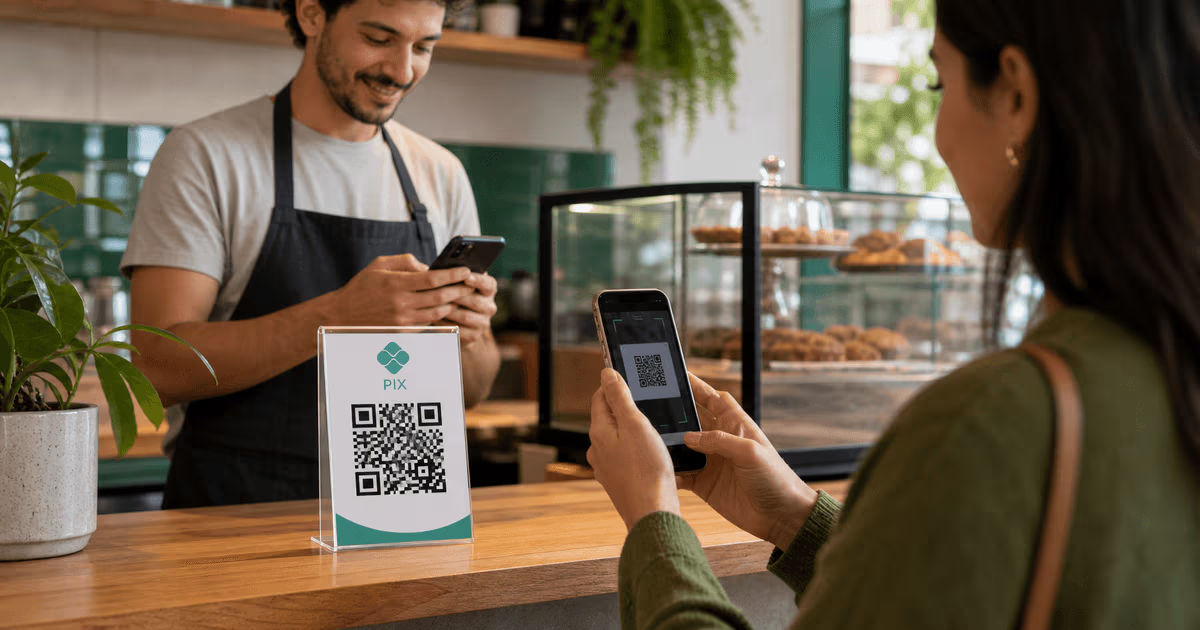
QR codes are the primary interface for Pix payments at the point of sale. The Central Bank designed the system with QR codes as a first-class payment method from day one, publishing detailed technical specifications for both static and dynamic Pix QR codes. When a customer walks into a shop, restaurant, or market stall anywhere in Brazil, they expect to see a Pix QR code at the register. Scanning it with their banking app initiates an instant transfer. No card terminal needed, no cash handling, no waiting. This guide covers everything you need to know to accept Pix payments via QR code, whether you run a corner bakery in Sao Paulo or an e-commerce operation serving the entire country.

According to Statista's research on Pix adoption, the system processed over 4 billion transactions per month by mid-2025, with QR code-initiated payments accounting for a significant share of in-person transactions. The trajectory is clear: Pix is not a trend. It is the permanent foundation of Brazilian commerce, and businesses that do not accept it are leaving money on the table.

Static vs Dynamic Pix QR Codes: Which One Your Business Needs

The Central Bank of Brazil defines two types of Pix QR codes, and understanding the difference is essential before you generate a single code.

Static Pix QR codes contain a fixed Pix key (your CPF, CNPJ, email, phone number, or random key) and optionally a fixed amount. They are reusable — print one, tape it to your counter, and every customer scans the same code. If you set a fixed amount, every transaction is for that exact value. If you leave the amount blank, the customer enters the payment amount manually in their banking app before confirming. Static codes are ideal for small businesses with consistent pricing: a food truck that sells acai bowls for R$15 each, a parking attendant collecting a flat R$10 fee, or a street vendor accepting tips. They cost nothing to generate and never expire.

Dynamic Pix QR codes are unique per transaction. Each code contains a transaction identifier, a specific amount, and optional metadata like an order number or invoice reference. Once paid, the code cannot be reused. Dynamic codes are essential for businesses that need to match payments to specific orders — restaurants with table service, e-commerce checkout flows, subscription billing, and any scenario where you need to confirm that a specific invoice was paid by a specific customer. They require integration with a payment service provider (PSP) or your bank's API to generate programmatically for each transaction.

Most businesses need both types. A static code taped to the register handles walk-up purchases where the cashier verbally confirms the amount. Dynamic codes generated by the point-of-sale system handle itemized orders where automatic reconciliation matters. The good news is that every major Brazilian bank and fintech — Nubank, Inter, Mercado Pago, PagSeguro, Stone, Itau, Bradesco, Banco do Brasil — supports both types. For creating and managing QR codes with tracking capabilities beyond what bank apps offer, see our Pix QR code generator.

A common mistake is using static codes for high-volume operations. When 50 customers scan the same static QR code in an hour and each manually enters a payment amount, reconciling which payment belongs to which order becomes a manual nightmare. If your business processes more than 20 Pix transactions per day and you need to tie payments to specific orders, invest in dynamic QR code integration from the start. The upfront setup cost saves exponentially more time than manual reconciliation.

How Pix QR Code Payments Actually Work (Technical Flow)

Understanding the technical flow helps you troubleshoot issues and choose the right implementation. Here is what happens in the ten seconds between a customer scanning your QR code and the money arriving in your account.

Step 1: QR code scan. The customer opens their banking app (Nubank, Itau, Bradesco, Inter, Caixa, or any of the 800+ institutions connected to Pix) and uses the built-in QR scanner. The app reads the encoded data: your Pix key, the transaction amount (if set), and the transaction identifier (for dynamic codes). The customer sees a confirmation screen showing the recipient name, institution, amount, and any description.

Step 2: Customer confirmation. The customer reviews the details and confirms the payment, typically with a PIN, biometric authentication, or device password. This is the only point where the customer can cancel — once they confirm, the payment is irrevocable.

Step 3: Instant settlement. The customer's bank debits their account and sends the transaction to the Central Bank's SPI (Sistema de Pagamentos Instantaneos), which routes it to your bank. Your bank credits your account. The entire process takes one to ten seconds. Both parties receive a confirmation notification. For dynamic QR codes, the PSP also receives a webhook notification that the specific transaction was completed.

Step 4: Reconciliation. For static codes, you see a credit in your bank statement with the payer's name and the Pix key used. For dynamic codes, the PSP matches the payment to the original transaction ID, automatically marking the invoice or order as paid in your system. This automatic reconciliation is why dynamic codes are worth the integration effort for any business processing significant volume.

The system operates on the Central Bank's infrastructure, which processes transactions with 99.99 percent uptime and handles peak loads exceeding 100 million transactions per day. Unlike card networks that batch-settle, Pix provides real-time gross settlement — each transaction is final and individually settled. There is no pending state, no authorization hold, and no possibility of a chargeback once the customer confirms. This finality is one of the most significant advantages over credit card payments for merchants.

Setting Up Pix QR Codes for Your Business

Getting started with Pix QR codes requires a Brazilian bank account or a payment service provider account. Here are the specific paths depending on your business type.

For sole proprietors and small businesses (MEI, ME). If you already have a business bank account at any Brazilian institution, Pix is already enabled. Open your banking app, navigate to the Pix section, and register your Pix keys — your CNPJ is the most professional option for business payments, but you can also use your email or phone number. Then generate a static QR code directly from the app. Print it, frame it, and place it at your point of sale. Total setup time: under five minutes. Total cost: zero.

For medium and large businesses needing automation. If you process dozens or hundreds of daily transactions, you need dynamic QR codes with automatic reconciliation. This requires integration with a PSP that offers a Pix API. The major providers in Brazil are Mercado Pago, PagSeguro (PagBank), Stone, Cielo, Rede, Gerencianet (now Efí), and Asaas. Each offers REST APIs that let your POS system or e-commerce platform generate a unique Pix QR code for each transaction. When the customer pays, a webhook notifies your system, and the order is automatically marked as paid. Integration typically takes one to three days for a developer familiar with payment APIs.

For e-commerce and online businesses. Pix for online payments works via dynamic QR codes displayed on the checkout page or via a Pix copia e cola (copy and paste) code that the customer pastes into their banking app. Most major e-commerce platforms in Brazil — VTEX, Nuvemshop, Shopify (via Brazilian payment apps), WooCommerce (via plugins) — have native Pix checkout integrations. Enable the Pix payment option in your platform settings, connect your PSP credentials, and the checkout flow handles QR code generation and payment confirmation automatically.

For foreign businesses operating in Brazil. Non-Brazilian companies can accept Pix through a Brazilian legal entity (subsidiary or branch) with a local bank account, or through international PSPs that offer Pix as a payout method. Companies like dLocal, EBANX, and Payoneer provide Pix acceptance for foreign merchants, handling the local banking relationship and converting settlements to USD, EUR, or other currencies. Fees are higher than domestic rates — typically 2 to 4 percent — but still lower than international credit card processing. A Brazilian CNPJ (business registration) is required for direct Pix access.

Regardless of your setup path, test your QR codes thoroughly before going live. Generate a test code, scan it with your personal banking app, and send a R$0.01 payment. Verify that the payment arrives, the recipient name displays correctly, and (for dynamic codes) the webhook fires and your system records the payment. Test with at least two different banking apps — QR code rendering can vary slightly between institutions, and catching display issues in testing prevents customer-facing problems.

How to Set Up Pix QR Code Payments in 4 Steps

Pix QR Code Security and Fraud Prevention

Pix is one of the most secure payment systems in operation, but security depends on correct implementation. The Central Bank mandates end-to-end encryption for all Pix transactions, multi-factor authentication for payment confirmation, and real-time fraud monitoring by all participating institutions. However, the merchant side introduces risks that you must actively manage.

QR code tampering. The most common fraud vector is physical QR code replacement. A bad actor prints a QR code linked to their own Pix key and pastes it over your legitimate code at the register. Every customer who scans the tampered code sends money to the fraudster instead of you. Prevent this by printing your QR code on tamper-evident materials, mounting it behind glass or acrylic, and checking the physical code daily. Some businesses print the first and last characters of their Pix key below the QR code so staff can visually verify the code has not been swapped. For high-risk locations, use a digital display that generates the QR code from your system rather than a printed static code.

Fake payment confirmations. A customer scans the QR code and shows you a screenshot of a payment confirmation — but the screenshot is fabricated, and no actual payment was made. Always verify payments through your own banking app or POS notification, never by looking at the customer's screen. For dynamic codes, your system should confirm the webhook before completing the transaction. For static codes, wait for the credit notification in your bank app before handing over goods. The real notification comes from your bank, not from the customer's device.

Pix key security. Your CNPJ Pix key is public by design — it needs to be, for customers to pay you. But your other keys (CPF, personal phone, personal email) should not be used for business transactions, as they expose personal information unnecessarily. If you need multiple receiving accounts for different business units or locations, register separate Pix keys for each. Never share your bank login credentials with staff who generate QR codes — use your PSP's dashboard with role-based access controls instead.

Transaction limits. The Central Bank allows institutions to set daily and per-transaction Pix limits, and most banks apply default nighttime limits (8 PM to 6 AM) that are lower than daytime limits. If your business receives large payments via Pix, verify that your bank's limits accommodate your expected transaction sizes. You can request limit increases through your banking app, though approval may take 24 to 48 hours. For businesses regularly receiving payments above R$10,000, work with your bank's commercial team to set appropriate limits and ensure your account is flagged as a commercial receiver.

Refund procedures. Since Pix payments are irrevocable, refunds must be processed as a new Pix transfer from your account to the customer's Pix key. Establish a clear refund policy, document the original transaction ID, and process refunds through your bank or PSP within a defined timeframe. The Central Bank introduced the MED (Mecanismo Especial de Devolucao) protocol that allows fraud-related reversals within 80 days, but this is a dispute mechanism, not a routine refund process. For legitimate refunds, initiate them promptly and keep records of both the original payment and the refund transfer.

Pix for E-Commerce: Online QR Code Payments

Pix has rapidly become the preferred payment method for Brazilian e-commerce, overtaking boleto bancario and competing directly with credit cards for online purchases. According to Statista data, Pix accounted for over 30 percent of Brazilian e-commerce transactions by value in 2025, up from less than 5 percent in 2021. The growth is driven by the same factors that fuel in-person adoption: instant settlement, zero chargebacks, and lower fees.

The online Pix checkout flow works differently from in-person payments. When a customer selects Pix at checkout, your payment system generates a dynamic QR code and a Pix copia e cola string. Desktop users see a QR code they can scan with their phone's banking app. Mobile users, who are already on their phone and cannot scan a QR code from the same device, tap a button that copies the Pix code to their clipboard and opens their banking app where they paste it. The best checkout implementations handle both flows seamlessly.

Critical implementation details for e-commerce Pix:

Expiration times. Dynamic Pix QR codes should expire within 15 to 30 minutes for e-commerce checkouts. If a customer abandons the checkout, you do not want the code to remain valid indefinitely — it complicates inventory management and reconciliation. Most PSPs let you set the expiration when creating the charge. Display a countdown timer on the checkout page so the customer knows they need to complete the payment promptly.

Order confirmation flow. Do not confirm the order until you receive the PSP webhook confirming payment. Display a waiting screen with a spinner or progress indicator while listening for the webhook. Most payments confirm within 5 to 15 seconds, so the wait is minimal. If the webhook does not arrive within 60 seconds, display a message asking the customer to check their bank app and contact support if the payment was debited but the order was not confirmed.

Installment payments. Pix does not natively support installments the way credit cards do (parcelamento). However, some PSPs offer Pix parcelado — a buy-now-pay-later product where the customer pays in installments via recurring Pix transfers, and the merchant receives the full amount upfront. This is a growing product category as Pix competes with credit card installment culture, which is deeply embedded in Brazilian consumer behavior.

Integration with checkout platforms. If you use Shopify, WooCommerce, VTEX, Nuvemshop, or another major platform, check for native Pix payment plugins from Brazilian PSPs. Mercado Pago, PagSeguro, and Stone all offer official plugins for major platforms. For custom-built checkout flows, use the PSP's REST API to create charges, generate QR codes, and receive webhooks. The API integration typically involves three endpoints: create charge, get charge status, and a webhook receiver for payment notifications. For creating QR codes to embed in your marketing materials that link to your checkout page, see our QR code creation guide.

Pix Automatico: Recurring Payments via QR Code

Pix Automatico, launched by the Central Bank in mid-2025, extends Pix to recurring payments — subscriptions, utility bills, rent, loan installments, and membership fees. Customers authorize a recurring Pix debit by scanning a QR code once and approving the recurring mandate in their banking app. Subsequent charges are debited automatically on the scheduled dates without requiring the customer to scan or approve each individual payment.

For businesses, Pix Automatico solves the two biggest problems with subscription billing in Brazil. First, credit card decline rates for recurring charges in Brazil average 15 to 25 percent due to card expiration, spending limits, and fraud blocks. Pix debits directly from the bank account, which has a much lower failure rate. Second, boleto-based recurring billing requires the customer to actively pay each month, leading to high involuntary churn — customers who intend to stay subscribed but forget to pay the boleto. Pix Automatico eliminates both problems.

The setup flow uses a QR code as the authorization mechanism. Your system generates a Pix Automatico mandate QR code containing the payment amount (fixed or variable), frequency (weekly, monthly, quarterly, annually), and duration. The customer scans the code, reviews the terms in their banking app, and authorizes the recurring debit. From that point, charges are processed automatically. The customer can cancel the mandate at any time through their banking app, and you receive a webhook notification of the cancellation.

Pix Automatico is particularly transformative for businesses that struggled with payment collection in Brazil: gyms, SaaS companies, streaming services, insurance providers, coworking spaces, and any subscription-based model. If your business currently relies on boleto or credit card recurring billing in Brazil, evaluating Pix Automatico should be a priority. The lower failure rates and instant settlement improve both revenue predictability and cash flow.

Not all banks support Pix Automatico as payers yet — the Central Bank is rolling out participation in phases. Check with your PSP for the current list of supported institutions and expected timeline for full coverage. As of early 2026, the major retail banks (Itau, Bradesco, Banco do Brasil, Caixa, Santander) and the leading fintechs (Nubank, Inter, C6) all support it.

Frequently Asked Questions About Pix QR Code Payments

How do I create a Pix QR code for my business?

Open your business bank account app, navigate to Pix, select Receive, and choose Generate QR Code. Enter your CNPJ as the Pix key and optionally set a fixed payment amount. Download or screenshot the generated QR code. For dynamic QR codes that are unique per transaction, use a payment service provider (PSP) like Mercado Pago, PagSeguro, or Stone, which offer APIs and dashboards to generate codes programmatically. You can also use our Pix QR code generator to create trackable codes with scan analytics.

Is Pix payment free?

For individuals, Pix is free for all transactions — sending and receiving. For businesses (CNPJ accounts), most banks and PSPs charge a small fee per Pix received, typically between 0.5 and 1.5 percent of the transaction value, or a flat fee of R$0.01 to R$0.50. Some banks offer free Pix receiving for business accounts up to a monthly threshold. Generating and displaying a static Pix QR code is always free. The fees apply only to successful incoming payments.

How does a Pix QR code work?

A Pix QR code encodes your Pix key (CNPJ, CPF, email, phone, or random key) and optionally a payment amount and transaction ID. When a customer scans it with their banking app, the app reads the encoded data and displays a payment confirmation screen showing the recipient name, institution, and amount. The customer confirms with their PIN or biometrics. The payment is processed through the Central Bank's instant payment system (SPI) and settles in your account within one to ten seconds. The entire process is encrypted end-to-end.

Can I accept Pix payments without a bank account?

No. Pix requires a bank account or digital payment account at an institution registered with the Central Bank of Brazil. However, the barrier is very low — digital banks like Nubank, Inter, and C6 offer free business accounts that can be opened in minutes with a CNPJ. Payment service providers like Mercado Pago and PagSeguro also offer digital accounts that function as Pix-enabled wallets without a traditional bank account.

What is the difference between static and dynamic Pix QR codes?

A static Pix QR code is reusable and always links to the same Pix key with an optional fixed amount. It is free to generate and works for simple transactions. A dynamic Pix QR code is unique per transaction — it contains a specific amount, transaction ID, and expiration time. Once paid, it cannot be reused. Dynamic codes are essential for businesses that need to automatically match payments to specific orders or invoices. Static codes are printed once and used repeatedly while dynamic codes are generated per sale by a PSP or bank API.

How long does a Pix payment take?

Pix payments settle in one to ten seconds in the vast majority of cases. The Central Bank mandates that participating institutions process Pix transactions within ten seconds. In practice, most payments confirm in under five seconds. The system operates 24 hours a day, 7 days a week, including weekends and holidays. There is no batch processing or next-business-day settlement — each payment is individually and instantly settled.

Is Pix safe for businesses?

Yes. Pix is one of the most secure payment systems globally. The Central Bank mandates end-to-end encryption, multi-factor authentication for payment confirmation, and real-time fraud monitoring by all participating institutions. For merchants, the key security advantage is zero chargebacks — once a customer confirms a Pix payment, it is irrevocable. The main risks are physical QR code tampering (someone replacing your printed code) and fake payment screenshot fraud, both of which are preventable with proper procedures.

Can foreigners use Pix in Brazil?

Foreigners who have a CPF (individual taxpayer registration) and a Brazilian bank account can use Pix as individuals. For businesses, a Brazilian CNPJ (business registration) and a local bank account are required. Foreign companies without a Brazilian entity can accept Pix through international PSPs like EBANX, dLocal, or Payoneer, which handle the local banking relationship and can convert settlements to foreign currencies. Tourism-focused Pix solutions for visitors without CPF are being developed but are not widely available as of early 2026.

How much can I receive via Pix?

There is no Central Bank-imposed maximum for Pix transactions. However, individual banks set their own daily and per-transaction limits. For personal accounts, typical daytime limits range from R$5,000 to R$20,000 and nighttime limits (8 PM to 6 AM) are usually R$1,000 to R$5,000. Business accounts typically have higher limits, often R$50,000 to R$500,000 or more depending on the institution and your account profile. You can request limit increases through your banking app. Contact your bank's commercial team for customized limits if your business requires higher thresholds.

What is a Pix key?

A Pix key is a unique identifier that links to your bank account, simplifying the payment process so the payer does not need to know your account number, branch, or bank code. There are five types of Pix keys: CPF (individual tax ID), CNPJ (business tax ID), email address, phone number, and EVP (a random 32-character UUID generated by your bank). Each key can be registered to only one account at a time. For business use, the CNPJ key is recommended as it displays your registered company name to customers during payment confirmation.

How do I generate a Pix QR code for free?

Every Brazilian bank and digital payment app generates static Pix QR codes for free — open your banking app, go to Pix, select Receive, and choose QR Code. No additional software or paid service is needed for basic static codes. For dynamic QR codes, some PSPs offer free tiers with limited monthly transactions (Mercado Pago, for example, includes Pix in its standard merchant account at no additional setup cost). The QR code generation itself is always free; fees apply only to received payments.

Can I use Pix for online payments?

Yes. Pix is widely used for e-commerce and online payments. At checkout, your payment system generates a dynamic QR code that desktop users scan with their phone, and a Pix copia e cola code that mobile users paste into their banking app. Most major Brazilian e-commerce platforms (VTEX, Nuvemshop, Shopify via Brazilian payment apps, WooCommerce via plugins) support native Pix checkout integration through PSPs like Mercado Pago, PagSeguro, and Stone. Pix accounts for over 30 percent of Brazilian e-commerce transaction volume as of 2025.

Enjoyed this article? Share it!

Ready to Create Your Own QR Codes?

Start for free and upgrade as you grow. All plans include dynamic QR codes, analytics, and custom branding.

All plans include Unlimited Static QR Codes 39 QR Code Types Unbranded QR Codes Email Support
Starter
For personal projects
Free
No card required
  • 3 Dynamic QR Codes Editable QR codes — change the destination URL anytime
  • 1,000 Scans / Month Soft limit — QR codes keep working
  • 30-Day Analytics View scan data from the last 30 days
  • 1 Folder Organize your QR codes into a folder
  • JPG, PNG, WEBP Downloads
  • Pause & Activate QR Codes Pause QR codes to stop scans, reactivate anytime within your plan limit
Starter+
For more personal projects
$5.83 /mo
$70 billed yearly
  • 15 Dynamic QR Codes
  • Unlimited Scans
  • 30-Day Analytics
  • Custom Logo Upload
  • SVG / PDF Downloads
  • 3 Folders
  • 5 MB PDF Upload
  • JPG, PNG, WEBP Downloads
Most Popular
Pro
Best for marketers
Everything you need for QR campaigns
$11.67 /mo
$140 billed yearly
  • 50 Dynamic QR Codes
  • Unlimited Scans
  • 60-Day Analytics Upgraded from 30 days
  • Password Protected QRs Require a password before showing QR content
  • Smart Redirect Rules Redirect by device, country, or time
  • Access Consent Screens Age verification, terms, disclaimers
  • Expiry Rules Auto-expire by date or scan count
  • QR Scheduling Set start/end times for QR activity
  • 5 Folders
  • 10 MB PDF Upload
Business
For teams & agencies
$24.17 /mo
$290 billed yearly
  • 250 Dynamic QR Codes
  • Unlimited Scans
  • 90-Day Analytics Upgraded from 60 days
  • Bulk QR (100/batch)
  • Team Management (3 Members) Invite team members to collaborate on QR codes, analytics, and folders
  • Lead Capture Forms Collect leads directly from QR code scans
  • 25 Folders
  • 20 MB PDF Upload
  • CSV Report Export
Enterprise
For large organizations
$82.50 /mo
$990 billed yearly
  • 1,000 Dynamic QR Codes
  • Unlimited Scans
  • Bulk QR (500/batch)
  • Retargeting Pixels Add Facebook, Google, GTM tracking pixels to QR landing pages
  • Team Management (10 Members) Invite up to 10 team members with role-based access control
  • White Label Domains Use your own domain for QR redirects (e.g. qr.yourbrand.com)
  • 100 Folders
  • 50 MB PDF Upload
  • Dedicated Success Manager

Why businesses choose QRLynx

Features most competitors charge extra for — included in every plan

39
QR Code Types
URL, WiFi, vCard, PDF & more
Bio Pages
Built-in Landing Pages
No Linktree needed
Unbranded
No Watermark on Free
Even on the Starter plan
Unlimited
Scans on All Paid Plans
No scan caps, no surprises
275+
Edge Locations
Sub-50ms redirects globally
Lead Forms
Capture Contacts
Built-in lead gen from scans
Smart Rules
Conditional Redirects
By device, location, or time
PDF QR
Upload & Share PDFs
Menus, flyers, documents

Ready to Transform Your QR Code Experience?

Join thousands of businesses already using QRLynx to create, customize, and track their QR codes with ease.

No credit card required
Free forever Starter plan
Cancel anytime