QR Code Versions Explained: Version 1 to Version 40

Key Takeaway
Understand QR Code Versions 1 to 40, module dimensions, capacity by data mode, error-correction tradeoffs, physical sizing, and how generators choose a version.
Reviewed: July 2026
Version dimensions, capacity values, error-correction guidance, margins, module sizing, Model 2, and Micro QR facts were checked against DENSO WAVE's current public QR Code references and the ISO/IEC 18004 framework in July 2026.
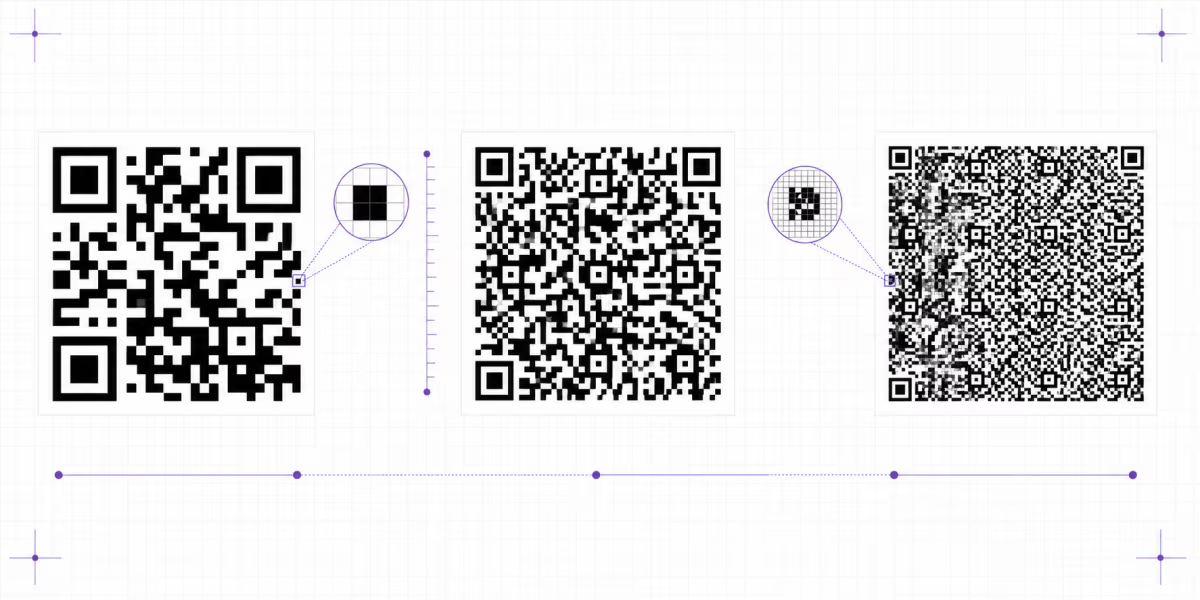
A standard Model 2 QR Code has 40 possible versions. Version 1 is 21 by 21 modules, Version 40 is 177 by 177 modules, and every step adds four modules per side. The version sets the symbol's module dimensions and contributes to capacity. It does not, by itself, define a physical print size or guaranteed scan distance.
Capacity also depends on the data mode and error-correction level. Physical size depends on the chosen module size plus the required quiet zone. Readability then depends on the printer, reader, contrast, distortion, surface, lighting, and how the finished symbol is used.
Most QR generators choose the smallest version that can hold the encoded data at the selected error-correction level. Manual version selection is mainly useful when an industrial workflow requires fixed symbol dimensions or when you are diagnosing why a QR has become too dense for the available print area.
The module-count formula
The number of modules on each side is 17 + 4 × version. Version 1 is 17 + 4 = 21 modules per side. Version 10 is 17 + 40 = 57. Version 40 is 17 + 160 = 177.
DENSO WAVE states that a standard QR Code also needs a clear margin four modules wide on every side. If the module is m millimeters wide, the full square area including that quiet zone is (17 + 4 × version + 8) × m millimeters per side.
That formula explains why version is not the same as physical size. A Version 3 symbol can be printed at several sizes by changing the module size. The practical lower limit comes from the printing process and the reader that must resolve each module, not from a universal one-inch rule.
See DENSO WAVE's version reference, module-size guidance, and code-area calculation for the underlying method.
Capacity by version at error-correction level L
The table preserves the maximum single-mode values published by DENSO WAVE for standard Model 2 QR Codes at level L. Numeric, alphanumeric, binary, and Kanji modes pack data differently, so a character count is meaningful only when the mode is named. Mixed content can produce a different bit calculation.
| Version | Grid | Numeric | Alphanumeric | Binary bytes | Kanji |
|---|---|---|---|---|---|
| V1 | 21×21 | 41 | 25 | 17 | 10 |
| V2 | 25×25 | 77 | 47 | 32 | 20 |
| V3 | 29×29 | 127 | 77 | 53 | 32 |
| V4 | 33×33 | 187 | 114 | 78 | 48 |
| V5 | 37×37 | 255 | 154 | 106 | 65 |
| V6 | 41×41 | 322 | 195 | 134 | 82 |
| V7 | 45×45 | 370 | 224 | 154 | 95 |
| V8 | 49×49 | 461 | 279 | 192 | 118 |
| V9 | 53×53 | 552 | 335 | 230 | 141 |
| V10 | 57×57 | 652 | 395 | 271 | 167 |
| V11 | 61×61 | 772 | 468 | 321 | 198 |
| V12 | 65×65 | 883 | 535 | 367 | 226 |
| V13 | 69×69 | 1,022 | 619 | 425 | 262 |
| V14 | 73×73 | 1,101 | 667 | 458 | 282 |
| V15 | 77×77 | 1,250 | 758 | 520 | 320 |
| V16 | 81×81 | 1,408 | 854 | 586 | 361 |
| V17 | 85×85 | 1,548 | 938 | 644 | 397 |
| V18 | 89×89 | 1,725 | 1,046 | 718 | 442 |
| V19 | 93×93 | 1,903 | 1,153 | 792 | 488 |
| V20 | 97×97 | 2,061 | 1,249 | 858 | 528 |
| V21 | 101×101 | 2,232 | 1,352 | 929 | 572 |
| V22 | 105×105 | 2,409 | 1,460 | 1,003 | 618 |
| V23 | 109×109 | 2,620 | 1,588 | 1,091 | 672 |
| V24 | 113×113 | 2,812 | 1,704 | 1,171 | 721 |
| V25 | 117×117 | 3,057 | 1,853 | 1,273 | 784 |
| V26 | 121×121 | 3,283 | 1,990 | 1,367 | 842 |
| V27 | 125×125 | 3,517 | 2,132 | 1,465 | 902 |
| V28 | 129×129 | 3,669 | 2,223 | 1,528 | 940 |
| V29 | 133×133 | 3,909 | 2,369 | 1,628 | 1,002 |
| V30 | 137×137 | 4,158 | 2,520 | 1,732 | 1,066 |
| V31 | 141×141 | 4,417 | 2,677 | 1,840 | 1,132 |
| V32 | 145×145 | 4,686 | 2,840 | 1,952 | 1,201 |
| V33 | 149×149 | 4,965 | 3,009 | 2,068 | 1,273 |
| V34 | 153×153 | 5,253 | 3,183 | 2,188 | 1,347 |
| V35 | 157×157 | 5,529 | 3,351 | 2,303 | 1,417 |
| V36 | 161×161 | 5,836 | 3,537 | 2,431 | 1,496 |
| V37 | 165×165 | 6,153 | 3,729 | 2,563 | 1,577 |
| V38 | 169×169 | 6,479 | 3,927 | 2,699 | 1,661 |
| V39 | 173×173 | 6,743 | 4,087 | 2,809 | 1,729 |
| V40 | 177×177 | 7,089 | 4,296 | 2,953 | 1,817 |
These are ceilings, not recommended payload sizes for every print use. A Version 40 symbol can be standards-valid while still being inappropriate for a small label or a low-resolution production process.
Version 40 capacity by error-correction level
| Level | Approximate restoration capability | Numeric | Alphanumeric | Binary bytes | Kanji |
|---|---|---|---|---|---|
| L | About 7% of codewords | 7,089 | 4,296 | 2,953 | 1,817 |
| M | About 15% of codewords | 5,596 | 3,391 | 2,331 | 1,435 |
| Q | About 25% of codewords | 3,993 | 2,420 | 1,663 | 1,024 |
| H | About 30% of codewords | 3,057 | 1,852 | 1,273 | 784 |
Why error correction changes the required version
QR Codes offer levels L, M, Q, and H. Raising the level adds more recovery information, which leaves less capacity for the payload at the same version. If the data no longer fits, the generator must choose a higher version or reject a manually fixed version.
DENSO WAVE describes the restoration figures as approximate shares of total codewords. They are not a promise that the same percentage of any visible corner, logo, scratch, or stain can be removed safely. Damage location, print quality, finder patterns, quiet zone, distortion, and the reader still matter.
Choose the level for the real operating environment. DENSO WAVE notes that M is commonly selected, while Q or H may suit environments where dirt or damage is more likely. A logo is also an obstruction, so add it conservatively and test the finished symbol rather than assuming level H makes every overlay safe. See the error-correction guide for the full decision.
How to create and test an auto-sized QR Code in QRLynx
QRLynx selects the smallest version that fits the encoded data, so focus on the real payload and final physical result.
Choose the payload and QRLynx QR type
Prepare the exact URL, text, contact, network, payment, or other payload, then choose the matching QRLynx QR type. Numeric, alphanumeric, binary, and Kanji data have different capacities, so use the real content rather than a placeholder.
Choose static or dynamic behavior
Use a static QRLynx QR when the final payload should be encoded directly. Use a dynamic Website / Link QR when destination editing or eligible redirect analytics matter. A short redirect URL can also be more compact than a long final URL.
Create and design the symbol
Enter the content in QRLynx. The renderer uses automatic version sizing and selects the smallest version that fits the payload at the chosen error-correction level. Keep strong contrast, preserve the quiet zone, and use logos or frame labels carefully.
Calculate the required physical area
Multiply the resulting module count by the chosen module size, then add four modules of quiet zone on every side. Confirm that the printer and intended reader can resolve the selected module size.
Test the real output
Print or display the exact final QRLynx symbol at its intended scale, material, contrast, distance, angle, and lighting. Test more than one intended reader before production.
Payload ready
Generate the smallest version that fits
Create the QR with the actual data and error-correction setting, then test the exported symbol at its final size. Use a dynamic URL when a short managed link is more practical than a long fixed destination.
Why a lower version can be easier to print at the same size
At the same physical width, a lower-version QR has fewer modules across, so each module is larger. A higher-version QR at that same width has smaller modules. Larger modules generally give the printer and reader more resolution margin.
This does not make one version universally scannable from a specific distance. DENSO WAVE says module size should be selected from the printer and reader capabilities, and its phone FAQ notes that mobile performance depends heavily on the camera. Contrast, focus, glare, surface curvature, motion, and the quiet zone also affect the result.
The correct workflow is to minimize unnecessary payload, choose the required error correction, let the generator select the smallest fitting version, calculate the physical area, and test the final artifact. A short dynamic redirect can reduce the encoded payload when post-print destination editing is also useful, but QRLynx does not promise that every dynamic symbol will always be Version 2, Version 3, or any other fixed range.
Use the QR code size calculator, the print-size guide, and the readability checker as planning aids, followed by a physical test.
Version information and alignment patterns
Versions 1 to 6 do not carry the separate version-information areas used by larger symbols. A decoder can derive their version from the symbol dimensions. Versions 7 to 40 include replicated version information protected with BCH error correction.
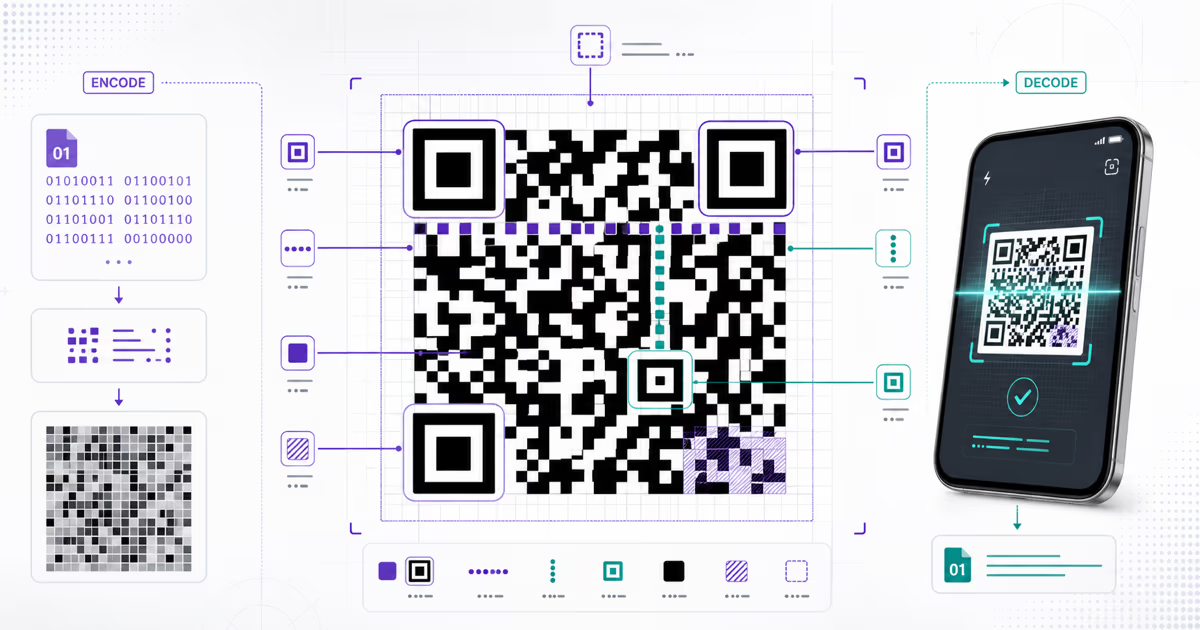
Standard Model 2 QR Codes also use alignment patterns to help readers account for distortion. DENSO WAVE explains that Model 2 improved on Model 1 so codes on curved surfaces or viewed at an angle can be read more efficiently by referring to embedded alignment patterns. More alignment patterns appear as versions grow, but they do not make every curved or distorted print reliable. The final surface still needs testing.
Model and version are different concepts. DENSO WAVE describes Model 1 as the original form with versions only up to 14. Model 2 extends through Version 40 and is what the term QR Code usually refers to today.
Micro QR Code versions
| Micro version | Modules | Available error-correction levels | Maximum numeric capacity |
|---|---|---|---|
| M1 | 11×11 | No correction level listed | 5 |
| M2 | 13×13 | L, M | 10 at L |
| M3 | 15×15 | L, M | 23 at L |
| M4 | 17×17 | L, M, Q | 35 at L |
Micro QR uses a separate version system
Micro QR Code is not Version 0 of a standard QR Code. It has versions M1 to M4, one position-detection pattern, and a two-module margin instead of the four-module margin required by standard QR Code. DENSO WAVE states that even M4 holds less data than a standard Version 1 symbol.
Micro QR can reduce the printed area for short data in controlled systems. Do not assume every consumer phone or application supports it. Confirm the exact encoder, reader, data mode, error correction, margin, and physical production process before choosing it for a public workflow.
See DENSO WAVE's Micro QR reference for the capacity table and standardization details.
QR Code version questions
Standards-based answers about dimensions, capacity, and practical selection.
What is a QR Code version?
For a standard Model 2 QR Code, the version is the numbered symbol size from Version 1 through Version 40. Version 1 is 21 by 21 modules, and each step adds four modules per side until Version 40 at 177 by 177.
How do I calculate the modules per side?
Use 17 + 4 × version. For example, Version 3 has 29 modules per side. The physical area also needs a quiet zone four modules wide on every side.
How much data can a QR Code hold?
The largest standard QR Code, Version 40 at error-correction level L, can hold up to 7,089 numeric digits, 4,296 alphanumeric characters, 2,953 binary bytes, or 1,817 Kanji characters in the corresponding single mode. Mixed data and higher error correction change the capacity.
Are QR Code version and error correction the same thing?
No. Version sets the module dimensions. Error-correction level sets how much recovery information is included. Raising error correction can require a higher version for the same payload because less capacity remains for data.
Does a higher QR Code version scan from farther away?
Not by itself. At a fixed physical width, a higher version makes each module smaller. Readability depends on module size, printer and reader resolution, contrast, focus, quiet zone, distortion, material, lighting, and the final test conditions.
What version does a URL require?
There is no universal URL-length-to-version rule. The exact string, character encoding, segmentation, error-correction level, and encoder affect the result. Enter the final data and let the generator choose the smallest version that fits.
Should I manually force a QR Code version?
Usually no. Let the generator choose the smallest fitting version. Fixed versions can be useful in controlled industrial layouts, but the generator must reject or enlarge the symbol if the data and error correction do not fit.
Does a dynamic QR always use Version 2 or Version 3?
No fixed version is guaranteed. A dynamic QR commonly encodes a shorter managed URL than a long direct destination, which can reduce density, but the actual version still depends on the exact encoded string and error-correction setting.
Does QRLynx show the QR version in saved metadata?
QRLynx automatically generates a standards-compatible symbol that fits the selected content and design. The current product does not promise a user-facing saved-metadata field for the version, so this guide does not claim one.
What is the difference between Model 2 and Micro QR?
Model 2 is the familiar standard QR Code with three finder patterns and Versions 1 to 40. Micro QR uses one finder pattern, versions M1 to M4, lower capacity, and a smaller required margin. Reader support must be verified for the intended workflow.
Can error correction guarantee a damaged QR will scan?
No. L, M, Q, and H provide increasing recovery capability, but damage location, finder patterns, quiet zone, print quality, distortion, and reader capability still matter. Test the finished symbol after any logo or design change.
Use version as a design constraint, not a marketing score
A higher version is not a better QR Code. It is a larger module grid chosen because the encoded data and error-correction setting require more capacity. For practical scanning, the useful target is normally the smallest version that accurately holds the required payload.
If a direct static payload creates a symbol that is too dense for the available print area, reduce unnecessary data or reconsider the architecture. A dynamic URL QR can encode a managed short link and allow destination changes after printing. It still needs an appropriate physical size, quiet zone, contrast, and real-world test.
For the broader standard, read ISO/IEC 18004 explained. For exact payload syntax by type, use the QR format reference.