How to Accept Crypto Payments by QR Code with QRLynx

Key Takeaway
Choose a direct wallet QR or processor checkout, create the correct QRLynx payment QR, label the asset and network, and verify every merchant payment flow.
What does a merchant need to accept crypto by QR code?
A merchant needs a receiving route, a QR payload that matches that route, a visible asset and network label, a way to confirm payment, and a record that connects the transfer to the sale.
There are two practical paths. A direct-wallet QR encodes a public receiving address or payment URI, and the merchant monitors the wallet or account. A processor-checkout QR opens a hosted invoice or checkout URL, and the processor manages the payment request, status, and settlement options it supports.
QRLynx can create both QR surfaces. Its Bitcoin and Ethereum types create static address-based payment URIs. Its Website / Link type can open a processor checkout as a static or dynamic URL QR. QRLynx creates and manages the QR, while the wallet or payment processor executes and confirms the financial transaction.
Choose the merchant payment flow first
| Payment flow | What the QR represents | Merchant fit |
|---|---|---|
| Direct Bitcoin or Ethereum wallet | A public receiving address expressed as a bitcoin: or ethereum: URI | A merchant prepared to verify transactions, reconcile sales, secure wallet access, and manage refunds |
| Direct address on another network | A network-specific public address in a static Text QR | A controlled wallet flow tested with the exact payer and receiving services |
| Processor checkout | A hosted invoice or checkout URL | Orders that need transaction references, payment status, quote handling, receipts, conversion, or processor-managed refunds |
What QRLynx creates for each crypto payment route
The current QRLynx Bitcoin QR type encodes bitcoin:ADDRESS. The current Ethereum QR type encodes ethereum:ADDRESS. Both are static-only payloads, and the current forms do not add an amount, order reference, Ethereum chain ID, or token contract.
For another public-address format, QRLynx can encode the exact supplied value as a static Text QR. Wallet recognition varies, so a merchant should decode the finished QR and test it with the intended payer wallet and receiving account.
For a processor flow, create the invoice or checkout in the chosen processor first, then place its HTTPS URL in the QRLynx Website / Link type. Static mode directly encodes the checkout URL. Dynamic mode uses a QRLynx short link, supports destination updates and scan analytics, and is appropriate only when the processor URL remains valid for the intended use. A scan is not proof of payment, so the merchant still confirms status in the wallet, processor, or order system.
Which system confirms each part of the payment
| Surface | QRLynx confirms | Payment system confirms |
|---|---|---|
| Direct wallet QR | The generated QR decodes to the public payload supplied by the merchant | Asset, network, amount, recipient account, confirmations, and credited balance |
| Processor URL QR | The QR opens the configured checkout URL, and a dynamic URL QR can record scans | Invoice validity, exchange quote, payment status, settlement, receipt, and refund state |
| Printed sign | The exported QR remains readable when tested at the final size | The person scanning selects and authorizes the intended transaction |
Design the merchant payment policy before printing
Define the exact assets and networks the receiving account supports, who controls wallet access, how staff confirm a completed payment, how the fiat sale value is recorded, and how refunds are authorized. A short, specific policy gives staff one repeatable process.
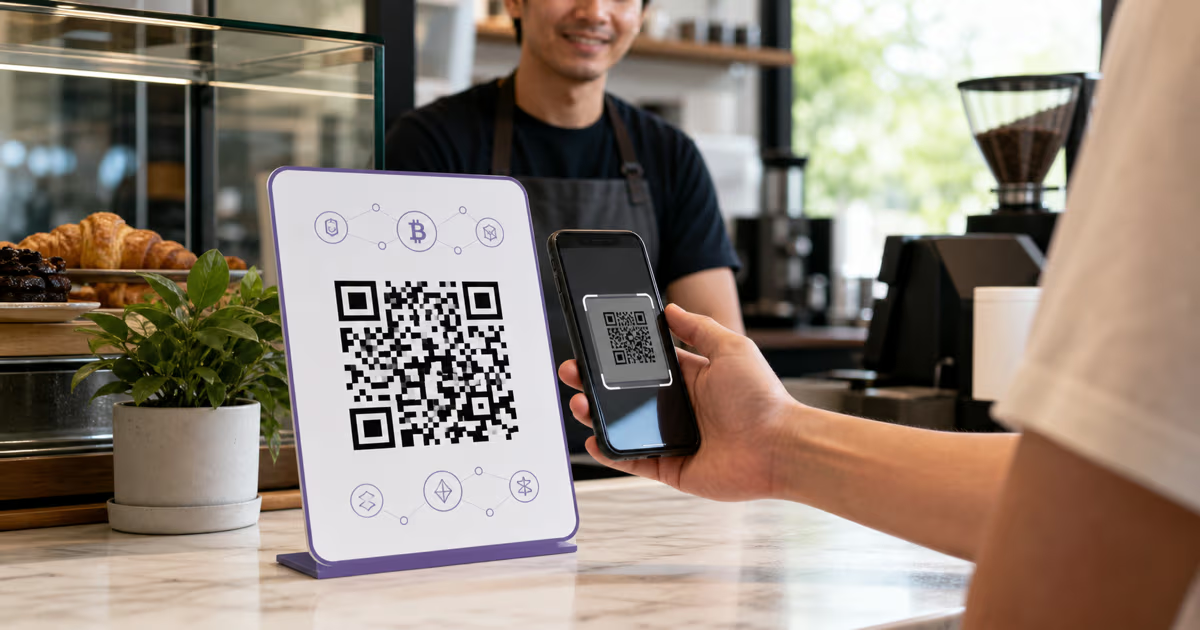
For a direct QR, place the asset and network beside the code, such as Bitcoin on Bitcoin mainnet or USDC on Base. Show a recognizable portion of the receiving address so the payer can compare it with the wallet preview. If the QR does not contain an amount, tell the payer where the final amount appears.
For a hosted checkout, display the order amount and currency in the checkout itself and keep the customer on the processor’s documented confirmation path. Transaction-specific checkouts usually provide a clearer match between an order and an onchain transfer than one reusable wallet address.
How to create a merchant crypto payment QR in QRLynx
Choose direct wallet or processor checkout
Use a direct wallet when the business can monitor and reconcile the account. Use a processor checkout when the sale needs an invoice reference, payment status, quote handling, settlement options, or processor-managed operations.
Choose one exact asset and network
Confirm that the receiving wallet, exchange, or custodian supports the same asset and network the payer will use. Record that combination in the merchant payment policy.
Copy the public address or checkout URL
Copy a receiving address from the intended wallet account, or create the hosted invoice in the processor and copy its HTTPS checkout URL. Keep private keys and recovery phrases outside the QR workflow.
Select the matching QRLynx type
Choose Bitcoin for a Bitcoin address, Ethereum for an Ethereum address, Text for another tested public-address payload, or Website / Link for a hosted processor checkout.
Choose static or dynamic only when supported
Bitcoin, Ethereum, and Text payment payloads remain static. A Website / Link checkout can be static or dynamic. Use dynamic only when destination editing and scan analytics fit the checkout lifecycle.
Add the visible payment instructions
Label the asset and network, show the amount source, and include enough of the receiving address or order reference for the customer and staff to compare.
Decode and test the finished QR
Use the QRLynx QR scanner to compare the complete decoded payload with the source, then test the final printed or displayed QR with the intended payer wallet or processor flow.
Confirm credit before completing the sale
Use the wallet, processor, or order system to confirm the payment status required by the business. Record the transaction identifier, amount, asset, network, time, and fiat sale value in the merchant record.
Merchant launch and checkout checklist
| Check | What to verify | Owner |
|---|---|---|
| Receiving route | The public address or checkout URL belongs to the intended merchant account | Account owner |
| Asset and network | Payer and recipient use the same named payment rail | Checkout staff |
| QR payload | The decoded value exactly matches the approved source | QR publisher |
| Amount | The customer sees where the final crypto or fiat amount is defined | Checkout staff or processor |
| Confirmation | Staff know which wallet, processor, or order status completes the sale | Operations lead |
| Record | Transaction ID, timestamp, asset, network, amount, and sale value are retained | Finance team |
| Refund | A current destination, network, amount policy, and authorization are verified | Authorized account owner |
| Physical security | Displayed codes are inspected and compared with the approved master | Site manager |
Reconcile each payment to the sale
A reusable wallet address can receive several transfers, so the merchant needs a reliable way to match each transfer to an order. Record the transaction identifier, timestamp, asset, network, crypto amount, fiat sale value, customer or order reference where appropriate, and the account that received it.
A processor checkout can supply transaction-level status and references when those features are part of its current product. For a direct wallet, the merchant builds the matching process around wallet records and the point-of-sale or invoicing system.
QRLynx scan analytics measure interaction with a dynamic checkout URL. They do not establish that a wallet authorized a transfer or that the merchant received funds. Financial reconciliation should use the authoritative wallet, blockchain, processor, and order records.
Handle refunds and QR security with a controlled workflow
For a refund, verify the customer, approved amount, asset, network, and a current receiving destination before an authorized person sends funds or approves the processor refund. The address that originally sent a payment can belong to an exchange or intermediary, so it is not automatically the correct refund destination.
Keep private keys and recovery phrases within the wallet or custodian’s approved security process. A receive QR contains public payment information only. Use role-based access, hardware signing or multisignature controls when appropriate, and a documented recovery process for merchant-controlled wallets.
Inspect physical displays against an approved master image. For screens, control access to the device and checkout account. The official Bitcoin and Ethereum URI specifications both place final authorization with the payer, so the customer should review the recipient and amount before confirming.
Accounting and tax records for US merchants
For United States federal tax purposes, the IRS treats digital assets received for services as income measured in US dollars at the time of receipt. The IRS also states that the basis of digital assets received for services is generally their fair market value when received, and it requires records sufficient to establish positions reported on a tax return.
A US merchant record should therefore retain the receipt time, asset, quantity, fair market value source, transaction identifier, fees, and later disposition information when applicable. Sales tax, financial reporting, and licensing questions depend on the business and jurisdiction.
This section is operational information, not tax or legal advice. US businesses can review the IRS digital-asset FAQs and work with a qualified professional. Merchants elsewhere should use the current rules and professional guidance for their jurisdiction.
Evaluate a crypto payment processor by workflow
Processor products, supported jurisdictions, assets, networks, fees, settlement choices, and integrations change. Evaluate the current first-party documentation and contract for the exact merchant account rather than relying on a dated provider leaderboard.
- Availability: merchant country, customer geography, business category, onboarding, and support.
- Payment request: transaction-specific address or QR, quote duration, supported assets and networks, underpayment and overpayment handling.
- Settlement: crypto or fiat options, timing, fees, minimums, and withdrawal rules.
- Operations: payment status, order references, receipts, refunds, exports, API or commerce-platform integration.
- Controls: account permissions, custody model, security documentation, compliance responsibilities, and incident support.
Once a processor checkout URL is approved, QRLynx can turn that route into a branded, tested QR surface without claiming to replace the processor’s payment system.
Crypto payment QR questions about QRLynx
Can QRLynx create a QR code for accepting Bitcoin?
Yes. The QRLynx Bitcoin type encodes bitcoin: followed by the supplied public address. The current form creates an address-based static QR and does not add an amount or order reference.
Can QRLynx create a QR code for accepting Ethereum?
Yes. The QRLynx Ethereum type encodes ethereum: followed by the supplied public address. It is static-only and the current form does not add a chain ID, token contract, or amount.
Can I use QRLynx for USDC or USDT payments?
Yes, when the merchant has a tested receiving route. Use the Ethereum type for an address-only EVM flow, a Text QR for another tested public-address format, or a Website / Link QR for a processor checkout. Label and verify the exact asset and network.
Should a merchant use a static or dynamic crypto payment QR?
Direct Bitcoin, Ethereum, and Text payment payloads are static in QRLynx. A processor checkout URL can use the Website / Link type in static or dynamic mode. Dynamic mode is useful when destination management and scan analytics match the checkout lifecycle.
Does a QRLynx scan mean the crypto payment completed?
No. A scan shows that someone interacted with the QR. Confirm payment through the receiving wallet, blockchain record, processor status, and order system used by the merchant.
Can a merchant reuse one wallet QR for every sale?
A reusable receiving address can work when the merchant has a reliable reconciliation method. Transaction-specific processor checkouts usually provide clearer order matching, quote handling, and status for structured commerce.
How should the asset and network appear beside the QR?
Use the complete payment rail, such as Bitcoin on Bitcoin mainnet or USDC on Base. Show enough of the receiving address or order reference for the payer and staff to compare with the wallet or checkout preview.
How should a crypto refund be sent?
Verify the customer, approved amount, asset, network, and a current receiving destination before an authorized person sends or approves the refund. The original sending address is not automatically the correct destination.
How can staff verify a payment before completing the sale?
Use the merchant’s documented wallet, processor, or order status. The required confirmation policy depends on the selected payment rail and receiving service, so staff should follow one approved workflow.
What records should a merchant keep for a crypto payment?
Keep the transaction identifier, timestamp, asset, network, crypto amount, fiat sale value, fees, order reference when applicable, receiving account, and refund or disposition records required by the business and jurisdiction.
Official sources and related QRLynx guides
The payment URI structure is documented in the official Bitcoin BIP 321 and Ethereum ERC-681 specifications. US businesses can review the current IRS digital-asset FAQs. Merchant acceptance models and operational decisions were also checked against a current first-party business crypto-payment guide.
For payload-specific guidance, see the QRLynx guides to USDC QR codes and USDT QR codes. Create a direct address QR with the Bitcoin generator or Ethereum generator, build other payment surfaces with the QRLynx QR generator, and decode the exported result with the QRLynx QR scanner.
Payment route approved
Create and verify the merchant payment QR in QRLynx
Encode the approved wallet payload or checkout URL, label the exact payment rail, and decode the exported QR before launch.