How to Create a vCard QR Code (2026 Guide)

Key Takeaway
vCard QR codes share full contact details with one scan. Compare vCard vs URL, static vs dynamic, NFC alternatives, and design best practices with analytics.
Why vCard QR Codes Are Replacing Paper Business Cards
The paper business card has been a networking staple for over 400 years, but it has a fundamental flaw: most of them end up in a drawer, a pocket, or a trash can. According to Adobe research, 88 percent of paper business cards are discarded within a week of being handed out. Of the ones that survive, fewer than 30 percent ever get their contact details manually typed into a phone. That means roughly 90 percent of every networking interaction that ends with a card exchange produces zero lasting digital contact.
vCard QR codes eliminate this problem entirely. A single scan with any smartphone camera saves your full name, phone number, email address, company, title, website, physical address, and even a profile photo directly into the recipient's phone contacts. No typing. No lost cards. No forgotten names three days after a conference. The contact data is digital from the moment of exchange, which means it is searchable, syncable across devices, and permanently accessible.
The adoption numbers tell a compelling story. Statista projects over 102 million Americans will scan a QR code in 2026, and Grand View Research values the global digital business card market at $242.3 million in 2024, growing at 11.2 percent annually through 2030. Professionals are not just open to digital contact sharing — they are actively seeking it.
This guide walks you through everything you need to know about creating a vCard QR code: what it is, how it compares to a simple URL QR code, what information to include, static versus dynamic options, real-world use cases from networking events to email signatures, design best practices, how it stacks up against NFC, and answers to the 12 most common questions. Whether you are a solo freelancer, a sales team of 50, or a real estate agent handing out hundreds of cards per month, a vCard QR code is the most efficient way to turn a brief introduction into a permanent digital connection.
What Is a vCard QR Code and How Does It Work?
A vCard (Virtual Contact File) is a standardized file format for electronic business cards, defined in RFC 6350. The format was originally created by the Internet Mail Consortium in the 1990s and is now universally supported by iOS, Android, Windows, macOS, Google Contacts, Outlook, and virtually every address book application on the market. The current standard is vCard 4.0, though many QR generators still use vCard 3.0 for maximum backward compatibility.
A vCard file uses the .vcf extension and contains structured text fields for contact data. Here is a simplified example of a vCard 3.0 structure:
BEGIN:VCARD
VERSION:3.0
N:Smith;Jane;;Ms.;
FN:Jane Smith
ORG:Acme Corp
TITLE:VP of Sales
TEL;TYPE=WORK,VOICE:+1-555-123-4567
TEL;TYPE=CELL:+1-555-987-6543
EMAIL:jane.smith@acme.com
URL:https://acme.com
ADR;TYPE=WORK:;;123 Main St;Portland;OR;97201;USA
END:VCARD
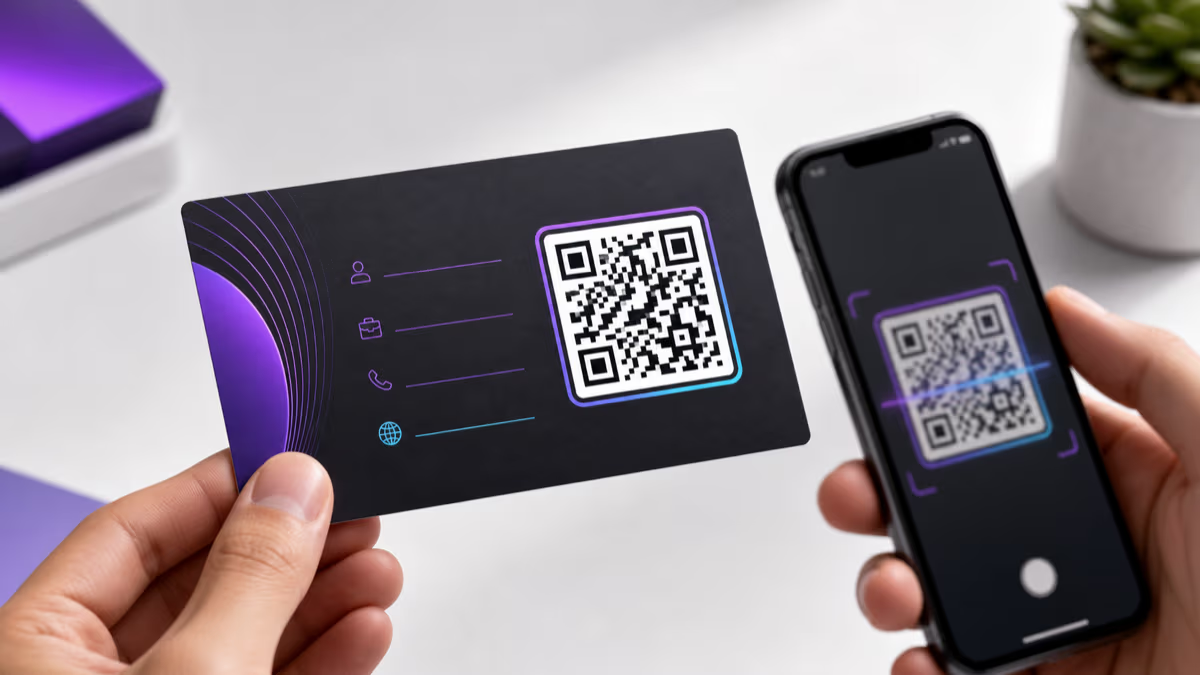
When this data is encoded into a QR code, scanning it triggers the phone's native contact-saving flow. On iPhone, a preview card appears showing all the contact fields, and the user taps 'Create New Contact' or 'Add to Existing Contact.' On Android, the behavior is similar — the phone's default contacts app opens with all fields pre-filled, and the user taps 'Save.' The entire process takes about three seconds from scan to saved contact.
vCard 3.0 vs vCard 4.0
vCard 3.0 (RFC 2426) is the most widely supported version and is the safer choice for QR codes that need to work across every device. vCard 4.0 (RFC 6350) adds support for additional properties like instant messaging handles, relationship fields, and better internationalization, but older Android devices and some third-party contact apps may not parse 4.0 fields correctly. For maximum compatibility, use vCard 3.0 unless you need 4.0-specific features like the IMPP (instant messaging) property.
Data Capacity Limits
A QR code can hold a maximum of approximately 4,296 alphanumeric characters at the lowest error correction level. A typical vCard with name, title, company, two phone numbers, email, website, and address uses about 300 to 500 characters — well within limits. However, adding a Base64-encoded profile photo can push the data to 10,000+ characters, which exceeds QR code capacity. For photo-inclusive vCards, use a dynamic QR code that links to a hosted vCard file rather than encoding the data directly. QRLynx handles this automatically when you create a contact-type QR code.
vCard QR Code vs URL QR Code: Which Should You Use?
When people think about putting their contact information on a QR code, they often consider two approaches: encoding a vCard directly into the QR code, or encoding a URL that links to a digital profile page. Both have legitimate use cases, but they solve different problems.
Feature Comparison
| Feature | vCard QR Code | URL QR Code (Profile Page) |
|---|---|---|
| Contact saving | Instant — one tap to save to phone contacts | Manual — user must tap a 'Save Contact' button on the page |
| Works offline | Yes (static vCard) / No (dynamic vCard link) | No — requires internet connection |
| Updatable after printing | No (static) / Yes (dynamic) | Yes — edit the profile page anytime |
| Rich media support | Limited — text fields only (photo via Base64 is unreliable) | Full — images, videos, social links, portfolio |
| Analytics and tracking | No (static) / Yes (dynamic) | Yes — page views, clicks, geography |
| Social media links | Not natively supported in vCard 3.0 | Yes — clickable icons for LinkedIn, Twitter, Instagram, etc. |
| Best for | Quick 1:1 networking, phone-to-phone contact saving | Marketing, portfolios, comprehensive digital presence |
The Hybrid Approach: Dynamic vCard QR Codes
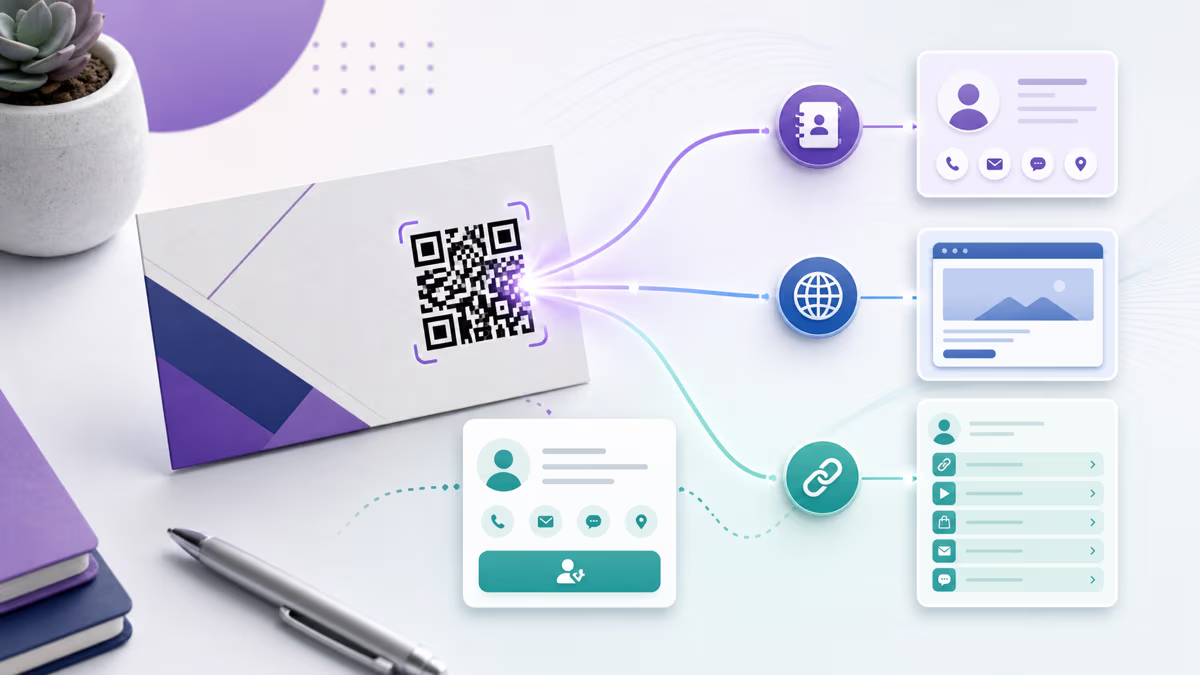
The best strategy for most professionals is a dynamic vCard QR code — which is what QRLynx creates when you select the 'Contact' QR type. Instead of encoding raw vCard text into the QR pattern (which cannot be changed), a dynamic vCard QR encodes a short redirect URL. When scanned, this URL serves the vCard file for download. The advantages are significant: you can update your phone number, title, company, or any other field at any time through the QRLynx dashboard without reprinting the QR code. You also get full scan analytics — how many people scanned your code, when, where, and on what device. For a deeper dive into how this works, see our static vs dynamic QR codes guide.
When to Choose a URL QR Code Instead
If your goal is not just contact saving but building a comprehensive digital presence — with social media links, a portfolio gallery, testimonials, a booking calendar, and a video introduction — a URL QR code linking to a bio page or landing page is the better choice. QRLynx's URL QR codes can point to any web page, including your LinkedIn profile, Linktree, or a custom-built landing page. Many professionals use both: a vCard QR code on their physical business card for instant contact saving, and a URL QR code on their email signature or conference badge that links to a richer digital profile.
What Information to Include in Your vCard QR Code
The information you encode in your vCard determines how useful it is to the recipient. Include too little and the contact entry is meaningless. Include too much and you risk overwhelming the scanner or exceeding QR code data limits. Here is a field-by-field breakdown of what to include and what to skip.
Essential Fields (Always Include)
Full name: Use your professional name as you want it to appear in the recipient's contacts. If you go by a nickname professionally, use that. The vCard 'FN' (Formatted Name) field is what displays as the contact name.
Primary phone number: Include the number you actually answer. If you use separate work and personal numbers, include only the work number on a professional vCard. Use the international format with country code (e.g., +1-555-123-4567) for cross-border networking.
Email address: Your primary professional email. Use a domain-based email (jane@yourcompany.com) rather than a free email provider for credibility.
Company and title: These fields appear as the contact's organization and job title in phone contacts. They help the recipient remember the context of your meeting — 'Jane Smith, VP Sales at Acme Corp' is far more useful than just 'Jane Smith.'
Recommended Fields (Include When Relevant)
Website URL: Your company website, personal portfolio, or LinkedIn profile. This gives the recipient a one-tap path to learn more about you.
Work address: Include if you have a physical office where clients or partners visit. Omit for fully remote workers unless the mailing address serves a purpose.
Secondary phone number: A mobile number in addition to an office line, or vice versa. Useful for roles where clients may need to reach you urgently.
Optional Fields (Use Sparingly)
Profile photo: While vCard supports a PHOTO property, encoding a Base64 image dramatically increases the data size and can cause scanning failures on older devices. If you want a photo in your vCard, use a dynamic QR code where the photo is served from the hosted vCard file, not encoded in the QR pattern itself.
Social media handles: vCard 3.0 does not have native fields for social media. You can use the 'NOTE' field to list handles, but they will not be clickable. For social link integration, consider the URL QR code approach or a dynamic vCard with a landing page.
Fields to Avoid
Home address and personal phone: Keep professional and personal information separate. A vCard QR code on a business card should contain only business contact details.
Sensitive information: Never include financial details, personal ID numbers, or internal-only contact information in a QR code that will be publicly visible.
Static vs Dynamic vCard QR Codes: A Critical Decision
The choice between static and dynamic is the single most important decision you will make when creating a vCard QR code. It affects whether you can update your information, whether you can track scans, and how much data you can include.
Capability Comparison
| Capability | Static vCard QR | Dynamic vCard QR |
|---|---|---|
| Data encoded in QR pattern | Full vCard text (300-500+ chars) | Short URL only (~30 chars) |
| QR code density | High (complex pattern, harder to scan at small sizes) | Low (simple pattern, scans easily even at small sizes) |
| Update contact info after printing | No — must reprint | Yes — edit anytime in dashboard |
| Scan analytics | None | Full: count, time, device, location |
| Profile photo support | Limited (Base64 bloats data) | Yes — photo served from hosted file |
| Works offline | No — requires internet to resolve redirect | |
| Cost | Free on most platforms | Free tier available on QRLynx (3 dynamic QR codes) |
| Best for | Permanent info that never changes | Active professionals who update roles, numbers, or companies |
Why Dynamic Is Almost Always the Better Choice
Consider this scenario: you print 500 premium business cards with a static vCard QR code. Three months later, you change jobs. Every single one of those cards now shares outdated information — wrong company, wrong title, possibly wrong phone number. With a dynamic vCard QR code, you log into QRLynx, update your contact fields, and every card you ever handed out now delivers your current information on the next scan.
Dynamic vCard QR codes also produce cleaner, less dense QR patterns because they encode only a short URL rather than the full vCard text. This means the QR code scans faster and more reliably, especially at smaller print sizes — critical for business cards where space is limited. The only legitimate reason to choose static is if your audience will be scanning in environments with no internet access, such as underground facilities or remote field locations. For the vast majority of professional networking scenarios, dynamic is the clear winner.
For a comprehensive comparison of these two approaches across all QR code types, see our static vs dynamic QR codes guide.
Step-by-Step: Creating a vCard QR Code with QRLynx
Creating a professional vCard QR code takes less than five minutes. Follow these steps to build one that works across all smartphones and contact apps.
How to Create a vCard QR Code
Use Cases: Where vCard QR Codes Deliver the Most Value
A vCard QR code is versatile enough for any scenario where you need to share contact information quickly and reliably. Here are the highest-impact use cases across industries and contexts.
Networking Events and Conferences
The classic use case. You meet someone at a conference, and instead of fumbling with paper cards or spelling out your email, you show the QR code on your phone or badge. They scan, tap save, and your full contact details are in their phone before the conversation ends. At high-volume events where you might meet 30 to 50 people in a day, a vCard QR code ensures every connection is captured digitally — not lost in a stack of wrinkled cards at the bottom of a conference bag.
Business Cards: Print and Digital
The most common deployment is printing the vCard QR code directly on physical business cards. Place it on the back of the card, or integrate it into the front design. Many professionals are now using 'hybrid' cards — a traditional front with name, title, and logo, and a back dominated by a large QR code with 'Scan to save my contact' text. For a complete walkthrough on designing QR codes for business cards, see our business card QR code guide.
Email Signatures
Adding a vCard QR code image to your email signature lets every recipient save your contact with a quick scan of their screen. This is especially effective for sales professionals, consultants, and account managers who send dozens of outreach emails daily. The recipient sees the QR code at the bottom of every email, and when they decide to save your contact, it takes one scan instead of manual copying. Use a small PNG (80x80 to 120x120 pixels) to keep the email signature clean.
Trade Shows and Exhibition Booths
Display a large vCard QR code on your booth banner or table stand with the message 'Scan to connect with our sales team.' Booth visitors scan the code and instantly have your sales representative's direct contact in their phone — no more collecting stacks of cards that get lost in swag bags. For teams, create individual vCard QR codes for each booth staffer so visitors connect with the person they actually spoke to.
Real Estate Agents
Real estate agents exchange contact information constantly — at open houses, property showings, community events, and door-to-door canvassing. A vCard QR code on listing flyers, 'For Sale' yard signs, and open house sign-in sheets ensures every potential buyer or seller can instantly save the agent's direct line. Pair this with a property listing QR code for a complete digital experience. See our real estate QR code guide for more strategies.
Medical and Legal Professionals
Doctors, dentists, lawyers, and accountants benefit from vCard QR codes on appointment cards, office signage, and patient/client intake forms. When a patient needs to call the office, they search their phone contacts instead of hunting for a card or googling the number. The vCard ensures your practice phone, fax, address, and website are all one tap away.
Freelancers and Consultants
Independent professionals who attend meetups, coworking spaces, and client lunches can display their vCard QR code on their phone's lock screen, on a sticker on their laptop, or on a digital business card app. When someone asks 'How do I reach you?' the answer is 'Scan this.' It is faster than dictating an email address and more reliable than exchanging social media handles.
Design Tips for vCard QR Codes on Business Cards
The design of your vCard QR code directly impacts whether people scan it. A well-designed code communicates professionalism and invites interaction. A poorly designed one looks like a shipping label.
Size and Placement on Business Cards
For a standard 3.5 x 2 inch (89 x 51 mm) business card, the QR code should be at least 0.8 x 0.8 inches (20 x 20 mm). Ideally, aim for 1 to 1.2 inches (25 to 30 mm) for comfortable scanning at arm's length. If the QR code is the primary element on the card back, you can go larger — up to 1.5 inches (38 mm). Always maintain a quiet zone (white border) of at least 4 modules around the QR code to prevent scanning interference from adjacent design elements.
Color Strategy
The QR code foreground must be darker than the background. The minimum contrast ratio for reliable scanning is 4:1, but 7:1 or higher is recommended. Classic combinations that work well on business cards include: navy blue on white, black on cream, dark green on light gray, and charcoal on pale gold. Avoid red or orange foregrounds on white — they have lower contrast than they appear and can fail on older phone cameras. Never use a dark background with light foreground modules (inverted QR codes) as many scanners struggle with them.
Logo and Branding Integration
Adding your company logo or a professional headshot to the QR code center increases brand trust and scan rates. With QRLynx, upload the logo and the platform automatically positions it within the error correction safe zone. Use the 'H' (high) error correction level, which allows up to 30 percent of the QR pattern to be obscured while remaining scannable. Keep the logo or photo within 20 to 25 percent of the total code area for the best balance of branding and reliability.
Call-to-Action: The Most Important Element
According to QR code industry research, codes with a call-to-action text achieve 30 to 40 percent higher scan rates. For a vCard QR on a business card, effective CTAs include: 'Scan to save my contact,' 'One scan, I'm in your phone,' 'Save my details instantly,' or simply 'Scan me.' Position the CTA directly below the QR code in a readable font size (8pt minimum).
Print Quality Matters
Always download your QR code in SVG or high-resolution PNG (300 DPI minimum) for print. Avoid JPEG — its lossy compression can blur the fine modules of a QR code and cause scan failures. Test the printed card before ordering a full batch: scan from arm's length, under indoor office lighting, using both an iPhone and an Android phone. If the QR code is printed on textured or specialty paper (linen, cotton, metallic), increase the code size by 20 percent to compensate for reduced contrast. For comprehensive print guidance, see our QR code size guide.
NFC vs QR Code Business Cards: A Practical Comparison
Near Field Communication (NFC) business cards have entered the market as a premium alternative to QR codes. Both technologies enable contactless digital contact sharing, but they work differently and suit different contexts. Here is an honest, practical comparison.
Factor Comparison
| Factor | QR Code Business Card | NFC Business Card |
|---|---|---|
| How it works | Recipient scans with phone camera from a distance | Recipient taps phone to the card (must touch or be within 4 cm) |
| iPhone support | All iPhones with a camera (iPhone 5+) | iPhone 7+ (NFC reading), iPhone XS+ (background NFC) |
| Android support | All Android phones with a camera | Most Android phones with NFC (varies by manufacturer) |
| Range | Scannable from inches to several feet depending on size | Must be within 4 cm (essentially touching) |
| Cost per card | $0.02 to $0.50 (print only — QR code itself is free) | $3 to $15 per card (NFC chip embedded) |
| Durability | Lasts as long as the paper or material | NFC chip lasts 10+ years but card material may degrade |
| Multiple recipients at once | Yes — display on screen, everyone scans simultaneously | No — one tap per recipient |
| Works on posters, flyers, signage | Yes — any printed surface | No — requires embedded NFC chip in each item |
| Scan analytics | Yes (dynamic QR codes) | Depends on NFC card provider |
| Updatable contact info | Yes (dynamic QR codes) | Depends on provider — some allow updates, some are static |
When to Choose QR Codes
QR codes win on versatility, cost, and reach. They work on any printed material — business cards, brochures, posters, email signatures, slide decks, name badges, and even t-shirts. They can be scanned by multiple people simultaneously (display on a projector at a keynote and the entire audience can scan at once). They cost nothing beyond the print or digital placement. And with dynamic QR codes from QRLynx, they offer full scan analytics and updatable contact information.
When to Choose NFC
NFC cards offer a premium tactile experience — the 'tap and connect' interaction feels futuristic and memorable. They work well for executive-level networking where the card itself is a conversation piece. However, NFC requires the recipient's phone to have NFC capability, limits sharing to one person at a time, and costs significantly more per card.
The Best Approach: Use Both
Many professionals are now using hybrid cards with both an NFC chip and a printed QR code. The NFC chip handles in-person one-on-one exchanges (tap to connect), while the QR code serves as a fallback for phones without NFC and for situations where you need to share with multiple people (display the QR code on screen at a presentation). This dual approach ensures you never miss a connection regardless of the recipient's device capabilities.
Advanced Strategies: Analytics, Teams, and Integration
Once you have created your vCard QR code, there are several advanced strategies that can multiply its networking effectiveness.
Scan Analytics for Networking ROI
With a dynamic vCard QR code from QRLynx, every scan is tracked. You can see exactly how many people scanned your code, when they scanned (day and time), what device they used (iPhone vs Android), and their approximate geographic location. This data is invaluable for professionals who attend multiple events. Compare scan counts across conferences to determine which events deliver the most valuable connections. Track scan timing to see whether people save your contact during the event or days later when reviewing materials. For detailed guidance on leveraging scan data, see our QR code scan tracking guide.
Team vCard QR Codes
For sales teams, real estate brokerages, consulting firms, and any organization where multiple team members need professional digital contact sharing, QRLynx's Business plan supports team management. Create a branded template with your company colors and logo, then generate individual vCard QR codes for each team member. Each person's code contains their unique contact details but shares the same visual design, creating a consistent professional image across the organization.
Integrating vCard QR Codes into Your Digital Ecosystem
Your vCard QR code should not exist in isolation. Integrate it across every touchpoint where someone might want to save your contact:
- Email signature: Embed the QR code image (80x80 to 120x120 px) alongside your email signature block
- LinkedIn banner: Include the QR code in your LinkedIn profile banner image
- Presentation slides: Add the QR code to your closing slide with 'Connect with me — scan to save'
- Virtual meeting backgrounds: Place a small QR code in the corner of your Zoom or Teams virtual background
- Website contact page: Display the QR code on your site's contact or about page
- Resume or CV: Add a small vCard QR code to your resume header so recruiters can instantly save your details
CRM Integration
When someone scans your vCard QR code and saves your contact, you have successfully established a digital connection — but you have no record of it in your CRM. The solution is to pair your vCard QR code with QRLynx's lead form feature (available on Pro plans and above). When enabled, a brief form appears before the vCard download, asking the scanner for their name and email. This gives you a two-way connection: they save your contact, and you capture their details for follow-up in your CRM. It is the digital equivalent of exchanging business cards rather than just giving yours away.
Common Mistakes to Avoid with vCard QR Codes
Even experienced professionals make avoidable errors when creating and deploying vCard QR codes. Here are the most common mistakes and how to prevent them.
Mistake 1: Using a Static QR Code for a Business Card
Business cards have a long shelf life. A card you hand out today might be scanned six months from now. If you used a static vCard QR code and have since changed your phone number, email, or employer, the scanner gets outdated information — which is worse than no information at all. Always use a dynamic vCard QR code for business cards.
Mistake 2: Including Too Much Data in a Static Code
If you do use a static vCard (for offline scenarios), keep the data minimal. A full vCard with a Base64-encoded photo can generate a QR code so dense that it requires a large print size to scan. Stick to name, phone, email, and company for static codes. Save the photo and extended fields for dynamic codes.
Mistake 3: Skipping the Call-to-Action
A QR code without context is a mystery. Many people still do not instinctively scan random QR codes. Adding 'Scan to save my contact' or a similar CTA increases scan rates by 30 to 40 percent. Never assume people know what the code does.
Mistake 4: Poor Print Quality or Size
A QR code that is too small, printed at low resolution, or placed on a busy background will frustrate scanners and damage your professional image. Always download in SVG or high-res PNG, print at 300 DPI minimum, and test on actual printed materials before ordering the full run.
Mistake 5: Not Testing Across Devices
Your vCard QR code should work on iPhone, Android, and desktop computers. Test on at least two different devices before deployment. Pay special attention to how the vCard data renders in the contact app — field labels, phone number formatting, and address layout can vary between platforms.
Mistake 6: Ignoring Analytics
If you are using a dynamic vCard QR code (which you should be), check your scan analytics regularly. Low scan rates might indicate poor placement, insufficient CTA text, or a design that does not invite scanning. Use the data to iterate and improve. For a comprehensive guide on creating effective QR codes that get scanned, see our complete QR code creation guide.
Save to Apple Wallet & Google Wallet (new in 2026)
Every QRLynx Digital Business Card now ships with one-tap save buttons to Apple Wallet on iPhone and Google Wallet on Android and desktop. The pass keeps your name, title, company, phone, email, and photo a single swipe away on the recipient's phone — alongside their boarding passes and loyalty cards.
This is the same flow that platforms like HiHello, V1CE, and Wave Connect charge $5-20/month for. On QRLynx it's free, on every plan, with no app install required from the recipient. Read the full step-by-step wallet guide for screenshots and the technical detail.
Frequently Asked Questions About vCard QR Codes
What is a vCard QR code?
A vCard QR code is a scannable code that contains your contact information in the vCard (VCF) digital format. When someone scans it with their smartphone camera, your full name, phone number, email, company, title, website, and address are automatically presented for saving directly to their phone contacts — no manual typing required.
What is the difference between a vCard QR code and a regular QR code?
A regular QR code can encode any type of data — a URL, plain text, WiFi credentials, or email address. A vCard QR code specifically encodes contact information in the standardized vCard format (RFC 6350), which is recognized by all smartphone operating systems as contact data. This triggers the native contact-saving flow rather than opening a web browser.
Can I update my vCard QR code after printing business cards?
Yes, if you created a dynamic vCard QR code. Dynamic codes encode a redirect URL rather than the contact data directly, so you can update your name, phone, email, title, company, or any other field through the QRLynx dashboard at any time. All previously printed cards will deliver your updated contact information on the next scan. Static vCard QR codes cannot be changed after creation.
Does a vCard QR code work on both iPhone and Android?
Yes. The vCard format is universally supported across iOS, Android, Windows, and macOS. When an iPhone user scans a vCard QR code, the Contacts app presents a preview with a 'Create New Contact' button. On Android, the default contacts app opens with all fields pre-filled. The experience is seamless on both platforms.
How much contact information can a vCard QR code hold?
A QR code can hold approximately 4,296 alphanumeric characters. A typical vCard with name, title, company, two phone numbers, email, website, and address uses 300 to 500 characters — well within limits. However, adding a Base64-encoded profile photo can push the data beyond QR code capacity. For photo-inclusive vCards, use a dynamic QR code that links to a hosted vCard file.
Is NFC better than a QR code for digital business cards?
Neither is universally better — they solve different problems. NFC offers a premium tap-to-connect experience but requires the recipient's phone to have NFC capability, only works within 4 cm range, and costs $3 to $15 per card. QR codes work on any phone with a camera, can be scanned from inches to several feet away, work on any printed surface, and cost nothing beyond printing. Many professionals use hybrid cards with both NFC and QR for maximum compatibility.
Can I add my photo to a vCard QR code?
Yes, but with caveats. Static vCard QR codes can include a Base64-encoded photo, but this dramatically increases the QR code data density, making the code harder to scan at small sizes. The recommended approach is to use a dynamic vCard QR code where QRLynx hosts the photo server-side and serves it as part of the vCard file download. This keeps the QR code clean and scannable while still including your photo.
How do I put a vCard QR code on my business card?
Create your vCard QR code in QRLynx, download it in SVG format (for print quality), and send the file to your card printer or import it into your card design software (Canva, Adobe InDesign, Vistaprint editor). Place the QR code at a minimum size of 0.8 x 0.8 inches with a clear call-to-action like 'Scan to save my contact.' Test the printed card before ordering the full batch.
Can I track who scans my vCard QR code?
With a dynamic vCard QR code from QRLynx, you can track the number of scans, timestamps, device types (iPhone vs Android), and approximate geographic locations. However, you cannot see the specific identity of who scanned unless you enable QRLynx's lead form feature, which asks scanners for their name and email before delivering the vCard download.
What is the difference between vCard 3.0 and vCard 4.0?
vCard 3.0 (RFC 2426) is the most widely supported version and works across virtually all devices and contact apps. vCard 4.0 (RFC 6350) adds support for instant messaging handles, relationship fields, and better internationalization, but some older Android devices may not parse 4.0 properties correctly. For QR codes that need maximum compatibility, vCard 3.0 is the safer choice.
Can I create vCard QR codes for my entire team?
Yes. QRLynx's Business plan supports team management, allowing you to create individually branded vCard QR codes for each team member with a consistent design template. Each person gets their own unique contact data while sharing the same visual branding — company colors, logo, and QR code style — for a unified professional appearance across the organization.
Do vCard QR codes work offline?
Static vCard QR codes work offline because the contact data is encoded directly in the QR pattern — no internet connection is needed to decode it. Dynamic vCard QR codes require an internet connection to resolve the redirect URL and download the hosted vCard file. For most professional networking scenarios (conferences, offices, restaurants), mobile data or WiFi is available, making dynamic codes the practical choice.
Start Sharing Your Contact Details with a Single Scan
A vCard QR code is the most efficient bridge between a brief introduction and a lasting professional connection. It eliminates the manual typing that kills 90 percent of paper business card exchanges, works universally across iPhone and Android, and — when created as a dynamic code — gives you the power to update your contact information and track engagement without ever reprinting a card.
Whether you are networking at a conference, staffing a trade show booth, handing out business cards to clients, or embedding a QR code in your email signature, a vCard QR code ensures that every person who wants to save your contact actually does. The technology is mature, the user behavior is established, and the tools are accessible to everyone.
Ready to upgrade your networking? Create your vCard QR code now with QRLynx and turn every introduction into a permanent digital connection. For more on designing the perfect QR code for your business card, explore our complete business card QR code guide.